Published June 23, 2026

Help and support for settlement agents


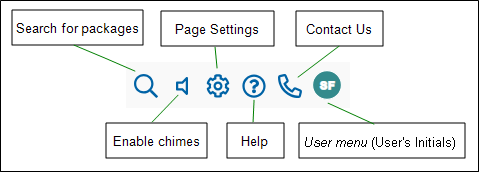
To quickly access help and support, use the My Simplifile Toolbar > Help button and Contact Us button near the top-right corner of the Simplifile application.

Example My Simplifile Toolbar

Example My Simplifile toolbar with callouts image

The buttons displayed on the My Simplifile Toolbar change based on the functions available on the page. The Help button, Contact Us button, and User menu button appear on all My Simplifile Toolbars.


Release notes


Settlement agent and lender videos

Video iconBasic Interface Navigation (Collaboration and Post Closing)

(Interface Navigation)

Video iconCollaboration and Fee Disclosures (Collaboration and Post Closing)

(Collaborating on Fee Disclosures)

Video iconeClosing with Simplifile (Collaboration and Post Closing)

(The eClosing Workflow)

Video iconLoan Templates (Collaboration and Post Closing)

(Loan Templates)

Video iconManaging User - Collaboration & Post Closing

(Managing Users)

Video iconPost Closing Workflow (Collaboration and Post Closing)

(Post Closing Workflow)

Video iconSharing Documents and Messages (Collaboration and Post Closing)

(Sharing Documents and Messages)

Video iconSimplifile for Settlement Agents

(Simplifile for Settlement Agents)

Video iconStarting a Loan - Collaboration & Post Closing

(Starting a Loan)


IMPORTANT: If you have Simplifile account related questions, email the Client Success Team at simplifile_client_success@ice.com.

IMPORTANT: Interested in learning more about ICE Mortgage Technology products including Simplifile or for escalation of critical issues, email the Client Success Team at simplifile_client_success@ice.com.