Document rejection
If you reject a document, you must record the reasons for rejection in Simplifile. Then, when the system returns the package to the submitter, the submitter knows what he or she needs to do to prepare the document before re‑submitting the package. You or your administrator sets up the rejection reasons. For more information, see Setup tasks for recipients.
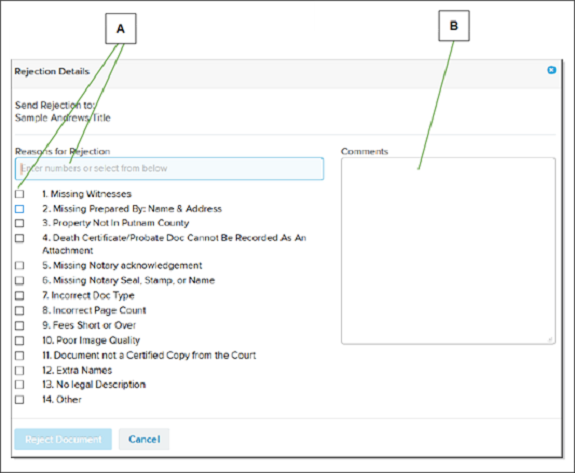
Below is an example of a list of rejections in Simplifile.
| Letter | Description |
|---|---|
| A | Enter the numbers of the rejection reasons you want to include, separated by commas. You can also mark the boxes of the reasons you want. |
| B | Use the Comments box to add information you want to give to the submitter. For example, you can give specifics about a reason or, if none of the listed rejection reasons meet your needs, you can use the box to add a reason. |
A document can always be rejected to the submitter. However, you may be able to choose additional rejection options. For example, you might be able to return a document to someone in your own organization, such as the treasurer, or to any office in the document’s workflow.
- To reject a document from the Document Viewer, see the Document Viewer page topic Document Viewer page task.
- To reject a document from the Record Queue page, see the Record Queue page topic Reject a document in a package from the Record Queue page task.