.png)
Use the buttons below to view general role definition guidelines for each persona.
Encompass Persona Functional Definition
Closer / Funder
The content in the Encompass persona-based release notes is aligned to the Closer / Funder persona using general role definition guidelines. The following description reflects our interpretation of the standard job responsibilities associated with this persona.
Because closers often act as funders and vice versa, the roles are combined for the purpose of Persona Release Notes. Basic responsibilities of the Closer / Funder include, but are not limited to, the following:
- Manage the closing process
- Completes and audits the closing information
- Orders closing documents
- Reviews, prints, and reorders returned closing documents
- They also manage the funding process
Encompass Persona Functional Definition
Loan Officer
The content in the Encompass persona-based release notes is aligned to the Loan Officer persona using general role definition guidelines. The following description reflects our interpretation of the standard job responsibilities associated with this persona.
Basic responsibilities of the Loan Officer include, but are not limited to, the following:
- Develops business and initiates loans
- Develops new client relationships and manages relationships over time
- Initiates the loan process
- Gathers basic client info
- Orders services for prequalification and preapproval
- Communicates with processor
- Monitors loans in the Pipeline by tracking milestones and items requiring attention
Encompass Persona Functional Definition
Loan Processor
The content in the Encompass persona-based release notes is aligned to the Loan Processor persona using general role definition guidelines. The following description reflects our interpretation of the standard job responsibilities associated with this persona.
Basic responsibilities of the Loan Processor include, but are not limited to, the following:
- Coordinates people and information to construct and finalize loans
- Uses tools such as forms documents, and communication logs
- Monitors own Pipeline by tracking milestones and items requiring action
Encompass Persona Functional Definition
Manager
The content in the Encompass persona-based release notes is aligned to the Manager persona using general role definition guidelines. The following description reflects our interpretation of the standard job responsibilities associated with this persona.
Basic responsibilities of the Manager include, but are not limited to, the following:
- Manages the business
- Monitors the Pipelines of loan team members
- Manages the bottom line, such as resource assessment and management, and financial forecasting
Encompass Persona Functional Definition
Post Closer
The content in the Encompass persona-based release notes is aligned to the Post Closer persona using general role definition guidelines. The following description reflects our interpretation of the standard job responsibilities associated with this persona.
Basic responsibilities of the Post Closer include, but are not limited to, the following:
- Confirms all documents are completed and generated
Encompass Persona Functional Definition
Quality Control
The content in the Encompass persona-based release notes is aligned to the Quality Control persona using general role definition guidelines. The following description reflects our interpretation of the standard job responsibilities associated with this persona.
Basic responsibilities of the Quality Control include, but are not limited to, the following:
- Inspects the loan for quality
Encompass Persona Functional Definition
Reporting
The content in the Encompass persona-based release notes is aligned to the Reporting persona using general role definition guidelines. The following description reflects our interpretation of the standard job responsibilities associated with this persona.
Basic responsibilities of the Reporting include, but are not limited to, the following:
- Pulls, creates, and manages reports in Encompass
- Manages Encompass Reporting Database
Encompass Persona Functional Definition
Secondary Marketing / Lock Desk
The content in the Encompass persona-based release notes is aligned to the Secondary Marketing / Lock Desk persona using general role definition guidelines. The following description reflects our interpretation of the standard job responsibilities associated with this persona.
Because Secondary Marketing often acts as Lock Desk and vice versa, the roles are combined for the purpose these Persona Release Notes. Basic responsibilities of the Secondary Marketing / Lock Desk include, but are not limited to, the following:
- Determines pricing strategies and develops / implements loan programs
- They also receive and process lock requests
Encompass Persona Functional Definition
Servicer
The content in the Encompass persona-based release notes is aligned to the Servicer persona using general role definition guidelines. The following description reflects our interpretation of the standard job responsibilities associated with this persona.
Basic responsibilities of the Servicer include, but are not limited to, the following:
- Services the loan
Encompass Persona Functional Definition
Shipper
The content in the Encompass persona-based release notes is aligned to the Shipper persona using general role definition guidelines. The following description reflects our interpretation of the standard job responsibilities associated with this persona.
Basic responsibilities of the Shipper include, but are not limited to, the following:
- Assists with inventory control and provides input to secondary market functions
- Ships loans to document custodians and the investor
Encompass Persona Functional Definition
Underwriter
The content in the Encompass persona-based release notes is aligned to the Underwriter persona using general role definition guidelines. The following description reflects our interpretation of the standard job responsibilities associated with this persona.
Basic responsibilities of the Underwriter include, but are not limited to, the following:
- Verifies loan accuracy
- Provides conditions to be met
- Verifies that conditions are met
To learn about another persona, select a persona from the options above; otherwise, to view or print the release notes, select Close ("X") at the top of the window and chose one or more options from the Filter by Persona or Print by Persona menu by selecting a button at the top of the page.
Encompass 25.2 Persona-Based Release Notes
The Encompass Persona-Based release notes are broken down by common Encompass personas. We realize every organization may have slightly different functional definitions for these personas. As such, you may want to review each persona's release note segments before forwarding to ensure they match personas / roles within your organization.
How to Navigate Persona-Based Release Notes
To use the Persona-Based Release Notes page, use the navigation buttons described below:
-
Filter by Persona: Create and view a customized on-screen version of the release notes by selecting one or more persona checkboxes. To remove one or more personas, clear the corresponding checkbox for the persona being removed.
-
Persona Definitions: View general role definition guidelines for each persona.
-
Print by Persona: View a dedicated PDF version of the release notes aligned to each of the available Encompass persona by selecting a persona one at a time. A new window will open and display the selected PDF file.
Encompass 25.2 Persona-Based Release Notes
The Encompass 25.2 Persona-Based Release Notes include a high-level overview of new features, feature and form enhancements, and fixed issues applicable to the each Encompass persona, followed by more detailed information and instructions where appropriate.
Refer to the online help and the Guides & Documents page for additional information and related documents.
Your customized on-screen version of the Persona-Based release notes include the following personas:
Closer / Funder
Loan Officer
Loan Processor
Manager
Post Closer
Quality Control
Reporting
Secondary Marketing / Lock Desk
Servicer
Shipper
Underwriter
To create a new customized on-screen version of the Persona-Based release notes, click Filter by Personas, and then select or clear the corresponding checkbox for the persona being added or removed.
New Features & Forms in Version 25.2 (Banker Edition)
This section discusses the new features being introduced in this Encompass release.
Use the Actual Number of Days to Calculate APR
 New Option to Use the Actual Number of Days to
Calculate APR Instead of the Standard 30 Days
New Option to Use the Actual Number of Days to
Calculate APR Instead of the Standard 30 Days
A new Admin Tools policy is now available to enable lenders to calculate the APR for loans using the actual number of days for the first loan payment date rather than the standard 30 number of days for the first payment date. When the actual number of days is used, the actual number of days in the month are used when determining the first payment date that's used to calculate APR. (January = 31 days, February = 28 days (except for leap year), March = 31 days, and so on.)
In the Encompass Admin Tools > Settings Manager > Policies category, the new Calculate APR using Actual Number of Days for Initial Period option is set to Disabled by default. Double-click the value, select Enabled, and then click Apply to apply this policy in your Encompass instance. Once enabled, Encompass uses the actual number of days to calculate APR.
Note that this policy is not applied to bi-weekly, construction, or HELOC loans.
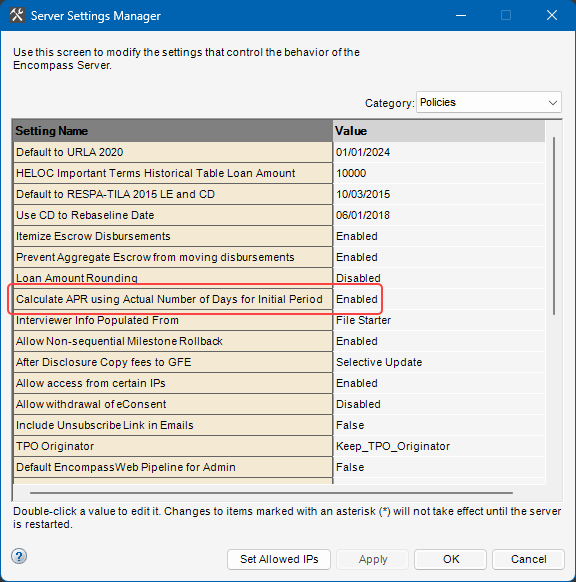
While this policy is applied at a global level in Encompass, the option to calculate APR using the actual number of days is also provided at the loan level. The new Use Actual Days checkbox (5062) is available on the RegZ - LE and RegZ - CD input forms only.
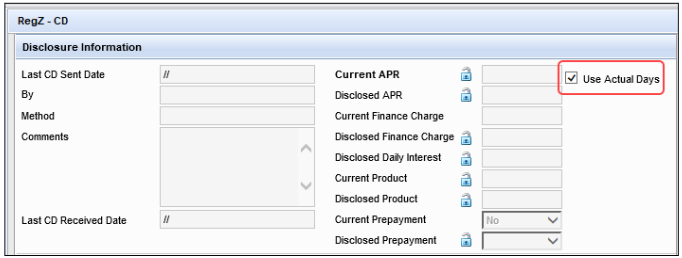
By default, the checkbox is selected or not selected based on the Calculate APR using Actual Number of Days for Initial Period policy in Encompass Admin Tools. Users can select this checkbox to elect to use the actual number of days in the month for the first payment date to calculate APR for the current loan. When this checkbox is not selected, the standard 30 days for the initial loan payment will be used to calculate the APR.
CBIZ-63566, CBIZ-63775, CBIZ-63273, CBIZ-41691
Feature Enhancements in Version 25.2 (Banker Edition)
This section discusses the updates and enhancements to existing forms, features, services, or settings that are provided in this release.
Encompass Forms & Tools
Update to HUD-928005b Conditional Commitment Input
Form to Include Flood and Supplemental Insurance in Monthly Expense Estimate
In previous versions of the HUD-928005b Conditional Commitment input form, the Other field (234) was used to capture proposed/estimated monthly housing expenses (determined by adding the monthly charges from lines 1007, 1008, 1009, and 1010 on the 2015 Itemization form). In Encompass 25.2, field 234 has been removed from this form and replaced with a new field (5063). Field 5063 calculates proposed/estimated monthly housing expenses by adding the monthly charges from lines 1006, 1007, 1008, 1009, and 1010 on the 2015 Itemization form.
In addition, a text entry field (1071) has been added where you can add a custom description or field label for field 5063 and the Total field on this form now includes field 5063 instead of field 234.
This new field 5063 is now being used on this form only so flood insurance and supplemental insurance are included in the total monthly expense estimate (1075) calculated on this form only, while also ensuring field 234 continues to calculate the proposed/estimated monthly housing expenses correctly on the other input forms where it is used. Field 5063 is calculated by adding field 234 and URLA.X144 (supplemental insurance) together.
The HUD-928005b Conditional Commitment form is used with FHA and VA loans only.
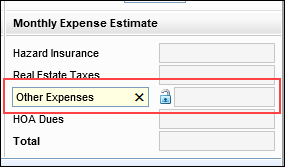
Migration:
For non-active (1393) loans, if data has been entered in the Supplemental Insurance field (URLA.X144), the value in the Other field (234) is copied to the new field 5063. Field 5063 is then locked so the field is not automatically calculated by Encompass and the migrated value is retained. (This migration logic is only performed in loans using the URLA 2020 forms version.)
CBIZ-49688, CBIZ-64350, CBIZ-65109
New Informational Fields Added to eDisclosure
Tracking in the Disclosure Tracking Tool
New Disclosure Tracking attributes (i.e., virtual fields) have been added to the eDisclosure Tracking tab in the Disclosure Tracking tool for standard disclosures to capture the date and by whom the review task was viewed from an Encompass Consumer Connect site's borrower portal. This information can then be taken into account if the tracked document (LE, CD, or other) is placed into an Informational collection for tracking the receipt of documents associated with that borrower task.
-
Informational Viewed Date (This is provided for the borrower and co-borrower.)
-
Informational Completed Date (This date is populated when the borrower or co-borrower selects the Done button in their borrower portal to indicate they have completed the task.)
-
Informational Viewed from IP Address (This is provided for the borrower and co-borrower.)
-
Informational Completed from IP Address (This field is populated when the borrower or co-borrower selects the Done button in their borrower portal to indicate they have completed the task.)
-
Loan Originator Informational Viewed Date
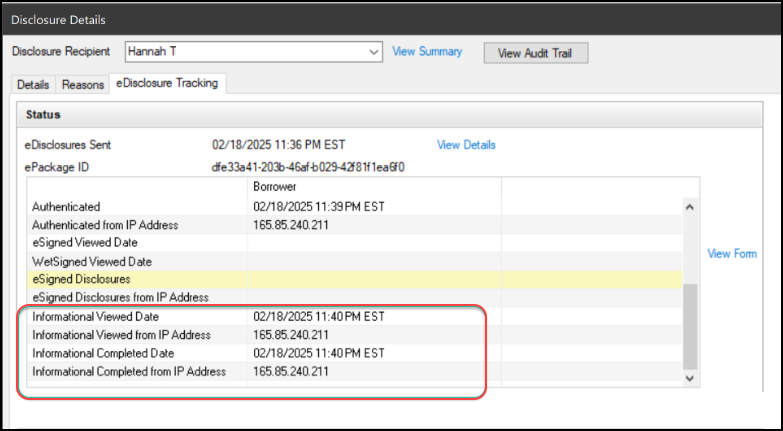
This tab displays only when you have selected an eDisclosure package entry in the Disclosure History list.
CBIZ-64498, NICE-50564
Business Contacts Update: Company Name Character
Limit
The character limit of the Company Name field used in the Contacts > Business Contacts tool has been increased from 64 characters to 255 characters to better accommodate longer company names.
CBIZ-64421
New Fields in Encompass
New fields that have been added to the Encompass Reporting Database and/or to various forms and tools are described below.
New Fields to Capture Error Exceptions for Mortgage
Analyzers
New fields have been added to Encompass to indicate when error exceptions are returned from a mortgage analyzer. The Yes/No fields help users understand when there are outstanding issues with the analyzer data that need to be reviewed.
-
Business Association Exception Exists (ANALYZER.X41)
-
Data Mapping Exception Exists (ANALYZER.X42)
These fields are not provided on any input forms or tools. They are included in the Encompass Reporting Database and can be added to custom input forms.
CBIZ-63581
New Fields Added for Encompass Investor Connect
Two new fields have been added to Encompass to capture information provided from Encompass Investor Connect:
-
Investor Connect Resource ID (INVESTOREC.X6)
-
Email ID of Sender (INVESTOREC.X7)
These fields are not provided on any input forms or tools. They are included in the Encompass Reporting Database and can be added to custom input forms.
In addition, the following Investor Connect fields in Encompass can now be added to the Encompass Reporting Database so they will be available for reports and adding to custom forms.
-
Investor Connect EC Received From (INVESTOREC.X1)
-
Investor Connect EC Status (INVESTOREC.X2)
-
Investor Connect EC Status Update Date (INVESTOREC.X3)
-
Investor Connect EC Submission Type (INVESTOREC.X4)
-
Investor Connect EC Received From (INVESTOREC0001)
-
Investor Connect EC Status (INVESTOREC0002)
-
Investor Connect EC Status Update Date (INVESTOREC0003)
-
Investor Connect EC Submission Type (INVESTOREC0004)
-
Investor Connect EC Updates Allowed (INVESTOREC.X5)
-
In addition, field INVESTOREC.X5, which is a dropdown field with Yes, No, and Documents Only enumerations, has been updated to default to Yes.
-
CBIZ-63684
Two New Fields Added to Encompass for Rent Schedule
and UAD 2025
Two new fields have been added to Encompass:
-
Rent Schedule (ULDD.X219)
-
UAD2025 (ULDD.X220)
These fields, which are available in the Encompass Reporting Database but are not provided on any input forms or tools, support the new UCDP process. The Rent Schedule field is newly added to the revised URAR report and is populated when an appraisal report is returned to Encompass. The UAD2025 indicator is needed for the ULDD integration with Freddie Mac and Fannie Mae.
CBIZ-64541
Secondary Marketing
Non-Admin Users Can Now Access the Lock Comparison
Tool
Starting in Encompass 25.2, non-admin users can access the Lock Comparison tool from loan files. Previously in Encompass, if a non-admin user attempted to access the Lock Comparison tool, an "Error Forbidden" error message was generated and the user could not access the tool.
SEC-29218
Updated Lock Validation Status Calculation
The Lock Validation Status (4788) calculation has been updated to use the following primary borrower pair values when comparing the loan data and the lock request data.
| Field ID | Field ID | Field Label |
|---|---|---|
| 2940 | 1484 | Borrower Minimum Required FICO |
| 2941 | 1502 | Co-Borrower Minimum Required FICO |
| 2950 | 1811 | Subject Property Occupancy Status |
SEC-29420
New Warning Added to Prevent Lock Extension on Locks
with Needs Validation Lock Validation Status on Lock Comparison Tool
When the Lock Validation Status (4788) on the Lock Comparison Tool is set to Needs Validation and a lock extension is requested, a "We are not able to process your lock extension at this time. Please request a Lock Update and then try your extension request again." warning message is displayed on the Lock Request Form and Secondary Registration tool.
This warning is only applicable when an ICE PPE integration is being used as the product and pricing provider.
SEC-29809
Update to the Compare With Current Loan Data Window
When ICE PPE Integration Used to Request Lock
When an ICE PPE integration is used to request a lock (regardless of the default provider selected on the Product and Pricing setting), the Copy Loan Data to Lock Request button, the Exclude Interest Rate if applicable when copying to Lock Request checkbox, and the informational text at the top of the window will not be displayed in the Compare with Current Loan Data pop-up window.
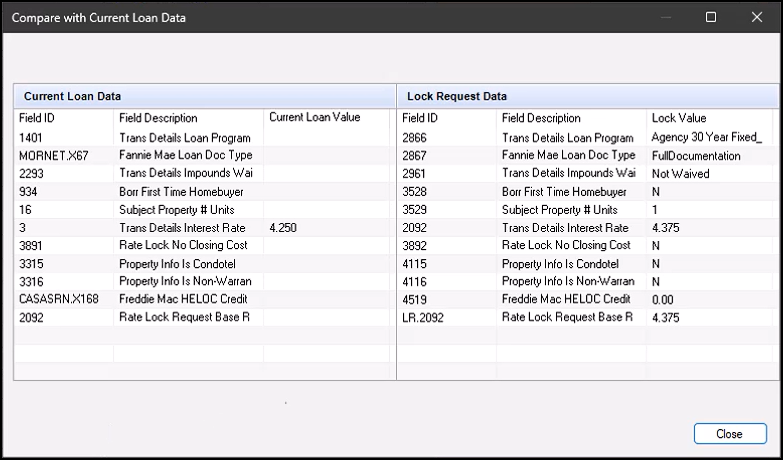
SEC-29828
Online Help Topic Now Available for the Lock
Comparison Tool
Online help is available for the Lock Comparison Tool. To view the help topic when you are using the Lock Comparison Tool, select Encompass Help from the Help menu in the toolbar or press the F1 button on your keyboard.
Please note, you must click anywhere in the Lock Comparison screen once before selecting Help > Encompass Help or pressing F1. This requirement will be removed in a future release.
SEC-29274
GSE Services & Integrations
For more GSE Integrations and Services 25.2 updates, see the GSE Release Notes.
iLAD Import Updates
iLAD import has been updated to support the latest iLAD version 2.1.0. See table below for details such as XPath, data point, and Encompass (import) field ID with relevant enumerations (as applicable).
| XPath | Data Point | Encompass Import Field |
|---|---|---|
| MESSAGE/DEAL_SETS/DEAL_SET/DEALS/DEAL/ LOANS/LOAN/FEE_INFORMATION/FEES_SUMMARY/ FEE_SUMMARY_DETAIL | FeeSummaryTotalInterestPercent | LE3.X16 |
| MESSAGE/DEAL_SETS/DEAL_SET/DEALS/DEAL/PARTIES/ PARTY/ADDRESSES/ADDRESS | PostalCode | 621 |
| MESSAGE/DEAL_SETS/DEAL_SET/DEALS/DEAL/SERVICES/SERVICE/CREDIT/CREDIT_RESPONSE/CREDIT_RESPONSE_DETAIL | CreditReportFirstIssuedDate | 5040 |
| MESSAGE/DEAL_SETS/DEAL_SET/DEALS/DEAL/LOANS/LOAN/TERMS_OF_LOAN | NoteDate | L770 |
| MESSAGE/DEAL_SETS/DEAL_SET/DEALS/DEAL/LOANS/LOAN/FEE_INFORMATION/FEES_SUMMARY/FEE_SUMMARY_DETAIL | FeeSummaryTotalAmountFinancedAmount | 948 |
| MESSAGE/DEAL_SETS/DEAL_SET/DEALS/DEAL/LOANS/LOAN/FEE_INFORMATION/FEES_SUMMARY/FEE_SUMMARY_DETAIL | FeeSummaryTotalFinanceChargeAmount | 1206 |
| MESSAGE/DEAL_SETS/DEAL_SET/DEALS/DEAL/LOANS/LOAN/REFINANCE | CurrentFirstMortgageHolderType |
991 |
| MESSAGE/DEAL_SETS/DEAL_SET/DEALS/DEAL/LOANS/LOAN/FEE_INFORMATION/FEES_SUMMARY/FEE_SUMMARY_DETAIL | FeeSummaryTotalOfAllPaymentsAmount | CD5.X1 |
| MESSAGE/DEAL_SETS/DEAL_SET/DEALS/DEAL/COLLATERALS/COLLATERAL/SUBJECT_PROPERTY/HAZARD_INSURANCES/HAZARD_INSURANCE | HazardInsurancePolicyIdentifier | VEND.X166 |
| MESSAGE/DEAL_SETS/DEAL_SET/DEALS/DEAL/COLLATERALS/COLLATERAL/SUBJECT_PROPERTY/HAZARD_INSURANCES/HAZARD_INSURANCE | HazardInsuranceCoverageAmount | VEND.X445 |
| MESSAGE/DEAL_SETS/DEAL_SET/DEALS/DEAL/COLLATERALS/COLLATERAL/SUBJECT_PROPERTY/PROPERTY_VALUATIONS/PROPERTY_VALUATION/PROPERTY_VALUATION_DETAIL | PropertyValuationEffectiveDate | ULDD.X30 |
CBIZ-63514
Updates to GSE Additional Provider Data Form for
Income Calculator and AIM Check
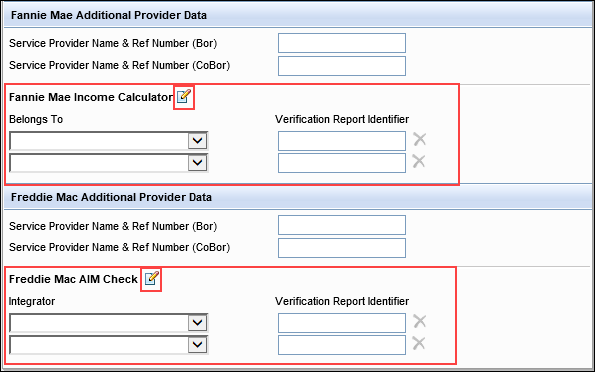
The following updates have been made to the GSE Additional Provider Data input form to support Freddie Mac's AIM (Assets and Income Modeler) Check and Fannie Mae's Income Calculator:
-
The Freddie Mac AIM Check (Bor, CoBor) field (GSEVENDOR.X61) has been re-labeled to ICE-DDA Freddie AIM Check (Bor, CoBor).
-
In the Fannie Mae Additional Provider Data and Freddie Mac Additional Provider Data sections of the form:
-
New Income Calculator fields are now provided in the Fannie Mae Additional Provider Data section: Belongs To (FANNIEIC0001) Verification Report Identifier (FANNIEIC0002). Here you can add up to two Income Calculator records. To add additional records, click the Edit icon to open the Fannie Mae Income Calculator quick entry window.
DU ULAD field mapping will be available in a future release.
-
New AIM Check fields are now provided in the Freddie Mac Additional Provider Data section: Integrator (FAC0001) Verification Report Identifier (FAC0002). Here you can add up to two AIM Check records. To add additional records, click the Edit icon to open the Freddie Mac AIM Check quick entry window.
LPA ULAD field mapping will be available in a future release.
-
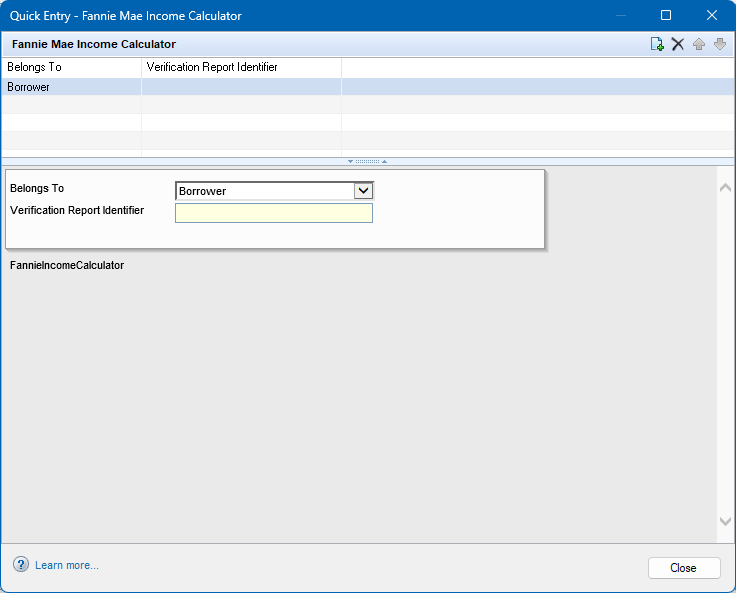
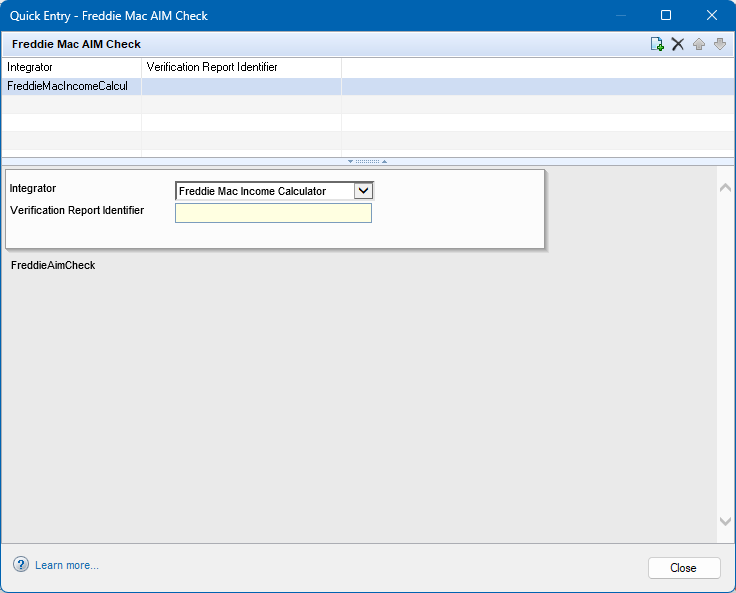
Borrower swap is not supported for these Fannie Mae Income Calculator fields. Support is targeted for a future release as more enhancements to the Digital Verification process are introduced.
CBIZ-62003, CBIZ-61037
Updates to ULDD/PDD Input Form
Construction Method Other Type Description
Added to ULDD Input Form
The Construction Method Type Other Description field (ULDD.X218) has been added to the Fannie Mae and Freddie Mac tabs in the ULDD/PDD input form for Phase 5 updates. This dropdown field provides two enumerations to select from: Container or Three-Dimensional Printing Technology. This field was introduced in Encompass 24.3, but it was not added to any standard input forms at that time.
CBIZ-62110
Updates for Correspondent Lending
New Commitment Rate Set Date Field Added to
Commitment Details Section of the Correspondent Loan Status Tool
A new Commitment Rate Set Date (5044) field has been added to the Commitment Details section of the Correspondent Loan Status tool.
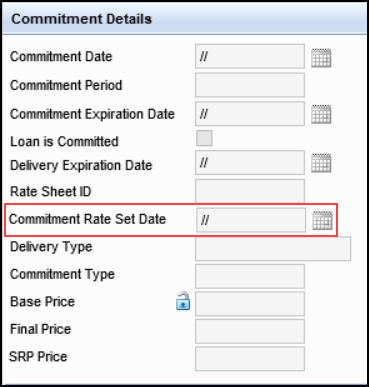
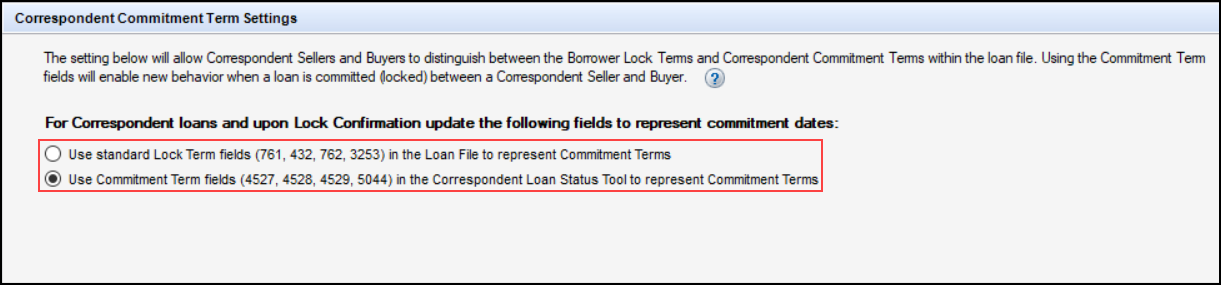
In correspondent loans, the last rate set date will either indicate the date between the lender and borrower or the date between the lender and correspondent. This is determined by the option selected by the administrator in the Correspondent Commitment Term Settings section of the Lock Desk Setup setting:
-
If Use standard Lock Term fields (761, 432, 762, 3253) in the Loan File to represent Commitment Terms is selected, field 3256 on the Secondary Lock Tool is mapped to field 3253 on the Borrower Summary - Processing form and indicates the last rate set date between the lender and borrower.
-
If Use Commitment Term fields (4527, 4528, 4529, 5044) in the Correspondent Loan Status Tool to represent Commitment Terms is selected, field 3256 on the Secondary Lock Tool is mapped to field 5044 on the Correspondent Loan Status tool and indicates the last rate set date between the lender and correspondent.
SEC-29722
Electronic Document Management (EDM)
New Setting to Skip Disclosure Fulfillment when
eConsent Agreement is Accepted
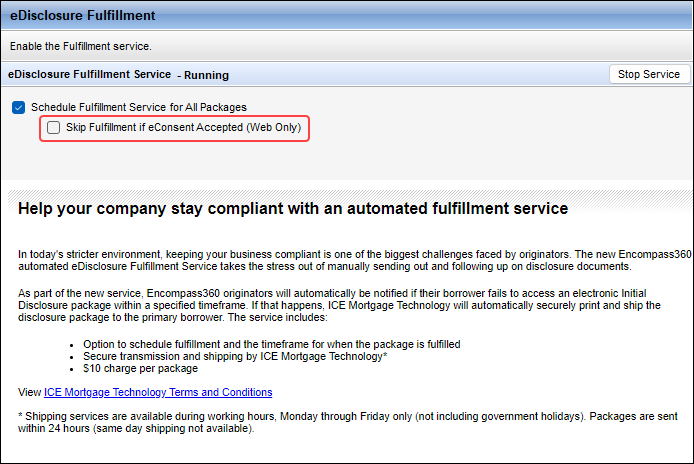
A new option to skip disclosure fulfillment if the eConsent Agreement has been accepted when it is time to send the disclosures is now available on the Additional Services > eDisclosure Fulfillment setting. When this option is selected, the eDisclosure Fulfillment service will not prepare or send the printed version of the disclosure package and send it to the primary borrower when they fail to view the documents in the package electronically within a specified time.
Important Notes:
-
This skip fulfillment option is applicable only to document flows ordered in the Encompass web interface or Encompass TPO Connect. This includes disclosures (web interface or TPO Connect), pre-closing docs (web interface), and the Request/Send option (web interface). Disclosures sent via the Send eDisclosures window after clicking the eDisclosures button in the eFolder in the desktop interface are not impacted by this new skip fulfillment option.
-
Note that even when this setting is set to skip fulfillment, users still have the option to not skip the fulfillment when needed. When the Skip Fulfillment if eConsent Accepted setting is selected, the system changes the Fulfillment default status to Off if eConsent has been accepted by all required parties. Users can still toggle the Fulfillment status to On if they want the disclosure package to be sent if the borrowers do not view the documents by the fulfillment date.
NICE-52668
Coming in Encompass 25.3: eFolder's Send to
Lenders Option is Removed
(Added on 5/2/2025)
In Encompass 25.3, the Send button in the eFolder will be changed from a dropdown component to a standard button. As part of this update, the Send Files to Lender... option will be removed and no longer available in Encompass. In previous versions of Encompass, this option was provided to users so they can submit loans to their lenders and investors from the eFolder. This functionality is provided in Encompass Investor Connect. Users can utilize that application going forward to submit loans to their lenders and investors.
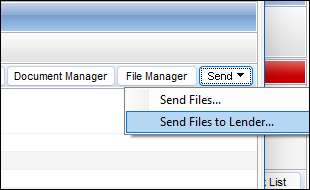
In Encompass 25.3, this Send button can be used to send files to borrowers. Prior to this update, the Send Files option from the Send button was used to send files to borrowers.
DOCP-77366
Workflow Management
Document Stacking Template Option Added to Update
Service Order Resulting Action
(Added on 5/2/2025)
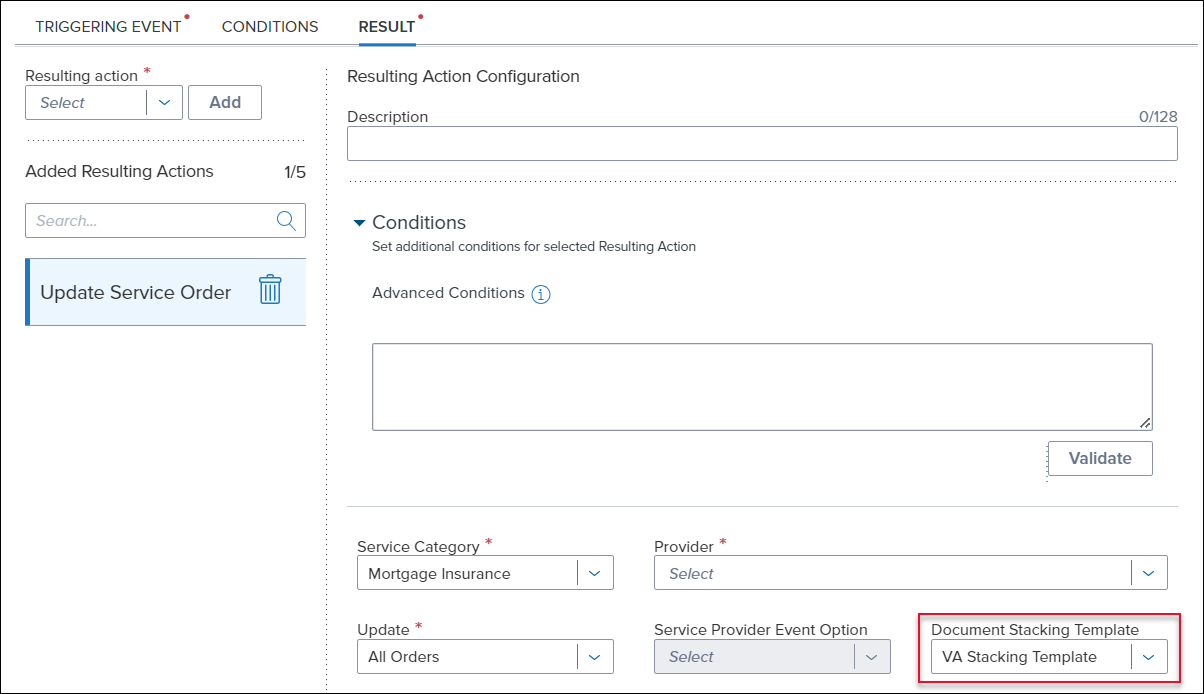
The Update Service Order resulting action has been updated with a new option for the Mortgage Insurance service category. When this category is selected, administrators can now choose from pre-defined document stacking templates which will be sent to the mortgage insurance partner when the rule is triggered in the Encompass desktop or web interface.
Items to Note:
-
If the stacking template used in the rule is configured with required documents at the time of the rule execution, but those required documents are not in the eFolder, the rule will attach the available documents to the order.
-
Administrators should write their rule readiness conditions in such a way that rules are only triggered for a specific MI partner. If the rule is triggered for an MI partner that isn't the provider of record for the loan, the rule will not send the documents.
For more information on configuring document stacking templates, review the Document Stacking Templates online help topic.
ENCW-115819
New Change Loan's Pipeline Folder Resulting Action
Added
(Added on 5/2/2025)
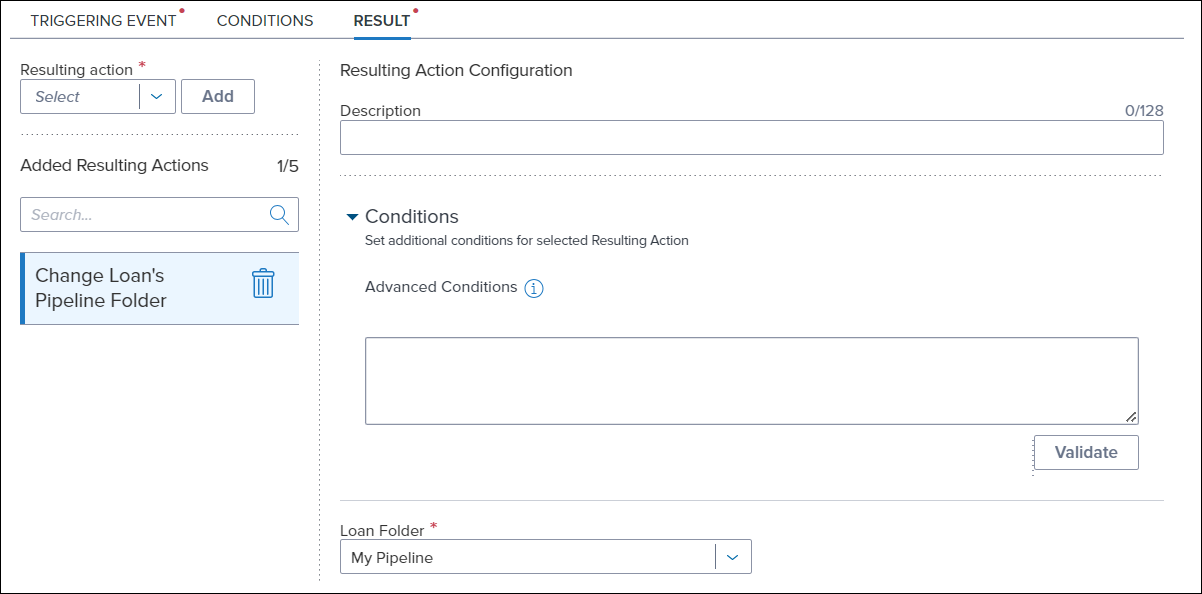
A new Change Loan's Pipeline Folder resulting action has been added to Workflow Rules. This option enables a workflow rule to move a loan from any folder that the loan resides in, including archived folders and the (Trash) folder, to another folder when triggered. This resulting action is not able to move loans to the (Trash) folder. Additionally, the move only occurs after the loan has been closed for at least 15 minutes in both the desktop and web interfaces.
To Select and Configure the Change Loan's Pipeline Folder Resulting Action:
-
From the Result tab on a workflow rule, select Change Loan's Pipeline Folder in the Resulting action field and then select Add.
- Enter a description for the resulting action in the Description field. This description displays under the specific resulting action in the Added Resulting Actions section.
- In the Advanced Conditions field, define any conditions that, when met, enable the
configured automation to execute. To validate the condition, select Validate.
The conditions syntax utilizes the Visual Basic .NET programming language. For information on how this syntax works, see the Advanced Coding for Business Rules guide.
- Select the Loan Folder drop-down list, and then select a folder to move the loan to.
ENCW-113473
Tag Column Searching Updated
(Added on 5/2/2025)
Changes have been made to the search functionality for the Tag column on the Workflow Rules page in the Encompass web interface to enable administrators to filter the list of rules more effectively. When searching for tags, users can now enter a single tag to view all rules that contain that tag. Subsequent searches for individual tags further refine the list to only show rules that contain all the selected tags, allowing for more precise filtering of results. The workflow rules can be applied to both the desktop and web interfaces.
How it works:
To illustrate this functionality, consider the following example.
-
You have three tags: Tag1, Tag2, and Tag3
-
You have multiple workflow rules that have been assigned these tags:
-
Rule A has Tag1
-
Rule B has Tag1 and Tag2
-
Rule C has Tag1 and Tag2
-
Rule D has Tag1, Tag2, and Tag3
-
-
A search for Tag1 shows all 4 rules.
-
A subsequent search for Tag2 shows Rule B, C, and D as those rules have Tag1 and Tag2.
-
A third search for Tag3 shows only Rule D, as that is the only rule that has all 3 tags.
ENCW-113258
Encompass Settings
Fields 3253 and 5044 Added to Commitment Term Options
in Correspondent Commitment Term Settings Section of the Lock Desk Setup
Setting
Fields 3253 (Last Rate Set Date) and 5044 (Commitment Rate Set Date) have been added to the Commitment Term options in the Correspondent Commitment Term Settings section of the Lock Desk Setup setting.
This update was made to support the new Commitment Rate Set Date field added to the Commitment Details section of the Correspondent Loan Status tool.)
-
Field 3253 - Added to the Use standard Lock Term fields (761, 432, 762, 3253) in the Loan File to represent Commitment Terms option.
-
Field 5044 - Added to the Use Commitment Term fields (4527, 4528, 4529, 5044) in the Correspondent Loan Status Tool to represent Commitment Terms option.
SEC-29723
Updated Enable Bid Tape Management Checkbox
Label in Trade Management Tabs Section of the Trade Management Setup
Setting
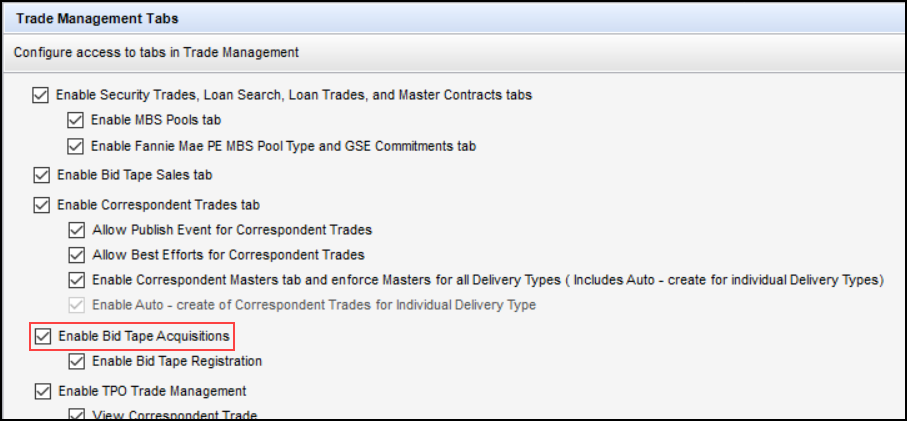
The Enable Bid Tape Management checkbox label has been updated to Enable Bid Tape Acquisitions in the Trade Management Tabs section of the Trade Management Setup setting to support the renaming of Bid Tape Management to Bid Tape Acquisitions.
SEC-29746
Personas
New Personas Option for Upcoming Web Document
Flows Button
(Updated on 4/18/2025)
A new option has been added to the Personas setting to manage access to the new Web Document Flows button that will be made available in a future Encompass release. The new option- Launch Web Document Flows from Desktop - is provided in the General section of the eFolder tab. Select this option to grant the persona access to this button. If this option is not selected for the persona, the button is not displayed on the Documents tab in the eFolder.
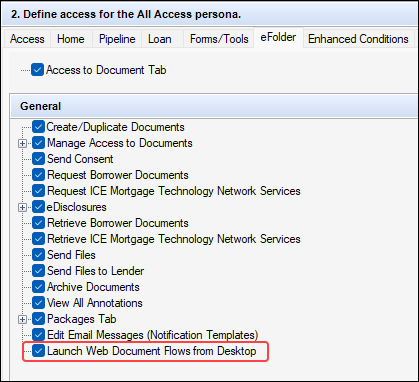
Please note, this Personas option will not be enforced in Encompass 25.2. The selections you make for this option will be retained in future releases, but they will not be applied or enforced until a future Encompass release when the Web Document Flows button is made available. When available, authorized users can click this button to launch the Disclosures, Request/Send documents, and Pre-Closing document flows in the Encompass web interface.
NICE-53060
Personas Options for Managing Tasks in the Web
Interface Removed
In the Encompass Settings > Company/User Setup > Personas setting, the Add Sub-tasks and Add adhoc Sub-tasks have been removed. These options were located on the Web Version tab, in the Workflow Tasks Tool > Manage Tasks > Add Tasks manually dropdown list of personas options. The functionality for these two options was never implemented and therefore will not impact any current users assigned with impacted personas.
NICE-51775
Additional Updates
Update to Encompass DLL File Security Certificates
(Added on 5/2/2025)
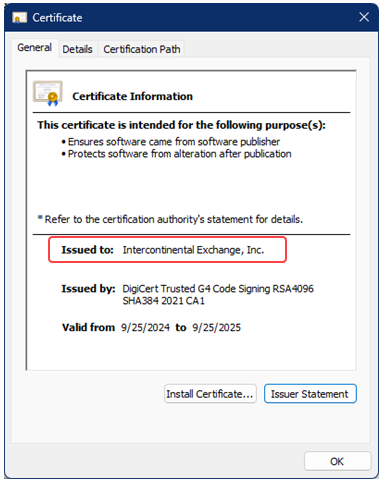
In Encompass 25.2, we have updated the certificates for DLL files using DigiCert. Previously, these certificates were listed as ICE Mortgage Technology, Inc. Now they are listed as Intercontinental Exchange, Inc. If your company is using any group policy settings, you may need to add Intercontinental Exchange, Inc. to your company allow list or your Encompass instance may not install or launch as expected.
Fixed Issues for Version 25.2 (Banker Edition)
This section describes the issues that have been fixed in this release.
Why we fixed these issues: These issues were fixed to improve usability and to help ensure Encompass is operating as expected. The issues that are chosen to be fixed are based on the severity of their impact to clients and client feedback.
Encompass Forms and Tools
Fee Variance Worksheet: Legal Limit (Net Baseline +
10%) Now Updates when Fees are Removed
On the Fee Variance Worksheet input tool, in the Charges that in Total Cannot Increase More Than 10% section, updates have been made to the Legal Limit (Net Baseline + 10%) fields (LE Baseline (FV.X212), CD Baseline (FV.X213)) so that the baseline is updated when fees are removed. In previous versions, Encompass was not removing applicable fees from the baseline calculation, but the Encompass Compliance Service (ECS) was, resulting in a discrepancy between the tolerance calculation when compliance reviews were run.
As part of this fix, fees that show as 0.00 in the itemization column on the Fee Variance Worksheet are now excluded from the Good Faith Baseline calculations (LE Baseline (FV.X381), CD Baseline (FV.X382).
Migration Notes:
-
Existing loans that have already been disclosed are not impacted by this fix. The new calculations will not be used in these loans.
-
Loans in Encompass 25.2 (and later) with no disclosures will use the new calculations.
CBIZ-40328
Branch Information Section of the TPO
Information Tool No Longer Cleared When Non-Super Admin/Admin User Saves Loan
An issue occurred where the Branch Information section of the TPO Information tool was cleared when a non-super admin/admin user saved a loan with data in the Branch Information section. This issue has been resolved and the Branch Information section is no longer cleared when a loan is saved by a non-super admin/admin user.
SEC-29662, SEC-29167
Reduced Spacing Between the Condition Name and
Description
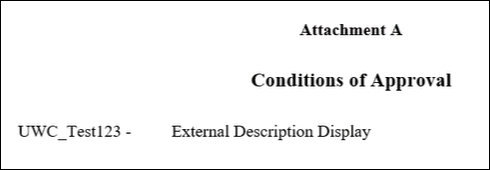
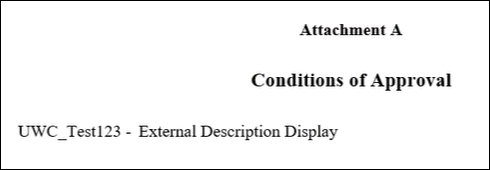
The space between the condition name and external description for enhanced conditions that are printed on output forms has been reduced to help improve readability and reduce the number of form pages that are printed.
Printed Form Before Fix:
Printed Form After Fix:
CBIZ- 62489
Encompass Settings
Options in Lock Request Submissions After Pricing
Has Been Retrieved Section of the Product and Pricing Setting Now Function
Properly
An issue occurred where the Allow lock request only if user has retrieved pricing within the last [Enter Number] minutes and the Apply the pricing timer only when there is no current lock options in the Lock Request Submissions After Pricing has been Retrieved section of the Product and Pricing setting were not being honored. This issue has been resolved and the options are now functioning properly.
SEC-29228
Encompass Developer Connect APIs
Interim Servicing Fields Can Now be Updated via APIs
For users utilizing APIs to update the values on the Interim Servicing Worksheet fields such as Servicer Loan Number (SERVICE.X108), Sub-Servicer (SERVICE.X110), Sub-Servicer Loan Number (SERVICE.X111), and so on, they received errors ("The Interim Servicing field is read only.") and the fields failed to update. Encompass has been updated to allow APIs to update the Interim Servicing Worksheet fields without errors.
CBIZ-39679
Transitioning from Encompass SDK to Developer Connect
APIs
ICE will be transitioning from legacy Encompass SDK (Software Development Kit) integrations in October 2025. This enables our clients, partners and ICE to continue to innovate and automate by eliminating legacy integrations and focusing on modern technology. ICE is transitioning clients and partners off SDK-based applications and plug-ins (lender, partner and ICE created) by October 31, 2025.
-
Standalone SDK modules (transition to Developer Connect APIs)
-
SDK loan plugins (migrate to SSF framework and NG plugin framework)
APIs for the most common SDK functions and native Encompass functionality will eliminate the need for many legacy SDK use cases. Encompass APIs are interoperable across web and desktop, as both user interfaces sit on top of the same underlying Encompass loan file. Alternatives to SDK functionality are available with more coming. There may not be 100% parity, but we will provide the most common functions and alternatives. For more information, refer to the Transitioning from SDKs and Legacy Integrations - FAQs.
Here is a list of the known Plugin issues that will be addressed in upcoming Encompass releases.
| Known Issue | Targeted Encompass Release for Fix |
|---|---|
| SSF getField() method must match case of custom field name or error is returned (ENCW-122154) | 25.3 |
| Reload Plugins 2.0 in Encompass desktop interface without having to log out and back in (NICE-53847) | 25.3 |
| Unable to execute elli.script.getObject("auth") in Encompass desktop interface (NICE-53386) | 25.3 |
| Plugins 2.0 premilestoneComplete event not allowing cancel in Encompass desktop interface (NICE-53463) | 25.3 |
| Plugins 2.0 precommit event not allowing cancel in Encompass desktop interface (NICE-53421) | 25.3 |
| Plugins 2.0 precommit event not returning Data parameter in Encompass desktop interface (NICE-53422) | 25.3 |
| Plugins 2.0 premilestoneComplete event not returning Data parameter in Encompass desktop interface (NICE-53462) | 25.3 |
Feature Enhancements for Version 25.2.0.1
(Added on 5/13/2025)
This update contains updates to users' Encompass client machines (25.2.0.1). The changes below are included in this update. Additional updates to fix issues discovered during testing of Encompass 25.2 are also included in this update. Learn more about these fixed issues in the Fixed Issues for Version 25.2.0.1 section.
The client-side update can be controlled manually via the Encompass Version Manager tool. If the tool has been configured to always apply new releases to users' computers automatically, users will receive this update upon their initial log in of Encompass following the release.
In Encompass, go to Help > About Encompass in the menu bar to view your Encompass version. Once the upgrade is complete, your new version number will be 25.2.0.1.
The Encompass SDK has been repackaged with this 25.2.0.1 update. If you are utilizing the Encompass SDK,
upgrading to this new package is needed to ensure that your SDK has the same functionality as this latest
version of Encompass. Visit the Encompass SDK and Other Install Files page to access the latest download links
to
Update to the Client Machines (25.2.0.1)
Updates to GSE Additional Provider Data Form for
Income Calculator and AIM Check
(Added on 5/13/2025)
Updates made to the GSE Additional Provider Data input form to support Freddie Mac's AIM (Assets and Income Modeler) Check and Fannie Mae's Income Calculator in the initial Encompass 25.2 release have been rolled back and are no longer included in the Encompass 25.2.0.1 release:
-
In the Fannie Mae Additional Provider Data and Freddie Mac Additional Provider Data sections of the form:
-
The Fannie Mae Income Calculator sub-section has been removed. The Belongs To (FANNIEIC0001) fields and Verification Report Identifier (FANNIEIC0002) fields that were in this section are no longer provided here, nor is the Edit icon previously provided that was used to access the Fannie Mae Income Calculator quick entry pop-up window.
-
The Freddie Mac AIM Check sub-section has been removed. The Integrator (FAC0001) fields and Verification Report Identifier (FAC0002) fields that were in this section are no longer provided here, nor is the Edit icon previously provided that was used to access the Freddie Mac AIM Check quick entry pop-up window.
-
CBIZ-66522
Transitioning from Encompass SDK to Developer
Connect APIs
ICE will be transitioning from legacy Encompass SDK (Software Development Kit) integrations in October 2025. This enables our clients, partners and ICE to continue to innovate and automate by eliminating legacy integrations and focusing on modern technology. ICE is transitioning clients and partners off SDK-based applications and plug-ins (lender, partner and ICE created) by October 31, 2025.
-
Standalone SDK modules (transition to Developer Connect APIs)
-
SDK loan plugins (migrate to SSF framework and NG plugin framework)
APIs for the most common SDK functions and native Encompass functionality will eliminate the need for many legacy SDK use cases. Encompass APIs are interoperable across web and desktop, as both user interfaces sit on top of the same underlying Encompass loan file. Alternatives to SDK functionality are available with more coming. There may not be 100% parity, but we will provide the most common functions and alternatives. For more information, refer to the Transitioning from SDKs and Legacy Integrations - FAQs.
Here is a list of the planned enhancements that will be provided in Encompass 25.2.0.1:
| Planned Enhancements for Plugins 2.0 | Targeted Encompass Release for Update |
|---|---|
| Auth Object - getAccessToken() In the upcoming release, plans are to include Auth Object getAccessToken() to retrieve an access token (NICE-53971) | 25.2.0.1 |
| Auth Object - getUser() In the upcoming release, plans are to include Auth Object getUser() to retrieve an entity providing basic user identity information for the current user (NICE-54021) | 25.2.0.1 |
— You have reached the end of the release notes for the selected personas —
The Change Log lists each release notes entry that has been added, deleted, or modified since the initial preview version of the full release notes was first published and is not specific to any persona.
.png)