Feature Enhancements in Version 25.4 December Service Pack
This section discusses the updates and enhancements to existing forms, features, services, or settings that are provided in this release.
Updates to ICE PPE
"ICE PPE" refers to the new User experience (introduced as part of the 24.2 release) using the Encompass Partner Connect (EPC) interface.
 Name of Lender on Loan Estimate Page 1 Updated for Float Action
When a Float action is executed, the Name of Lender (field ID 1264) on the Loan Estimate Page 1 will be updated with the Lender selected on the Results page.
Manufactured Home Width Type Field Mapped to ICE PPE
The Manufactured Home Width Type field has been mapped to ICE PPE.
-
When the Manufactured Home Width Type is set to “Manufactured Multiwide”, the Property Type will be set to “Double-wide Mobile.”
Updated Logic for "Use Encompass" Message
As part of the 25.3 Critical Patch 5 release, a “Use Encompass” message was introduced to replace the Estimated APR when certain criteria was not met. As part of this release, the “Use Encompass” logic has been updated as follows:
-
For any qualification where the program being qualified has a "HELOC" Program Type.
-
The APR will be set to be equal to the sum of the current value of the HELOC Index plus the Margin as defined in the Program Definition.
Updates to ICE PPE and Classic EPPS
"Classic EPPS" refers to the User interface for pricing loans, Administration, and the integration that preceded ICE PPE (introduced as part of the 24.2 release).
Custom Amortization Terms for ARMs
Qualification Selection Logic Expanded to Include ARM Programs
As part of the 24.3 release, the Qualification selection logic was modified to only return fixed programs that supported the defined custom term for the loan. As part of this release, this logic has been expanded to include ARM programs.
CPM Program Definition Supports Non-Standard ARM Loan Terms
As part of the 24.3 release, Min and Max fields were added to the CPM Program Definition next to the Loan Term for fixed rate Program Types. As part of this release, the Min and Max fields will also be displayed for ARM Program Types.
APOR Determination Modifications When Custom Term Selected Expanded to Include ARM Terms
As part of the 24.3 release, the APOR determination for Custom Terms was modified for fixed terms. As part of this release, this APOR determination has been modified to include ARM terms.
Updates to Classic EPPS
Updates to Rule Manager
Two New Conditions Added to Rule Definition
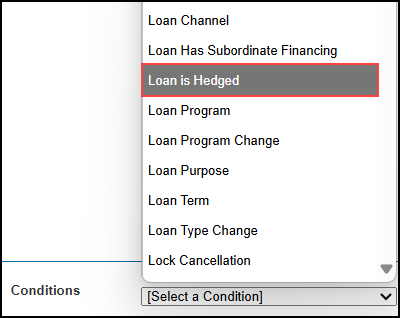
Two new Conditions, "Loan is Hedged" and "Prepay Penalty Term", have been added to the Rule Definition.
-
Loan is Hedged - The loan is hedged is equal to the value in field ID 2401.
-
The alert that is triggered if a Condition selected in the definition is only evaluated in the ICE PPE integration applies to this Condition.
-
Prepay Penalty Term - The prepay penalty term assigned to the given program.

EPPS-71911, EPPS-84886
Added "Dollars" Parameter to Adjust Final Price Rule Task on Rule Definition
A new "Dollars" parameter has been added to the Adjust Final Price Rule Task on the Rule Definition.

-
The dollar amount must be an integer (no cents).
-
The dollar amount must be in the range of -$99,999<=X<=$99,999.
-
If cents are added or the amount is outside the range, an error message “Please enter an integer in the range of -$99,999 to $99,999” will be displayed.
-
Both the Percent and Dollars can be specified in a single Rule.
-
A Percent or Dollars is required.
-
The task has been updated to use the PriceWithDollars Condition action.
New Export Button Added to Rule Manager Listing Page
A new Export button has been added to the Rule Manager listing page to enable a Client admin to export the Rules from the Rule Manager.

When the Export button is selected, a CSV file containing the current column headers (excluding Actions) and the data currently displayed in the grid will be generated.
New Search Text Field and Button Added to Rule Manager Listing Page
A new Search text field and button have been added to the Rule Manager listing page to enable a Client admin to search the Rules.

-
Using Search will filter the Rules on the listing page and return only the Rules with the search text in the Rule Name.
-
Hidden Rules will only be returned when the Hidden checkbox is selected.
Updates to Custom Program Management (CPM)
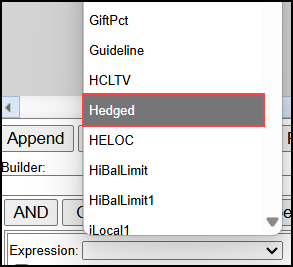
New "Hedged" Expression Added to Condition and Matrix Definitions
A new Hedged expression has been added to the Condition and Matrix (Matrix and Rate Matrix) Definitions. This is equal to the value in field ID 2401.
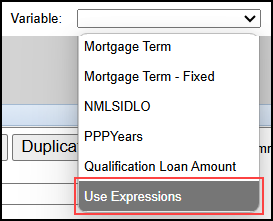
"Use Expressions" Variable Added to Client Matrices and CPM Matrices
A new "Use Expressions" variable has been added to the Client and CPM Matrices (Matrix and Rate Matrix) to allow column headers to behave as the Expressions cells in the Expressions column. This change supports the creation of complex/multi-dimensional matrices for more efficient rule maintenance structures.
 Modified "PriceDollars" Action on Condition Definition in CPM
As part of the 25.4 release, a PriceDollars action was added to the Condition Definition in CPM. As part of this release, this action has been modified.
-
The action has been renamed to “PriceWithDollars”.
-
The action takes two parameters, Percent and Dollars.
-
Percent - The amount to increase/decrease the price by. “NULL” or “Nothing” can be used to indicate no value.
-
Dollars - A dollar amount to be converted to a percent value by dividing the loan amount. “NULL” or “Nothing” can be used to indicate no value.
-
The Percent and Dollar values will be combined into a single price adjustment which will be displayed in the Price Details with the description (if provided).
| Next Section: Fixed Issues | 
|
|

|
Previous Section: Introduction |