Velocify Pulse 26.1 Major Release: Feature Enhancements
This section discusses the updates and enhancements to existing features, services, or settings in this release.
Sales Manager
 New Leads and Calls On/Off Report
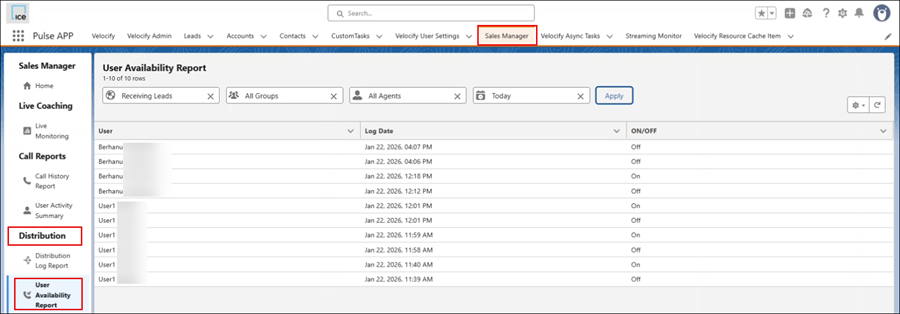
A new report has been added to Sales Manager that displays historical on/off logs for all users.
-
Report can be used to review or troubleshoot distribution based on user availability
-
A log is added each time the Leads or Calls button is changed for a user.
-
The following filters are available:
-
Availability Type
-
User
-
Group
-
Date Range.
-
PULS-9454
Call Transcription
This is a Pilot Program. To participate, contact your Customer Success Manager.
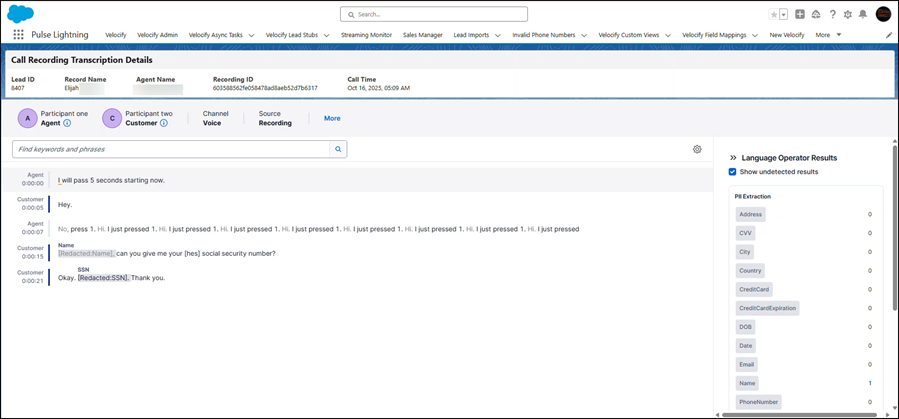
If Call Transcription is enabled, you can view a transcript of any Call Recording.
-
Redact is permanently enabled (cannot be disabled). Names, phone numbers, Social Security numbers, addresses, and all other PII are removed from the transcript.
-
Call Recordings need to be enabled for this feature.
-
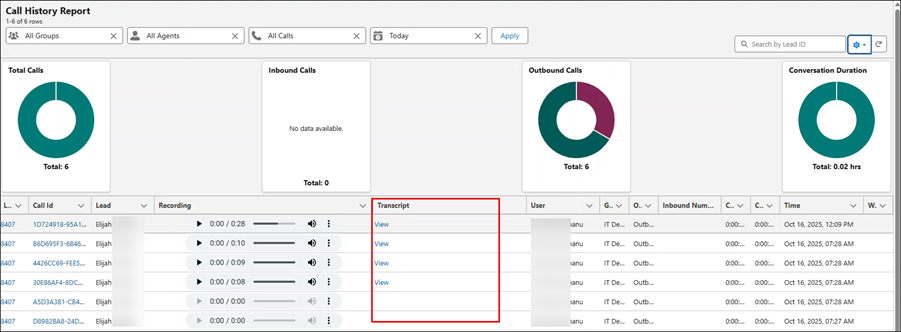
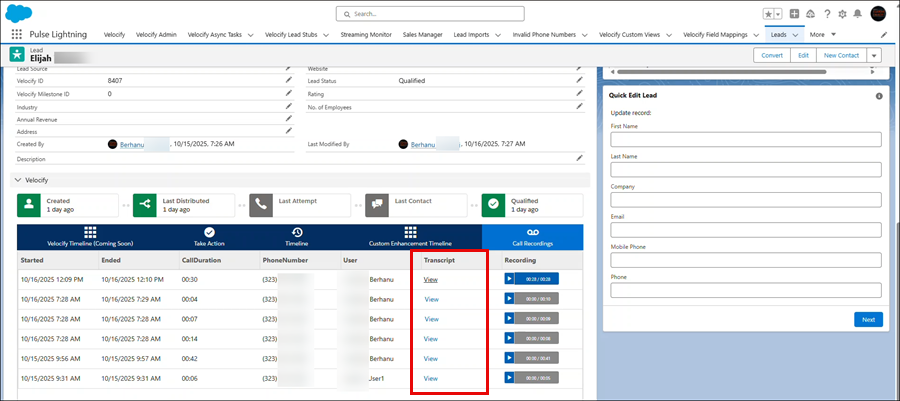
The transcript link displays in a new Transcript column in two locations:
-
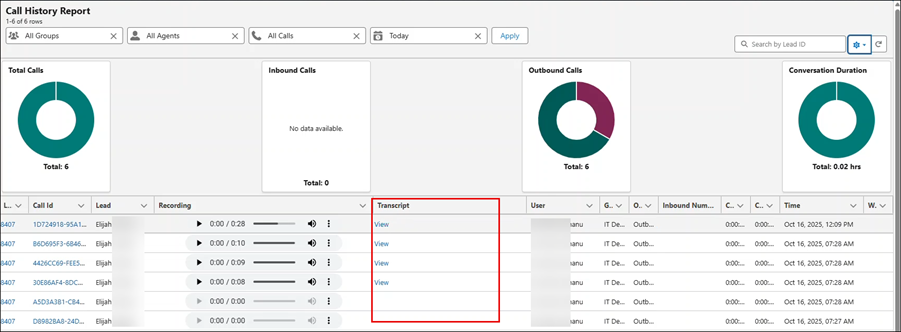
Call History Report: Sales Manager > Dialer Reports > Call History Report
-
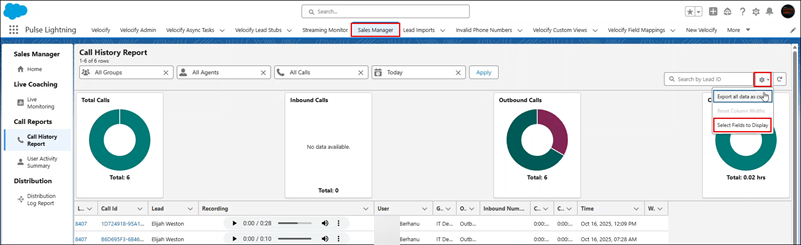
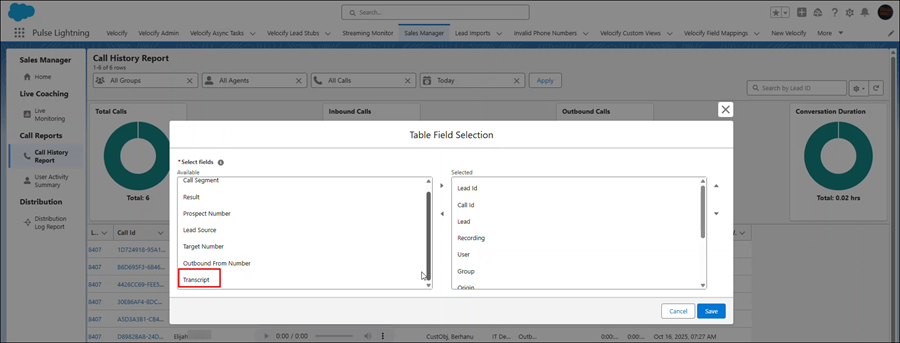
To enable this, click the Settings icon and then click Fields to Display.
-
In the Table Field Selection window, go to Transcript and move it from the Available to Selected panel. Click Save.
-
This displays the Transcript column. Click the View link to open a new tab and view the transcript. Note that for calls without recordings. the Transcript column is blank.
-
-
Call Recording visualforce widget
-
This is a Pilot Program. To participate, contact your Customer Success Manager.
PULS-8866
UI Updates
Distribution Rules Pages
All Distribution Rules pages — and their subpages — have been fully redesigned to meet WCAG 2.1 accessibility standards.
-
Main Landing Page: Admins can now search for individual filters across all Programs using the search functionality in the Filters column.
-
Edit Page Improvements:
-
A global Save button has been added and now applies across all tabs.
-
When editing Distribution Programs, make all necessary updates—including program filters—then click Save in the bottom-right corner
-
-
User Filters Tab:
-
Editing distribution settings for an individual user or group is now consolidated into a single edit page.
-
Access it by clicking the toolbar to the far right of the user or group, then selecting the Pencil icon.
-
From this unified page, you can:
-
Update record maximums
-
Modify filters for the user or group
-
Inherit maximums and filters from the parent group
-
-
This user-level edit page has its own Save button and does not rely on the global Save button for the overall program.
-
-
Accessing Global/User-Level Distribution Settings: To access a user’s overall Distribution Settings (such as Global Filters, Category Caps, Pipeline Thresholds), use the same toolbar and select the Globe icon
PULS-8426
Adjustable Column Widths in Admin Tables
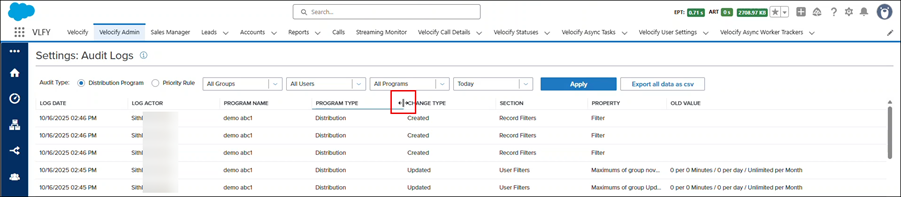
Admins can now adjust column widths in data tables on the following pages:
-
Audit Logs report
-
Processes main page
-
Distribution Programs main page
-
Actions
Additional Notes:
-
A horizontal scrollbar will display when enough columns are expanded to exceed the page width.
-
Column widths reset to their default size each time the page is loaded or refreshed.
PULS-9044
Admin Updates
| Next Section: Fixed Issues |

|
|

|
Previous Section: Introduction |