Package recording and storage
After your recording county (or jurisdiction) staff reviews and accepts all of the documents in a package, those documents are ready to be recorded and uploaded or printed. If you record based on submitted date, Simplifile holds any packages accepted out of submission date order. You cannot record them until the older packages are recorded. This can help to maintain the “race to record” sequence, if appropriate.”
Recorded documents become part of the legal record for your county (or jurisdiction). The system makes fee information for recorded documents available in a report. Fee information is also available for your county's (or jurisdiction’s) financial team to reconcile at the end of the day. For more information, see Reports for Counties.
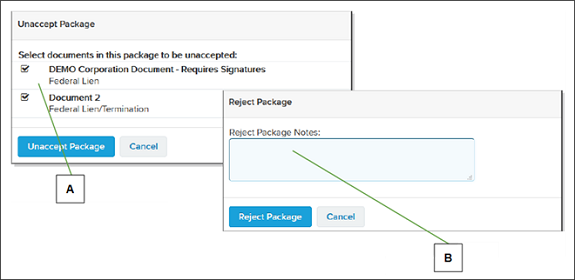
If an accepted document needs to be reviewed again, you can unaccept the document from the recording queue. This puts the document back in the reviewing queue.
| Letter | Description |
|---|---|
| A | When you choose to unaccept a package, you must unaccept one or more documents. Unaccepting a document returns the document to the review queue. |
| B | You can add notes to the Reject Package window to help the submitter know what to do before resubmitting the package |
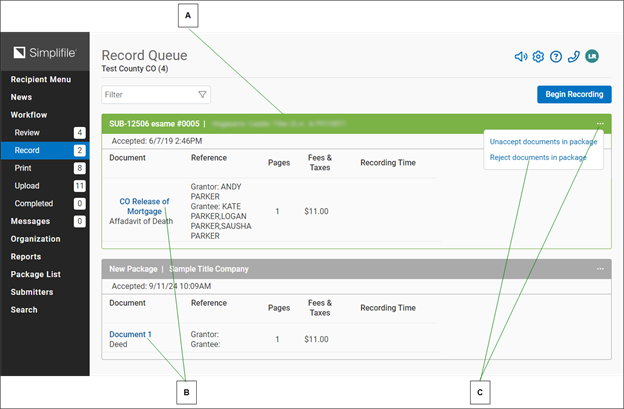
Below is a partial example of a recording queue.
| Letter | Description |
|---|---|
| A | The active package has a green header. |
| B | Complete any required fields. The system may add entry or page numbers for you in the correct sequence. |
| C | If necessary, select the Apply Stamps button when all items have been placed. |
| D | Select a time to change the recording time manually. |
| E | Select a document name to open the document in the document viewer. |
| F | Select the Menu  (ellipsis) button in the package header to choose to unaccept or reject documents in the package from the dropdown list that displays. (ellipsis) button in the package header to choose to unaccept or reject documents in the package from the dropdown list that displays. |
After a document is recorded, Simplifile sends that document to be printed or uploaded. To start the printing or uploading process, select the Print Queue or Upload Queue boxes on the Recipient Menu page. You can select the links in the navigation menu to view the documents in the Print Queue and the Upload Queue.
Uploaded documents are saved to a file location specified by your recording county (or jurisdiction). Once started, the upload process continues to run in the background until the person who started the process logs out, closes the browser, or stops the process.
When all of the documents in a package are recorded, the package status changes to recorded and the submitter is notified.
- To record and store package documents, see the Record Queue page topic Record (apply stamps) and store package documents task.