Merge duplicate loan records and download loan data
 Overview
Duplicate loan record merging
When multiple organizations work on the same loan, it creates the potential for two or more parties to initiate or work on the same loan at the same time. Simplifile continually checks for duplicate loan records to help you avoid issues that may result from such actions. If Simplifile finds any duplicate loan records, you can choose to merge the records.
In a merge, the lender’s version of the loan is the version Simplifile uses as the base. This assures that the lender’s fee set stays in force.
The fields Simplifile checks to avoid duplication include the following:
- Borrower names
- Loan number
- Settlement file number
- Property address
- Loan amount
- Sales price of property
Simplifile checks for duplicates any time any of these fields are updated.

| Letter | Description |
|---|---|
| A | Select here to merge the two loans. |
When someone merges loans, the following happens:
- Any new or edited fees become pending. The collaborating party must review and approve these fees.
- Any documents with the same name are treated as proposed versions of the existing document.
- Any removed documents become pending. The collaborating party must review and acknowledge these documents.
- The word merged is appended to the file number of the loan whose changes were applied to the remaining loan.
- The loan whose changes were applied is moved to an Archived status.
- Merge activity is posted in the activity log for the loan that received the changes (the lender’s version with the agent’s information added).
Collaborators can review and unarchive the loan, if necessary. However, if both loans are active and the loan identifiers are not unique, Simplifile will again ask if the two loans should be merged. To avoid this, update one of the loan identifiers in one of the two loans.
Download loan data
Download loan data
If desired, you can download the following .xml files for a loan from within Simplifile:
- Closing Disclosure. This document contains final details about a loan, such as the fees and other closing costs required to finalize the loan and projected monthly payments.
- Split Disclosure. In some cases, two disclosure documents are prepared that separate the loan information into borrower‑only and seller‑only information. Both are downloaded in a single file.
Each document you download contains loan data as it exists in Simplifile at the time of download.
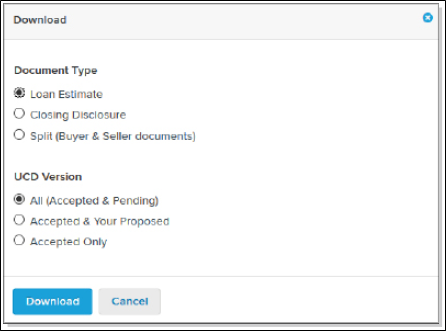
You can download several versions of the file you choose. Each version includes all closing fees that have been finalized—that is, they include all fees that have been approved by both you and the settlement agent. Two of the file versions also include different sets of fees that have been proposed but not yet approved. You can download one of the following versions:
- All (Accepted & Pending). This is a working copy of the data. In addition to the closing fees that have been approved by both you and the settlement agent, this version includes fees that either you or the agent still need to approve. This means that this version contains all disclosure items, whether approved or pending.
- Accepted & Your Proposed. This document lets you see the closing fees that have been approved by both parties, but the unapproved fees it includes are those that only you have proposed. It does not include fees the agent may have proposed that you still need to approve.
- Accepted Only. This is the master dataset of finalized fees. It includes all of the closing fees that have been approved by both you and the settlement agent. It may be incomplete because it does not include any fee that has not yet been agreed upon.
Below is an example of the download window.
How to download loan data
- Find the loan whose action history you want to download. For more information, see Work with loans.
- On the navigation menu, select the Loan Info item or Disclosures item.
- Select the Download button (
 ).
). - Choose the document type you want to download. Split includes two documents: one for only borrowers and one for only sellers.
- Choose the version you want to download.
- All (Accepted & Pending) Is a working copy of the UCD. It includes closing fees that have been approved by both collaborators as well as fees that one collaborator needs to approve.
- Accepted & Your Proposed lets you see the closing fees that have been approved by both collaborators and the unapproved fees that you have proposed. It does not include proposed fees that you need to approve.
- Accepted Only is the master dataset of finalized fees. It includes all of the closing fees that have been approved by both collaborators. It does not include any fee that has not yet been agreed upon.
- Select the Download button.
- Follow your browser’s instructions to open and/or save your file.