Download loan data
 Overview
Overview
If desired, you can download the following .xml files for a loan from within Simplifile:
- Closing Disclosure. This document contains final details about a loan, such as the fees and other closing costs required to finalize the loan and projected monthly payments.
- Split Disclosure. In some cases, two disclosure documents are prepared that separate the loan information into borrowable and seller‑only information. Both are downloaded in a single file.
Each document you download contains loan data as it exists in Simplifile at the time of download.
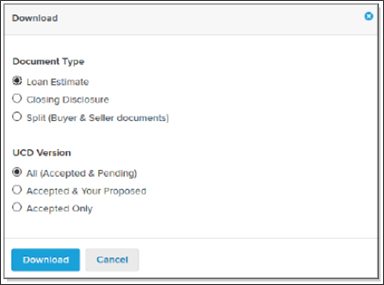
You can download several versions of the file you choose. Each version includes all closing fees that have been finalized—that is, they include all fees that have been approved by both you and the lender. Two of the file versions also include different sets of fees that have been proposed but not yet approved. You can download one of the following versions:
- All (Accepted & Pending). This is a working copy of the data. In addition to the closing fees that have been approved by both you and the lender, this version includes fees that either you or the lender still need to approve. This means that this version contains all disclosure items, whether approved or pending.
- Accepted & Your Proposed. This document lets you see the closing fees that have been approved by both parties, but the unapproved fees it includes are those that only you have proposed. It does not include fees the lender may have proposed that you still need to approve.
- Accepted Only. This is the master dataset of finalized fees. It includes all of the closing fees that have been approved by both you and the lender. It may be incomplete because it does not include any fee that has not yet been agreed upon.
Below is an example of the download window.
How to download loan data
How to download loan data
- Find the loan whose data you want to download. For more information, see Find a loan.
- Do one of the following:
- On the left navigation menu, select the Loan Info item. The Loan Information page opens. Then select the Download link (
 ).
). - On the left navigation menu, select the Disclosures item. The Disclosures page opens. Either
- Select the CD Preview tab, then select the Download CD button in the upper right corner.
- Select the Collaborate tab, then from the Actions
 dropdown button, choose the Download CD item.
- On the left navigation menu, select the Loan Info item. The Loan Information page opens. Then select the Download link (
- Choose the document type you want to download. Split includes two documents: one for only borrowers and one for only sellers.
- Choose the version you want to download.
- All (Accepted & Pending) Is a working copy of the UCD. It includes closing fees that have been approved by both collaborators as well as fees that one collaborator needs to approve.
- Accepted & Your Proposed lets you see the closing fees that have been approved by both collaborators and the unapproved fees that you have proposed. It does not include proposed fees that you need to approve.
- Accepted Only is the master dataset of finalized fees. It includes all of the closing fees that have been approved by both collaborators. It does not include any fee that has not yet been agreed upon.
- Select the Download button.
- Follow your browser’s instructions to open and/or save your file.