Fixed Issues for Version 25.4 (Banker Edition)
This section describes the issues that have been fixed in this release.
Why we fixed these issues: These issues were fixed to improve usability and to help ensure Encompass is operating as expected. The issues that are chosen to be fixed are based on the severity of their impact to clients and client feedback.
Encompass Forms and Tools
 Update to Address Issue with Debt-to-Income Ratio Calculations in Refi Loans for Investment Properties
For users working in loans for an investment property (i.e., the investment property is indicated as the Subject Property (URLA.X73)) and it's being refinanced (19), an issue occurred where the debt-to-income ratio (DTI) in Encompass did not match closely with the DTI returned from Fannie Mae's Desktop Underwriter (DU). It was determined that this was due to Encompass not calculating the Net Income / Loss when calculating the DTI. This issue has been resolved and now the DTIs in this scenario in Encompass and DU closely match. In Encompass, the MORNET.X158 (Top Ratio) and MORNET.X159 (Bottom Ratio) fields and the CASASRN.X201 (Housing Ratios) and CASASRN.X202 (Debt to Income Ratio) fields specific to DTI were updated to match how the GSEs are calculating DTI. Therefore, the Encompass DTI value may now be slightly different from the MORNET and CASASRN DTI values with this change.
The new DTI calculation referenced will be reflected in MORNET.X158 & MORNET.X159 on the Fannie Mae Additional Data Form and CASASRN.X201 & CASASRN.X202 on the Freddie Mac Additional Data Form based on Agency Specific DTI Guidelines.
Update to Closing Disclosure's Remarks Fields to Indicate when Fees Have Been Revised
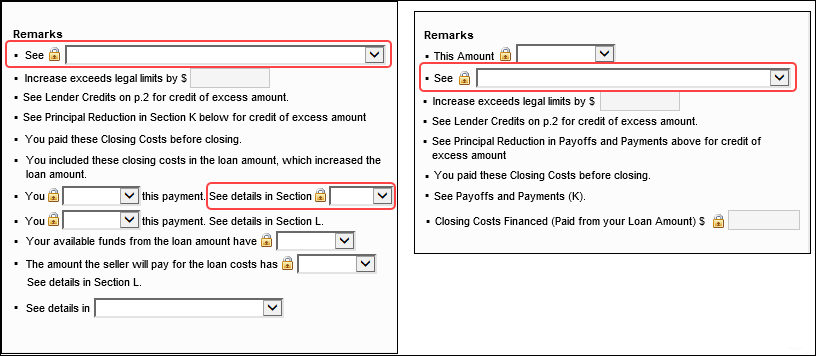
In previous versions of Encompass, the Closing Disclosure (CD) Page 3's See field (CD3.X123) in the Remarks section (which indicates the sections where fees impacting the Total Closing Costs of the loan have been revised) was not updated when relevant fees on the 2015 Itemization were changed until after the revised CD was disclosed. Thus, the Remarks on the disclosed CD were not up to date, while the Remarks on the CD in Encompass (CD3.X123) were up to date after disclosing. This issue has been fixed so that the Remarks field on the CD Page 3 is now updated accordingly when relevant fees are changed. This new system logic has also been applied to the CD3.X125 and CD3.X131 fields (which are also displayed in the Remarks section of the CD Page 3 when applicable).
Adjustments and Other Credits Fields on Closing Disclosure No Longer Cleared when Data Template is Applied to the Loan
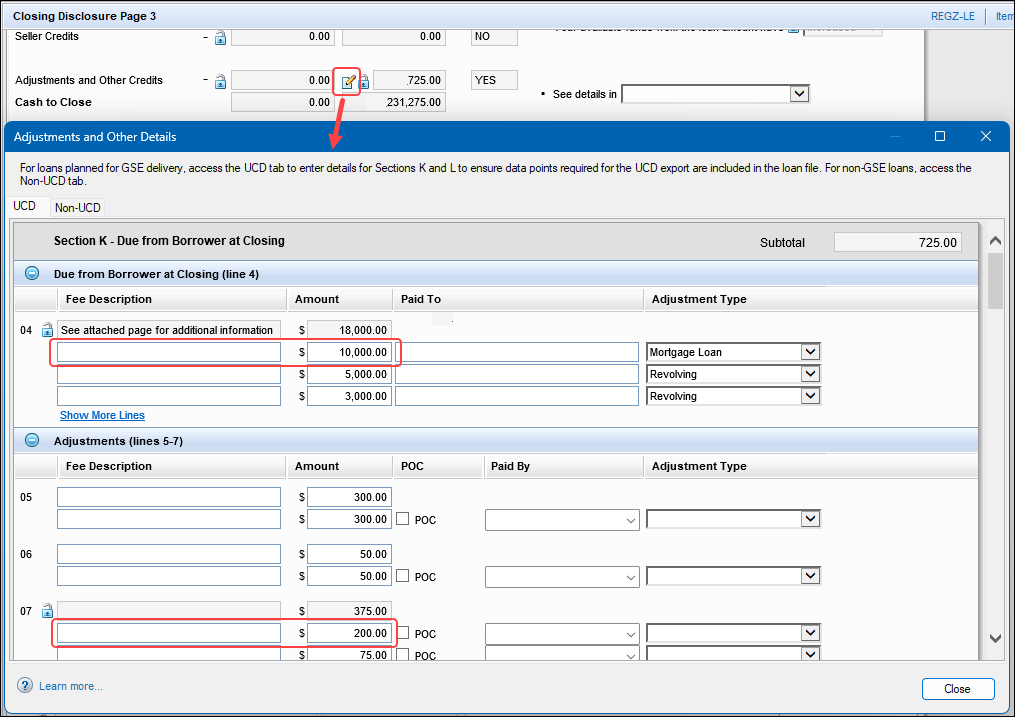
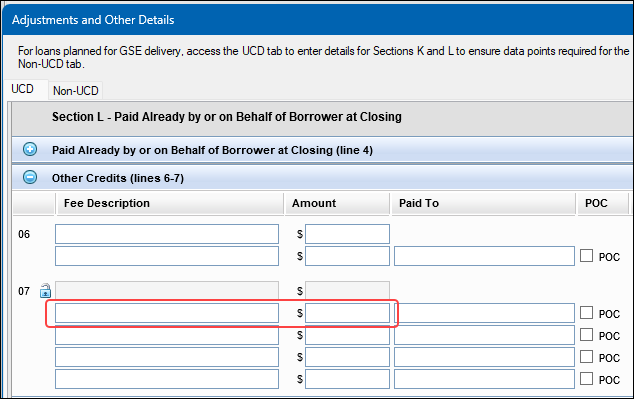
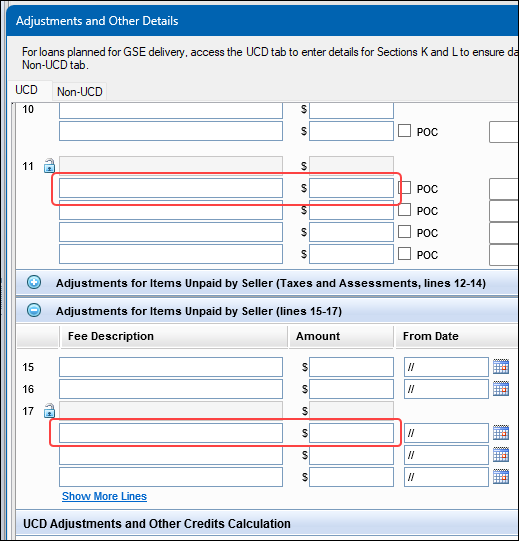
After applying any data template to a loan file, the following fields on the Closing Disclosure (CD) Page 3's Adjustments and Other Details pop-up window were being cleared. These fields should not have been cleared.
In Section K: CD3.X139, CD3.X140, CD3.X231, CD3.X232
In Section L: CD3.X290, CD3.X291, CD3.X322, CD3.X323, CD3.X353, CD3.X354
The values that were previously displayed in these fields were printed correctly to the printed CD output form, but they were not displayed in the input screen. This issue has been resolved and the values in these input fields are now retained even when a data template is applied.
Total Closing Costs Less Guarantee Fee Field Now Recalculating as Expected
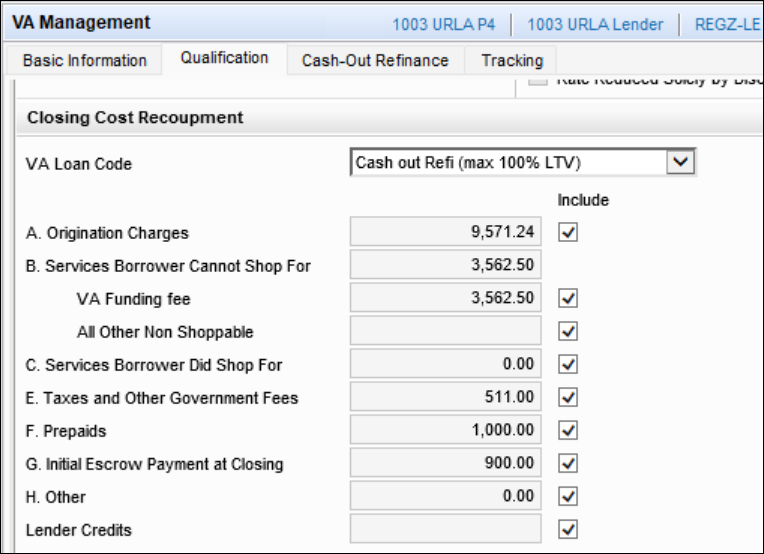
The Total Closing Costs Less Guarantee Fee field (VASUMM.X124) on the VA Management input form's Cash-Out Refinance tab is now recalculating as expected when changes are saved in the VA loan and when checkbox fields such as Include Prepaids (VASUMM.X145), Include Initial Escrow Payment at Closing (VASUMM.X146), and all of the other "Include" Closing Cost Recoupment checkboxes on the input form's Qualification tab are manually selected and/or cleared later. An issue was introduced in Encompass 25.1 where this Total Closing Costs Less Guarantee Fee field (VASUMM.X124) was not recalculating when users performed these actions like it should have.
Note that if the user has locked the Total Closing Costs Less Guarantee Fee field (VASUMM.X124) to override the system-calculated values, this field will not be automatically recalculated.
FHA Loans in New Connecticut Planning Regions: Base Loan Amount Now Updated Accordingly when FHA County Limits are Not Enforced
The Encompass system logic for FHA loans for subject properties located in a county within a new Connecticut planning region (introduced in 2022) has been updated to address an issue with the base loan amount (1109) not being recalculated when the down payment percentage (1771) or amount (1335) was updated. Beginning in Encompass 25.4, any time there is a change to the down payment percentage (1771) or amount (1335) for FHA loans with subject properties in a new Connecticut planning region, the base loan amount (1109) will be recalculated accordingly.
This new logic applies to these loans when the Enforce County Loan Limit option (3984) is being used for the loan and when it's not being used (i.e., the new logic applies regardless of the Enforce County Loan Limit checkbox being selected or not selected).
Note that if the Enforce County Loan Limit checkbox (3984) is selected (i.e., FHA county limits are being enforced for the loan), when there is a change to the down payment percentage (1771) or amount (1335), a pop-up notification is provided to explain that ICE is unable to determine the Connecticut FHA loan limits based on the new planning regions and it is the responsibility of the lender to ensure the FHA loan limits do not exceed the loan limits for the specified subject property address. This is existing Encompass behavior introduced in Encompass 25.1.
Update to North Carolina State Specific Information Input Form for Borrower-Paid and Financed Amounts Paid to Brokers
In the North Carolina State Specific Information input form's Mortgage Broker Fee Information Disclosure section, there was an issue where the amount of fees the borrower will pay to mortgage broker at or before closing (DISCLOSURE.X652) and the flat charge the borrower will pay at closing (DISCLOSURE.X647) were not calculating the correct values. DISCLOSURE.X652 was showing the Broker PAC (paid at closing) amount (instead of the borrower-paid PAC amount) and DISCLOSURE.X647 was showing the borrower-paid PAC amount (instead of the borrower financed amount). This resulted in incorrect values being output to the North Carolina Office of the Commissioner of Banks Fee Information From Your Mortgage Broker printed output form. This issue has been resolved and the correct values are now calculated for these fields when activated:
-
DISCLOSURE.X652 = the total of the Borrower-paid PAC and POC amounts from the 2015 Itemization input form where the "Paid To" fields in the 2015 Itemization = "Broker".
-
DISCLOSURE.X647 = the total of the borrower Financed amounts from the 2015 Itemization input form where the "Paid To" fields in the 2015 Itemization = "Broker".
Migration Notes:
For existing loans, these fields are not automatically recalculated upon upgrading to Encompass 25.4. These fields will be recalculated when users save any change to the loan or when the user opens the 2015 Itemization input form in the loan (unless the user has locked the fields on the North Carolina State Specific input form to override the system-calculated values).
Amortization Schedule Now Showing the Correct Midpoint Cancellation Payment Date
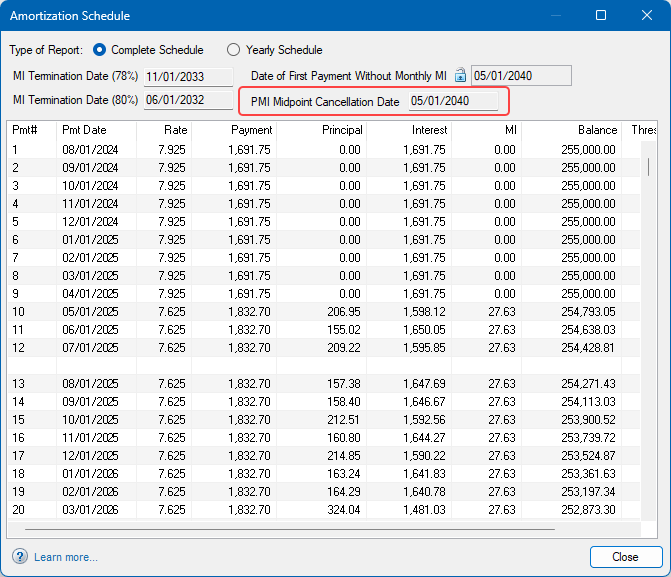
In Construction to Permanent (19) loans with monthly mortgage insurance (MI) payments, when the Midpoint Payment Cancellation option (1753) in the MIP/PMI/Guarantee Fee Calculation pop-up window was selected, the Amortization Schedule was incorrectly indicating the MI Cancellation occurring at payment 180 instead of payment 190, resulting in the MI falling off from the loan sooner than it should have. This issue has been addressed by updating the Amortization Schedule to use the same calculation logic that determines the PMI Midpoint Cancellation Date (3548). The date calculated for the PMI Midpoint Cancellation Date (3548) is now the date indicated for the MI Cancellation payment date in the Amortization Schedule.
In addition, the PMI Midpoint Cancellation Date (3548) is now included in the Amortization Schedule/View Payment Schedule pop-up window when the Midpoint Payment Cancellation option (1753) is selected in the MIP/PMI/Guarantee Fee Calculation pop-up window.
Migration Notes:
For existing closed loans (i.e., field 1393 is not empty or set to Active Loan), if the loan is Construction to Permanent and the Midpoint Payment Cancellation option (1753) is selected, then fields 799, 1206, CD5.X1 will be automatically locked to retain the existing values.
Corrected Estimated Construction Interest Calculation for Method B
The calculation for Estimated Construction Interest (4088) for Method B (SYS.X6) has been updated to ensure accurate interest calculations. Previously, Encompass incorrectly calculated the interest period in construction loans when Method B was used, the estimated closing date (763) was on the last day of a month, and the Number of Days (1962) used to calculate the repayment schedule was set to 365/365. This led to potential errors in disclosed interest and proposed monthly payments (5).
With this fix, the system will now correctly determine the interest period based on the Disbursement Date (2553) or Estimated Closing Date (763) if the Disbursement Date is blank.
Migration Notes:
For existing loans that meet all the criteria below, the Estimated Construction Interest field (4088) will be automatically locked to retain its existing value.
-
Loan is Construction or Construction to Perm (19)
-
Loan has been disclosed or is a non-active loan (1393)
-
Est Interest On (SYS.X6) is set to B (Full Loan)
-
Number of Days (1962) is set to 365/360 or 365/365.
HMDA Loan Amount Calculation Updated to Consider the Loan Amount when Application is Withdrawn or Denied
Encompass now populates the HMDA Loan Amount (HMDA.X31) with the loan amount (2) rather than the initial application amount (NMLS.X11) when the loan application is withdrawn or denied for any of the following reasons: (i.e., the Current Status (1393) of the loan is changed to any of these scenarios), there is no counteroffer indicated (4457), and the loan has not been disclosed yet (3152):
-
3 (Application denied)
-
4 (Application withdrawn)
-
5 (File Closed for incompleteness)
-
7 (Preapproval request denied by financial institution)
For reporting on the HMDA LAR, this change ensures that the most recently requested loan amount is reflected in HMDA.X31 rather than the original loan amount when there's a denial on the loan with no counteroffer or the borrower withdraws the application.
Migration Notes:
For existing loans that meet all the criteria below, the Loan Amount field (HMDA.X31) will be automatically locked to retain its existing value.
-
The Counteroffer Date field (4457) is empty.
-
The Current Status (1393) of the loan is 3 (Application denied), 4 (Application withdrawn), 5 (File Closed for incompleteness), or 7 (Preappoval request denied by financial institution).
-
The loan has not been disclosed (i.e., the Initial Disclosure Date field (3152) is empty).
-
The loan amount (2) and initial application amount (NMLS.X11) are not the same
Updated Calculation of Financed Discount Points for VA IRRRL Loans
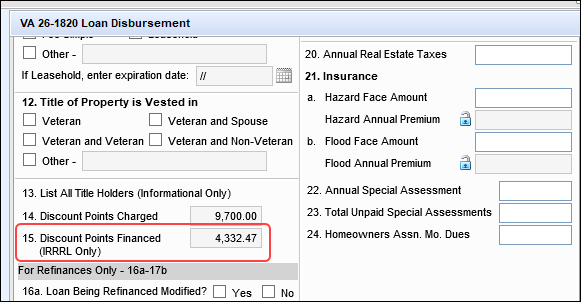
Encompass has been updated to accurately calculate the total discount points that a borrower is financing for VA IRRRL loans on the VA 26-1820 Loan Disbursement input form. Previously, the Discount Points Financed (for IRRRL Only) field on line 15 was calculated with field VARRRWS.X3 which calculates the principal amount to be refinanced (VARRRWS.X2) multiplied by the discount rate (VARRRWS.X9). Since field VARRRWS.X2 is derived from the existing loan and not the new loan, VARRRWS.X3 should not have been used for line 15 because line 15 represents the financed discount points amount based on the new loan.
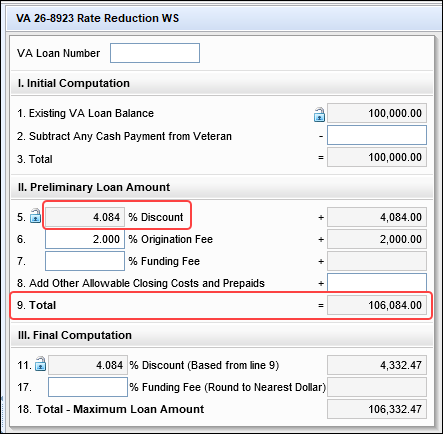
To ensure that the discount points financed amount also considers if the loan is a VA IRRRL, the Discount Points Financed (for IRRRL Only) field on line 15 is now field VARRRWS.X8. This field takes the discount percentage rate (VARRRWS.X9) and multiplies it by the value in VARRRWS.X7, which is derived from the new loan and is used specifically for VA IRRRL.
Field VARRRWS.X8:
Fields VARRRWS.X9 and VARRRWS.X7:
CBIZ-65794
Interest Rate Fields on the Verification of Additional Liabilities Updated to Retain Values Up to Three Decimals
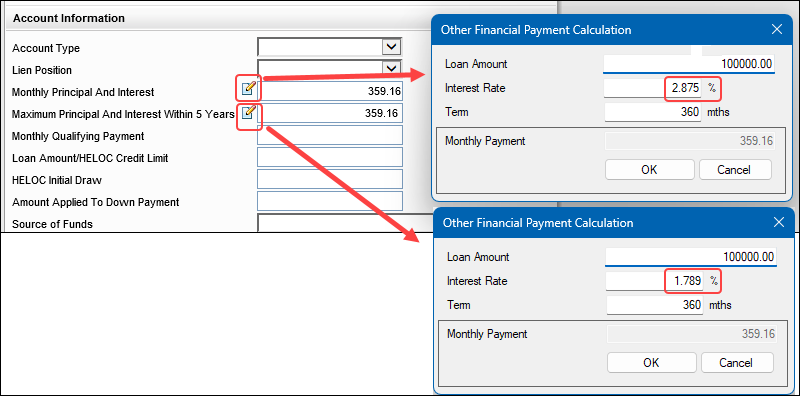
The Interest Rate field (URLARAL0026) in the Other Financial Payment Calculation pop-up window that is provided when you click the Edit icon for the Monthly Principal And Interest field (URLARAL0118) on the Verification of Additional Liabilities (VOAL) input form had an issue where users could type an Interest Rate value up to three decimals, but after closing the pop-up window and then reopening it later, the value would be rounded to two decimal points. For example, 2.875% would be rounded to 2.88%. This change caused the monthly payment in the pop-up window to recalculate, which resulted in an incorrect Monthly Principal and Interest payment on the VOAL.
The same rounding issue occurred with the Interest Rate field (URLARAL0029) in the Other Financial Payment Calculation pop-up window that is provided when you click the Edit icon for the Monthly Principal And Interest Within 5 Years field (URLARAL0118).
Both of these Interest Rate fields have been updated to retain the intended three decimal point value and no longer round to two decimal points. Note that Interest Rate values entered in these fields that are below three decimal points or above three decimal points are now rounded to three decimal points.
Update to Ensure a Range of Payments is Provided in Projected Payments Table for ARM Loans when There are Multiple Rate Changes in Years 1 - 6
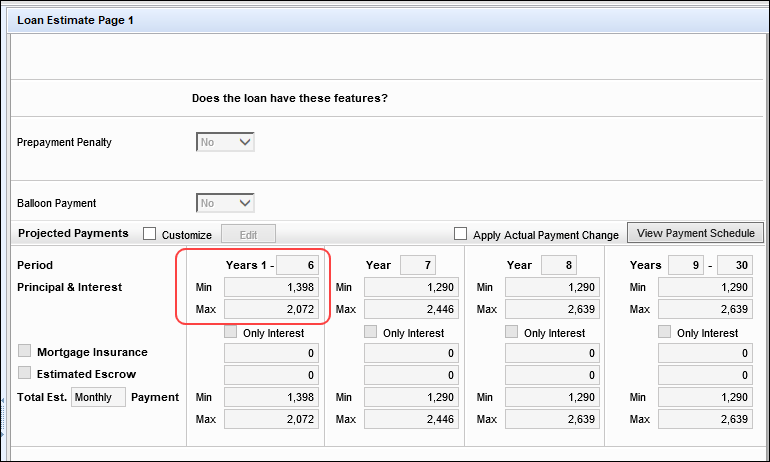
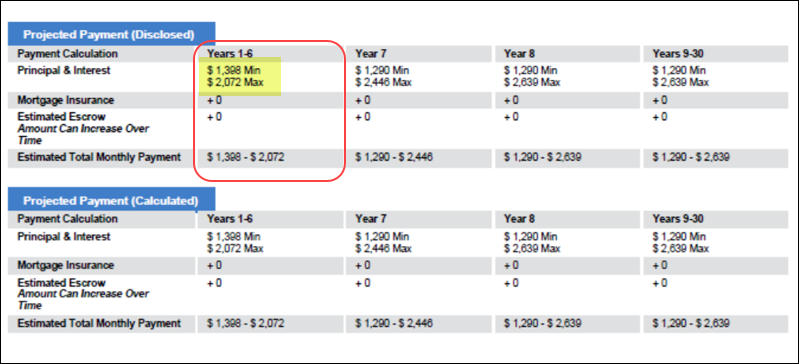
In loan scenarios when an ARM loan’s first adjustment period is over 1 (one) year and there are 2 (two) or more principal and interest (P&I) changes within the first column period, the minimum and maximum payments are now accurately reflected in the Mavent Compliance Reports and printed output forms where Projected Payments table is provided. Previously only one P&I payment was displayed for Years 1-6 in the reports and printed output forms.
For example, there's an ARM loan that has a 62-month initial fixed interest rate period with a subsequent 6-month change(s). This means after the initial rate change in month 62, the rate may change again in month 68. In this loan, the initial column of the Projected Payments Table covers Years 1-6 (5 years = 60 months and 6 years = 72 months). After the initial 62-month fixed rate period, the rate “may” change every six months thereafter until the lifetime rate limitation is reached. If multiple changes to periodic principal and interest payments result in more than one separate periodic payment or range of payments in a single year, § 1026.37(c)(1)(iii)(B) requires the creditor to disclose the range of payments that would apply during the year in which the events occur. Comment 37(c)(1)(iii)(B)-1. As a result, for the first column of the Projected Payments Table, Encompass now displays a minimum and maximum range of payments. (This update now ensures the Years 1 - 6 Projected Payments in Encompass match the payments returned by the Mavent Compliance Report.)
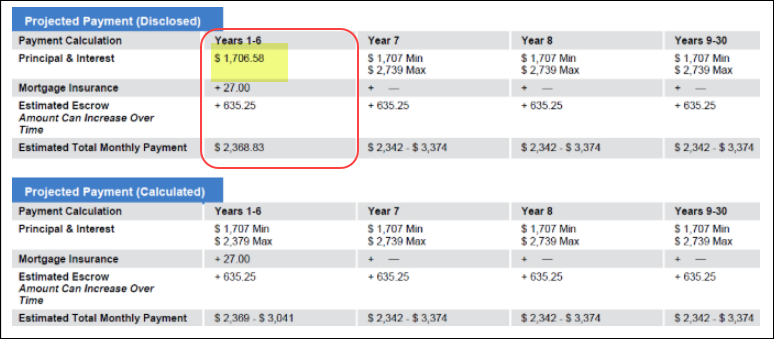
Prior to this fix, only one payment was displayed based on the Projected Payments table in Encompass. The Mavent report already correctly included the minimum and maximum payments accurately. (Please note, this sample table below is provided only to show the singular P&I payment that was previously provided in Encompass. This sample is from a different loan than the loan used in the samples above, which is why the amounts/values used here are different than amounts/values used in the samples above.)
Update to Address an Issue where the Good Faith Fee Variance Violated Alert was Cleared when it Should Not Have Been
In previous versions of Encompass, when a Good Faith Fee Variance Violated alert was triggered due to a user changing a disclosed transfer tax fee to a higher amount, Encompass allowed users to clear this alert by providing a Change of Circumstance (LE1.X81 or CD1.X61) with an 'Interest Rate Dependent Charges (Rate Lock)' reason. However, the alert should have remained active for the loan since Transfer Tax increases should only clear the alert when the Change of Circumstance reason is any of the following:
-
Changed Circumstance - Settlement Charges
-
Changed Circumstance - Eligibility
-
Revisions request by the Consumer
-
Expiration (Intent to Proceed received after 10 days)
-
Delayed Settlement on Construction Loans
Since the alert was cleared without a valid Change of Circumstance reason, the loan could be out of compliance since the user was not alerted or compelled to redisclose the fee change with a valid Change of Circumstance.
Starting in Encompass 25.4, when the Loan Estimate (LE) or Closing Disclosure (CD) with increased transfer taxes in the 0% category is disclosed with "Interest Rate Dependent Charges (Rate Lock)" as the only reason and the increase in transfer taxes is the only fee increase driving the increase in that category, the Good Faith Fee Variance Violated alert will not be cleared from the loan and the LE or CD baseline in the "Charges that cannot Increase" will not be updated with that disclosure information.
Buy Side Lock Request and Buy Side Lock and Pricing Columns on Secondary Lock Tool Now Updated When Validate Pricing Button Selected on Lock Comparison Tool
An issue occurred where the Buy Side Pricing and adjustments on the Secondary Lock Tool were not updated when a Loan Officer made changes to a loan and then clicked on the Validate Pricing button on the Lock Comparison Tool.
This issue occurred when Auto-Lock enabled.
This issue has been resolved. The Buy Side Lock Request and Buy Side Lock and Pricing columns are now updated when the Validate Pricing button is selected.
GSE Services & Integrations
For more GSE Integrations and Services 25.4 updates, see the GSE Release Notes.
Field Mapping Update for the CPA Project Assessment Request Identifier Field
In Encompass 25.1, Encompass was updated to automatically populate the value in the FRE Condominium Project Identifier field (CASASRN.X221) to the CPA Project Assessment Request Identifier field (ULDD.FRE.X1). However, it was determined that the FRE Condominium Project Identifier is the incorrect value to populate to the CPA Project Assessment Request Identifier field. Therefore, this field mapping logic has been rolled back and this auto-population of field CASASRN.X221's value to ULDD.FRE.X1 no longer occurs.
Per the ULDD Field Mapping Guide, ULDD.FRE.X1 is intended for the Project Assessment Results # from the Condo Project Advisor Feedback Certificate.
Encompass Document Management (EDM)
Updated Versions of RestSharp and Other DLL Files
When adding a large number of enhanced conditions (30+) at once to a loan file from the eFolder, it could take Encompass up to 60 seconds to complete this operation. Updates have been made in Encompass to reduce the time it takes to add a large number of enhanced conditions at once to a loan.
NICE-54228
Enhanced Conditions: Update to Address Issue with More Conditions Than Expected Being Added to the Conditions Tab
When working with enhanced conditions on the eFolder's Conditions tab, users can click the New icon to select and add one or more conditions from the Conditions list to add to the tab. An issue occurred in the Add Conditions: Conditions List pop-up window where users could filter the conditions displayed in the list (based on the condition name, condition type, category, etc.) and then select the checkbox to select all of the conditions listed in the filtered list intending to add these conditions to the Conditions tab, but instead of only these filtered conditions being added, all of the conditions available to add to the loan were added to the Conditions tab. This issue has been resolved and now only the conditions selected in the list displayed to the user are added to the Conditions tab as expected.
Internal and External Descriptions for Imported Enhanced Conditions Now Displaying on eFolder's Conditions Tab
After importing an enhanced condition from an integrated service provider in the Encompass web interface, the internal description and external description for the condition displayed correctly when viewing the Conditions page within the loan in the Encompass web interface, but they did not display at all when viewing the loan's conditions on the Conditions tab in the eFolder in the Encompass desktop interface. These descriptions for the imported conditions were also not displayed for administrators viewing the Conditions list in the Encompass Settings > eFolder Setup > Enhanced Conditions settings. The cause of this issue with the missing descriptions was addressed and this issue is now fixed. The descriptions for these imported enhanced conditions are now displayed as expected in the Internal Description and External Description columns for the condition on the eFolder's Conditions tab and on the Enhanced Conditions settings screen in the Encompass desktop interface.
Note that this issue only occurred for enhanced conditions that had been mapped to a Condition Template and the condition finding description had been appended to the internal or external description fields. (This mapping is performed on the Encompass web interface's Services Management > Condition Mapping page.)
Inadvertent Error Message Triggered when Sending eMail via Status Online has Been Addressed
Users in Encompass instances that use the Status Online tool to send loan status updates to borrowers or partners had an issue where, after sending the email message, an error message was triggered indicating that "One or more errors occurred. Do you wish to retry sending the email?" Even though the email was sent successfully, the error message caused confusion since it indicated that there were issues when sending it. This issue has been fixed. The error message is no longer inadvertently triggered and the email sent via the Status Online tool continues to be sent successfully.
Encompass Settings
Postponed: Update to Address Issue with the Encompass Password Policy
In previous versions of Encompass, the Force user to change password option and the password expiration policy in Encompass are not being honored in certain applications and users are permitted to log in with their expired Encompass password. The update to fix this issue was previously planned for the Encompass 25.4 release, but this update is now postponed until a future release. When this fix is eventually released, it may result in many users being blocked from logging into their application until they change their password as soon as their company upgrades to the newly released version of Encompass in Production environments. To help reduce the number of users who will be required to change their password when this fix is released, administrators can notify intended users now to proactively change their password prior to the Encompass release.
Additional communication about when this fix will be released will be provided soon.
Details and Impacted Users:
When the Encompass administrator selects the Force user to change password option on a user’s profile, or if the password has expired based on the Password Expiration policy (# of Days to Expiration option managed in Admin Tools > Server Settings Manager > Password), the next time the user attempts to log into an application they should be prevented from logging in until the password is changed. However, this setting is not being enforced for Encompass users logging into the following applications with their expired Encompass password:
-
Encompass web interface
-
Encompass Consumer Connect Admin portal
-
Encompass Data Connect
-
Encompass TPO Connect website
-
Encompass TPO Connect Admin Portal
-
Encompass Developer Connect API (OAuth Token response)
-
Encompass Developer Connect Portal (API Keys, SSO Setup, MFA setup)
-
Insights
-
ICE Mortgage Technology Resource Center (Login with Encompass via Access Login)
-
Marketplace (login with Encompass via Access Login)
In addition, the password expired policy is also not being enforced for external TPO users logging into their assigned TPO Connect websites. If the administrator reset the TPO user password, or if the password had expired based on the Password Expiration policy (# of Days to Expiration managed in Admin Tools > Server Settings Manager > Password), the TPO user is still able to log in with their temporary or expired password.
When the Encompass update to fix this issue is eventually released, if the user’s password has expired or if the Force user to change password option has been selected on their user profile, the user will be prevented from logging into the applications listed above until their password is changed. The users will be required to change their password by logging into the Encompass desktop interface and then following the steps in the resulting change password pop-up notification. They may also contact their Encompass system administrator for assistance.
External TPO users will also receive a change password pop-up notification when they try to log into their TPO Connect website. They must follow the steps in the notification to change their password.
Again, to help reduce the number of users who will be required to change their password when this fix is released, administrators can notify intended users now to proactively change their password prior to the Encompass release with this fix.
Please note, this issue does not impact Encompass desktop interface users, nor users who are signing in with their company SSO.
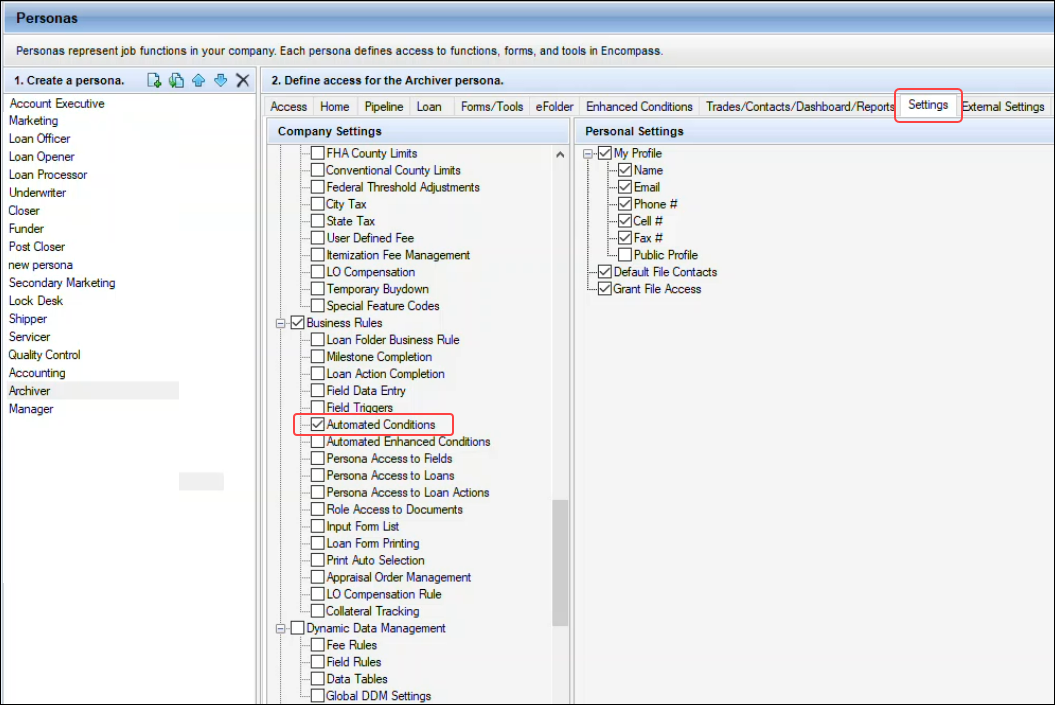
Business Rules > Automated Conditions Checkbox in Personas Settings Now Remains Selected When Changes are Saved
On the Encompass Settings > Company/User Setup > Personas settings, when administrators selected the Settings tab in the Personas setting, and then selected the Business Rules > Automated Conditions checkbox option, the checkbox remained selected for the currently selected persona, but then also displayed as selected when the user navigated to other personas (even if this option had not previously been selected for the other personas). In addition, after clicking the Save icon to save the changes to the Personas settings, the Automated Conditions checkbox would be cleared for all the personas, including the original persona where the administrator had selected it. These issues have been fixed and now the Automated Conditions checkbox remains selected for the intended persona when the Save icon is clicked and other personas are not impacted when this option is selected for a persona.
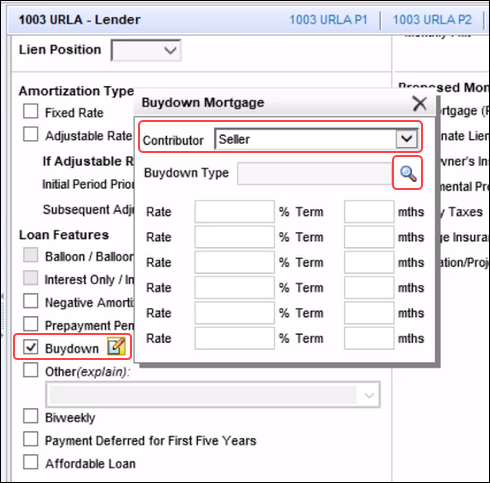
Buydown Mortgage Lookup Icon Fix
An issue occurred with the Buydown field (425) on the 1003 URLA - Lender input form and Field Triggers business rules. In scenarios where a Field Triggers business rule is configured to populate a value (such as 'Seller') to the Contributor field (CASASRN.X141) for the buydown mortgage when the Buydown checkbox (425) was selected, the Lookup [magnifying glass] icon for the Buydown Type (4645) was not working. Users could click the icon, but the expected pop-up window where users can select the buydown type to use for the loan was not displayed. (Users access this icon by clicking the Buydown checkbox's Edit icon to open the Buydown Mortgage pop-up window.)
This issue is now fixed, and the Lookup (magnifying glass) icon is now working as expected in this scenario.
Trade Management
Export Icon on Bid Tape Detail Page Now Functions Properly
An issue occurred where the .csv file was blank when a Bid Tape’s details were exported using the Export icon on the Bid Tape Detail page. This issue has been resolved. The Bid Tape’s details displayed on the Bid Tape Detail page are now exported into a .csv file when the Export icon is clicked.
Encompass Input Form Builder
Issue Resolved: Object reference not set to an instance of an object Error Triggered when Importing Custom Input Form Package
An issue occurred for administrators in the Encompass Input Form Builder where when they attempted to import a custom input form package with the Package Import Wizard, they received an Import failed: Unexpected server error: Object reference not set to an instance of an object error and the import failed. It was determined that this error occurred when attempting to import a document package that contained editable dropdown lists without any enumerations. This issue has been fixed and these types of custom form packages can now be imported successfully.
Encompass Developer Connect APIs
Transitioning from Encompass SDK to Developer Connect APIs
ICE will be transitioning from legacy Encompass SDK (Software Development Kit) integrations. This enables our clients, partners and ICE to continue to innovate and automate by eliminating legacy integrations and focusing on modern technology. For more details and transition timelines, visit the official Encompass SDK Transition page.
-
Standalone SDK modules (transition to Developer Connect APIs)
-
SDK loan plugins (migrate to SSF framework and NG plugin framework)
For more information, refer to the Encompass SDK Transition page.
APIs for the most common SDK functions and native Encompass functionality will eliminate the need for many legacy SDK use cases. Encompass APIs are interoperable across web and desktop, as both user interfaces sit on top of the same underlying Encompass loan file. Alternatives to SDK functionality are available with more coming. There may not be 100% parity, but we will provide the most common functions and alternatives. For more information, refer to the Transitioning from SDKs and Legacy Integrations - FAQs.
Here is a list of the known Plugin issues that have been addressed or are targeted for to be fixed in upcoming Encompass releases.
| Known Issue | Encompass Release for Fix |
|---|---|
| Plugins 2.0: getfield() of custom field of format 'Y/N' returns different values in desktop and web (NICE-53298) | 25.4 |
| Plugins 2.0: SSF getField() method must match case of custom field name or error is returned (ENCW-122154) | 26.1 (Targeted) |
| Plugin Milestone Completed Event add Milestone data to payload (ENCW-121331) | 26.1 (Targeted) |
Update to Enable Interim Servicing Fields to be Updated via V1 APIs
When attempting to perform an update to some Interim Servicing fields by executing a PATCH V1 API from Encompass Developer Connect, users received the following error and the fields did not update:
Unable to write to the read-only InterimServicing entity
The same update was successful when using the V3 API, but the V1 API was not working successfully because all of the Interim Servicing fields were read-only for the V1 APIs. The Interim Servicing fields have been updated so that they can be updated via V1 APIs (for example, Interim Servicing Servicer Loan Number (SERVICE.X108), Interim Servicing Sub-Servicer (SERVICE.X110), and Interim Servicing Sub-Servicer Loan Number (SERVICE.X111)), except for the following fields which have remained as read-only:
| Loan.InterimServicing.NextPaymentTotalAmountDue (SERVICE.X24) | Loan.InterimServicing.TotalAdditionalEscrow (SERVICE.X53) | Loan.InterimServicing.LastPaymentBuydownSubsidyAmount (SERVICE.X101) |
| Loan.InterimServicing.NextPaymentTotalAmountWithLateFee (SERVICE.X26) | Loan.InterimServicing.TotalAdditionalEscrowYearToDate (SERVICE.X54) | Loan.InterimServicing.TotalBuydownSubsidyAmount (SERVICE.X102) |
| Loan.InterimServicing.LastPaymentGuid (SERVICE.LASTGUID) | Loan.InterimServicing.TotalPaymentCollected (SERVICE.X55) | Loan.InterimServicing.TotalBuydownSubsidyAmountYearToDate (SERVICE.X103) |
| Loan.InterimServicing.LastPaymentNumber (SERVICE.X30) | Loan.InterimServicing.TotalPaymentCollectedYearToDate (SERVICE.X56) | Loan.InterimServicing.UnpaidBuydownSubsidyAmount (SERVICE.X104) |
| Loan.InterimServicing.LastPaymentStatementDate (SERVICE.X31) | Loan.InterimServicing.CurrentPrincipalBalance (SERVICE.X57) | Loan.InterimServicing.TotalUsdaMonthlyPremium (SERVICE.X107) |
| Loan.InterimServicing.LastPaymentReceivedDate (SERVICE.X32) | Loan.InterimServicing.NumberOfDisbursement (SERVICE.X74) | Loan.InterimServicing.LastPaymentEscrowTax (SERVICE.X121) |
| Loan.InterimServicing.LastPaymentTotalAmountReceived (SERVICE.X33) | Loan.InterimServicing.TotalTaxes (SERVICE.X75) | Loan.InterimServicing.LastPaymentEscrowHazardInsurance (SERVICE.X122) |
| Loan.InterimServicing.LastPaymentPrincipal (SERVICE.X34) | Loan.InterimServicing.TotalHazardInsurance (SERVICE.X76) | Loan.InterimServicing.LastPaymentEscrowMortgageInsurance (SERVICE.X123) |
| Loan.InterimServicing.LastPaymentInterest (SERVICE.X35) | Loan.InterimServicing.TotalMortgageInsurance (SERVICE.X77) | Loan.InterimServicing.LastPaymentEscrowFloodInsurance (SERVICE.X124) |
| Loan.InterimServicing.LastPaymentEscrowAmount (SERVICE.X36) | Loan.InterimServicing.TotalOtherTaxes (SERVICE.X79) | Loan.InterimServicing.LastPaymentEscrowCityPropertyTax (SERVICE.X125) |
| Loan.InterimServicing.LastPaymentLateFee (SERVICE.X37) | Loan.InterimServicing.TotalAmountDisbursed (SERVICE.X80) | Loan.InterimServicing.LastPaymentEscrowOther1 (SERVICE.X126) |
| Loan.InterimServicing.LastPaymentAdditionalPrincipal (SERVICE.X38) | Loan.InterimServicing.EscrowBalance (SERVICE.X81) | Loan.InterimServicing.LastPaymentEscrowOther2 (SERVICE.X127) |
| Loan.InterimServicing.TotalNumberOfPayment (SERVICE.X39) | Loan.InterimServicing.NextPaymentPrincipalAndInterest (SERVICE.X82) | Loan.InterimServicing.LastPaymentEscrowOther3 (SERVICE.X128) |
| Loan.InterimServicing.TotalNumberOfLatePayment (SERVICE.X40) | Loan.InterimServicing.LastPaymentPrincipalAndInterest (SERVICE.X83) | Loan.InterimServicing.LastPaymentEscrowUSDAMonthlyPremium (SERVICE.X129) |
| Loan.InterimServicing.TotalPrincipal (SERVICE.X41) | Loan.InterimServicing.LastPaymentMiscFee (SERVICE.X85) | Loan.InterimServicing.UnpaidEscrowTax (SERVICE.X130) |
| Loan.InterimServicing.TotalPrincipalYearToDate (SERVICE.X42) | Loan.InterimServicing.LastPaymentAdditionalEscrow (SERVICE.X86) | Loan.InterimServicing.UnpaidEscrowMortgageInsurance (SERVICE.X131) |
| Loan.InterimServicing.TotalInterest (SERVICE.X43) | Loan.InterimServicing.TotalMiscFee (SERVICE.X87) | Loan.InterimServicing.UnpaidEscrowHazardInsurance (SERVICE.X132) |
| Loan.InterimServicing.TotalInterestYearToDate (SERVICE.X44) | Loan.InterimServicing.TotalMiscFeeYearToDate (SERVICE.X88) | Loan.InterimServicing.UnpaidEscrowFloodInsurance (SERVICE.X133) |
| Loan.InterimServicing.TotalPAndI (SERVICE.X45) | Loan.InterimServicing.FloodInsurance (SERVICE.X89) | Loan.InterimServicing.UnpaidEscrowCityPropertyTax (SERVICE.X134) |
| Loan.InterimServicing.TotalPAndIYearToDate (SERVICE.X46) | Loan.InterimServicing.CityInsurance (SERVICE.X90) | Loan.InterimServicing.UnpaidEscrowOther1 (SERVICE.X135) |
| Loan.InterimServicing.TotalEscrow (SERVICE.X47) | Loan.InterimServicing.UnpaidPrincipal (SERVICE.X91) | Loan.InterimServicing.UnpaidEscrowOther2 (SERVICE.X136) |
| Loan.InterimServicing.TotalEscrowYearToDate (SERVICE.X48) | Loan.InterimServicing.UnpaidInterest (SERVICE.X92) | Loan.InterimServicing.UnpaidEscrowOther3 (SERVICE.X137) |
| Loan.InterimServicing.TotalLateFee (SERVICE.X49) | Loan.InterimServicing.UnpaidEscrow (SERVICE.X93) | Loan.InterimServicing.UnpaidEscrowUSDAMonthlyPremium (SERVICE.X138) |
| Loan.InterimServicing.TotalLateFeeYearToDate (SERVICE.X50) | Loan.InterimServicing.UnpaidMiscrFee (SERVICE.X94) | Loan.InterimServicing.CalcTriggered (SERVICE.X999) |
| Loan.InterimServicing.TotalAdditionalPrincipal (SERVICE.X51) | Loan.InterimServicing.UnpaidLateFee (SERVICE.X95) | Loan.InterimServicing.Comments (SERVICE.Comments) |
| Loan.InterimServicing.TotalAdditionalPrincipalYearToDate (SERVICE.X52) | Loan.InterimServicing.NextPaymentPaymentIndexDate (SERVICE.X99) |
Fixed Issues for Version 25.4.0.1 Server Patch 1
This update contains an update to users' Encompass client machines (25.4.0.1) and a Server Patch (server patch 1) that is applied to the Encompass server. The fixed issues below are included in this update.
In Encompass, go to Help > About Encompass in the menu bar to view your Encompass version. Once the upgrade is complete, your new version number will be 25.4.0.1 Server Patch 1.
The Encompass SDK has been repackaged with this 25.4.0.1 Server Patch 1 update. If you are utilizing the Encompass SDK, upgrading to this new package is needed to ensure that your SDK has the same functionality as this latest version of Encompass. Visit the Encompass SDK and Other Install Files page to access the latest download links to
Update to the Encompass Server (server patch 1)
Below is the update in the Server Patch (server patch 1) that is applied to the Encompass Server. The Server Patch contains the relevant Encompass code that applies to the following fixed issue. The Server Patch included with this release will be applied to the Encompass Server automatically and cannot be controlled manually via the Encompass Version Manager tool.
Update to Address Issue with Encompass Home Page
Some users experienced issues with the Encompass Home page not loading upon log in. This issue has been addressed and fixed. The Home page is now loading correctly for these users.
Update to the Client Machines (25.4.0.1)
Below are the updates which will be applied to users' Encompass client machines (25.4.0.1). The client-side update can be controlled manually via the Encompass Version Manager tool. If the tool has been configured to always apply new releases to users’ computers automatically, users will receive this update upon their initial log in of Encompass following the release.
Various eFolder Issues Resolved
In this release, there are several eFolder-related issues being addressed. These issues were impacting some eFolder users, but not all, based on the status of the Document Conversion eFolder setting (not enabled) and the old version of the document viewer being used. The following fixes are being provided:
-
In loans where there are a large number of files inside a document folder in the File Manager, the thumbnails of each page in the attached files and the currently selected file are now loading and displaying correctly in the file viewing panel. Previously these items took a very long time to load and display.
-
When viewing files in the File Manager, the thumbnails of each page in the selected file(s) were displaying as Legal-sized pages (8.5” x 14”) instead of the actual size of the pages in selected files (Letter-sized, 8.5” x 11”). This issue has been fixed.
-
Users attempting view files in the File Manager, by selecting a file in the Unassigned panel or Documents panel, or a thumbnail image, were sporadically receiving various Application Error messages, including Sequence contains no matching element. These issues have been fixed and the error messages are no longer triggered.
-
When attempting to manage file attachments(printing, uploading, opening, etc.) in the eFolder’s Document Details window, File Manager, and other areas of the eFolder, some users sporadically received Application Errors, such as Object reference not set to an instance of an object. The cause of these errors was identified and resolved.
-
In certain scenarios, when using the Send button in the eFolder to send multiple documents in one package to a recipient, a 409 Conflict error was triggered, followed by another message indicating the package creation had failed when attempting to send the package again. This issue has been fixed and the document package can now be created and sent successfully.
-
Internal and public notes added to files in the eFolder are now displayed in the correct color. Internal notes are yellow, while public notes are green.
DOCP-83819, DOCP-83117, DOCP-83423, DOCP-83609, DOCP-82764, DOCP-81495, DOCP-83363
| Next Section: Change Log | 
|
|

|
Previous Section: Feature Enhancements |