Feature Enhancements in Version 26.2 July Service Pack
This section discusses the updates and enhancements to existing forms, features, services, or settings that are provided in this release.
Updates to Attribution Categories
 New Optional Parameters Added to Rule Tasks
Two new optional parameters, Paid By and Adjustment Reason, have been added to the following Rule Tasks on the Rule Definition.
-
Adjust Final Price
-
Adjust Final Price by Rate
-
Adjust Rate
-
Deduct a Profit Margin
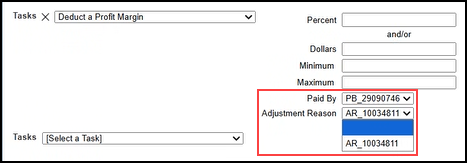
Behavior:
-
The Descriptions for Price Adjustments created using these Rule Tasks will be prepended with “[Paid By Abbreviation]-[Adjustment Reason Abbreviation]”.
-
If no values are available for Paid By and/or Adjustment Reason, the respective parameter(s) will not be displayed on the Rule Definition.
New Optional Columns Added to Custom Field Definition
Two new optional columns, Paid By and Adjustment Reason, have been added to the Custom Field Definitions.
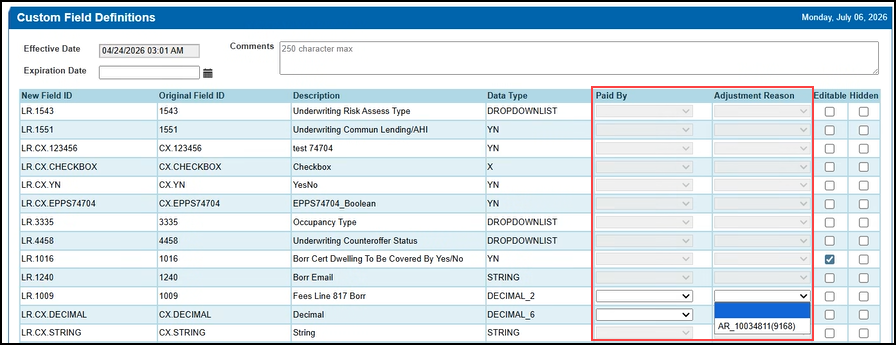
Behavior:
-
The dropdown options consist of a Name and Abbreviation in parentheses.
-
The two columns are only available to the Data Types of “INTEGER”, “DECIMAL”, and “DECIMAL_n” where “n” equals 1, 2, 3, 4, 5, 6, 7, 10.
-
When either column is populated, the Editable and Hidden checkboxes are disabled. The Hidden checkbox is selected and the Editable checkbox is cleared, if selected.
Updates to ICE PPE
"ICE PPE" refers to the new User experience (introduced as part of the 24.2 release) using the Encompass Partner Connect (EPC) interface.
New DTI Column Added to Results Page
A new DTI column has been added to the Results page. This enables you to easily confirm the DTI for individual programs.
The DTI will display as a dash in the column if no income check setting is enabled.

New Standard Products “Info” Icon Added to Simple Search Section of Results Page
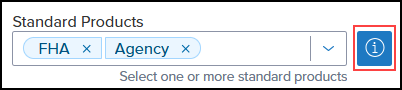
A new Info icon has been added next to the Standard Products field in the Simple Search section of the Results page. The icon will be displayed if the system detects a potential conflict with Up-Front Government fee factors.
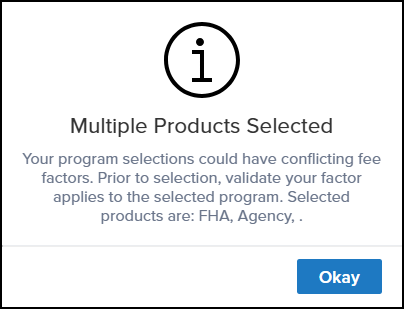
When the icon is selected, a message is displayed warning that multiple products are selected with a potential conflict with their fee factors.
New Non-QM Related Fields Added to Simple Search Section of Results Page
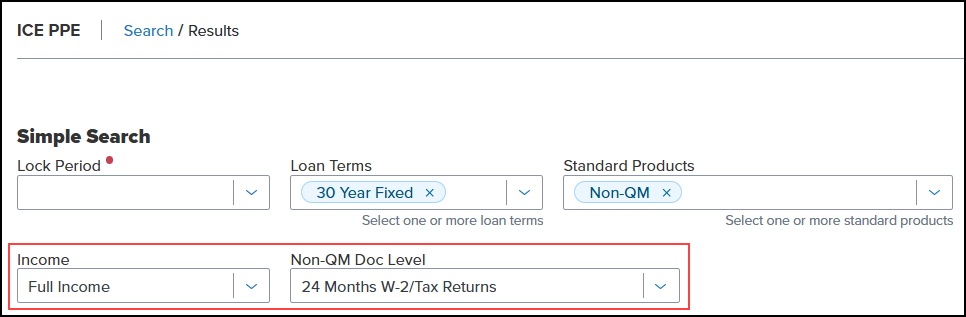
Three new fields, Income, Non-QM Doc Level, and DSCR, have been added to the Simple Search section of the Results page. This enables you to easily search for Non-QM programs without leaving the page.
-
The fields will be displayed when “Non-QM” is selected as the Standard Product.
-
The Non-QM Doc Level field will be displayed when “Full Income” or “Alternative Income” is selected in the Income field.
-
The DSCR field will be displayed when “No Income” is selected in the Income field.
Non-QM Doc Level Now Retained on Buy Side Pricing and Lock Updates
You can now see the Non-QM Doc Level value that was used when the loan was originally priced. This value now carries over and is displayed on the Search page during Buy Side Pricing and Lock Updates, so the doc level used to price the loan is not lost as the loan moves through the Lock process.
Comments Added During Float Now Displayed on Lock Request Form
The Comments (field ID 2214) field on the Lock Request Form has been updated to display comments added during a Float.
Behavior:
-
If the comments are modified from one Float to another Float, the newest comments will be displayed on the Lock Request Form.
-
If a null comment is sent after a Float with comments, the Comments field will be null.
Updates to ICE PPE and Classic EPPS
"Classic EPPS" refers to the User interface for pricing loans, Administration, and the integration that preceded ICE PPE (introduced as part of the 24.2 release).
Improved Bankruptcy Mapping for Qualification
Qualification now accounts for the Bankruptcy Status (field ID 2570) when determining bankruptcy mapping. Previously, ICE PPE relied solely on the Open Bankruptcy (field ID 2568) and Date of Bankruptcy (field ID 2340) fields, which did not always reflect the most current bankruptcy information.
If Open Bankruptcy is not set to "None" but a Bankruptcy Status is present, ICE PPE now treats Open Bankruptcy as "None" for qualification purposes only; the Encompass values themselves are not changed. This ensures loans are qualified using the most current bankruptcy information. All other bankruptcy mapping logic remains the same.
Updates to ICE PPE
This section refers to the Admin section of ICE PPE.
New Auto Set Values Added to Conditions Tab on ICE PPE - Search Page Customization
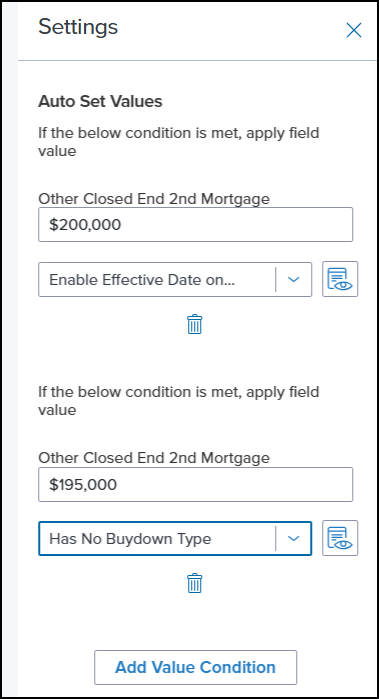
A new Auto Set Values condition has been added to the Conditions tab on the ICE PPE - Search Page Customization setting. When configured, the condition will prepopulate a field with a value when the rule is met.
-
Currently, dates are not supported.
-
A field can accept more than one Auto Set rule.
-
If there is more than one rule updating a field, the last configured condition in the configuration will take priority over all other changes.
Updated Behavior of Updated Lock Request Fields Setting When “Summary Document on Quote Requests” Option Disabled
The behavior of the Updated Lock Request Fields setting has been updated when the Summary Document on Quote Requests option is disabled (not selected).
When the option is disabled:
-
A non-null pricing ID is generated corresponding to the selected pricing option.
-
A summary quote (pricing document) is not generated.
Price Adjustment Per Day Field on Lock Extension Policy Definition Now Supports Zero
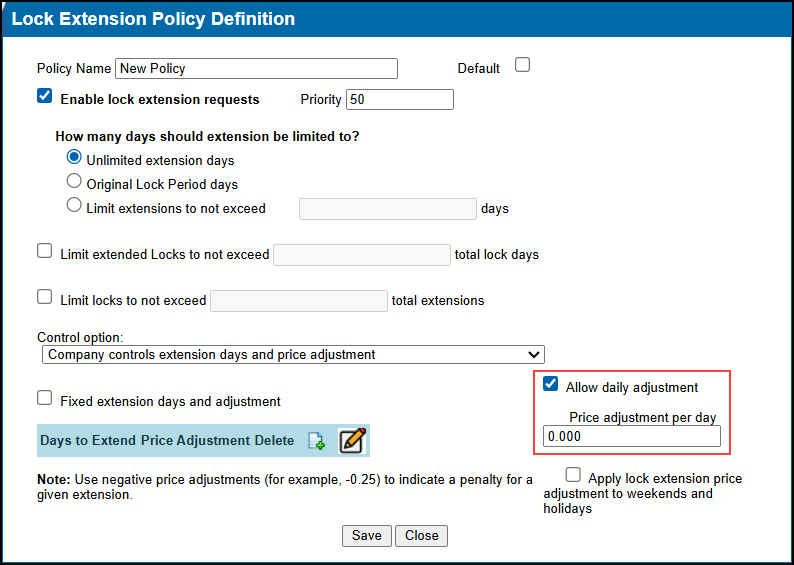
The Price Adjustment Per Day field on the Lock Extension Policy Definition has been updated to accept “0” as a valid value, allowing lock extension policies to be configured with no daily cost.
Updated Default Configuration for Loan Officer Field in Custom Search Page Setting
The default configuration for the Loan Officer field in the Custom Search Page setting has been updated with the following conditions:
-
Visibility - Visible with “No Rule”
-
Disability - Disabled unless the user has the “User Rights: Can Set Loan Officer” permission
Renamed “Channel” Rule Condition to “TPO Channel”
The Channel Rule Condition (CPM and Client) has been renamed to TPO Channel.
Updated Status Center Button on Investor Dashboard
The URL mapped to the Status Center button on the Investor Dashboard has been updated. While the URL has changed to https://www.ice.com/status, the button continues to direct users to the ICE Status Center.
“Prepay Penalty Term” Rule Condition No Longer Displays Deleted Terms
The Prepay Penalty Term Rule Condition (CPM and Client) has been updated to no longer list deleted terms in the Select Prepay Term dropdown list.
New “Apply LO Compensation” Action Added to CPM and Client Matrix Definitions
A new Apply LO Compensation Action has been added to the CPM and Client Matrix Definitions.
This feature was originally a part of the ICE PPE 26.1 May Service Pack 1 but was subsequently rolled back. It is now being reintroduced in this release.
When the Apply LO Compensation Action is selected, grid cells accept a comma-delimited set of exactly four values:
| Parameter | Accepted Values |
|---|---|
| BPS | Floating numbers or NULL |
| Dollars | Floating numbers or NULL |
| Min | Floating numbers or NULL |
| Max | Floating numbers or NULL |
Validations:
-
The validation is “Four parameters are required in each cell.”.
-
Cells can be empty/blank.
| Next Section: Fixed Issues | 
|
|

|
Previous Section: Introduction |