Feature Enhancements in Version 26.1 May Service Pack 1
This section discusses the updates and enhancements to existing forms, features, services, or settings that are provided in this release.
Update to Price Analyzer and Compare Rates Modal
 Price Analyzer and Compare Rates Modal Updates to Display Fees in Red
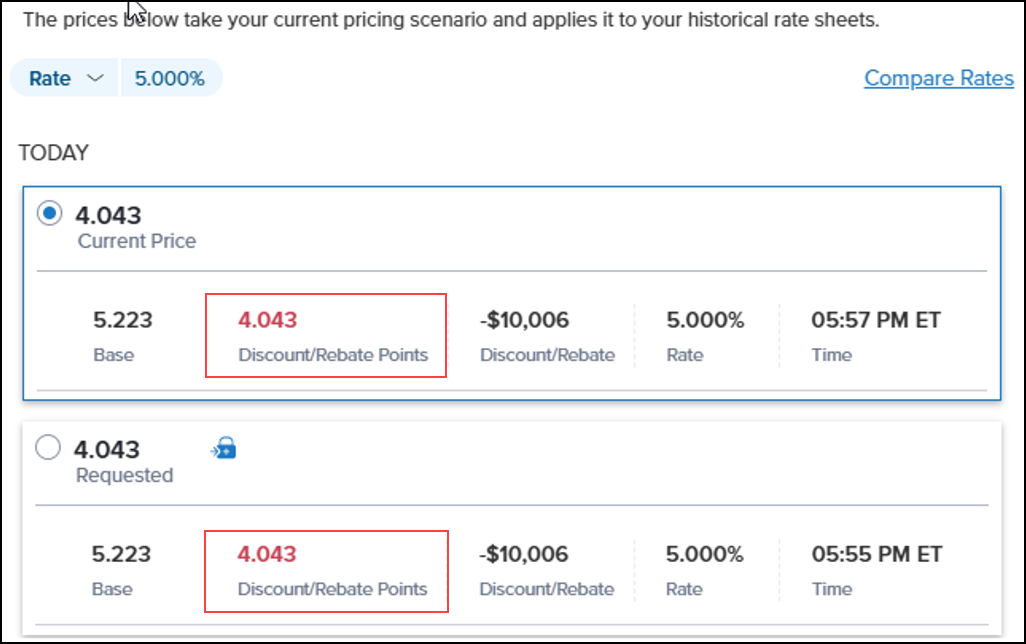
The Price Analyzer and Compare Rates modal have been updated to display fees in red to make them easier to identify.
-
For 100 base, negative values will be displayed in red text.
-
For 0 base, positive values will be displayed in red text.
Updates to ICE PPE Scenarios in Encompass TPO Connect
New “Select a Channel” Modal Displayed When Accessing Scenarios
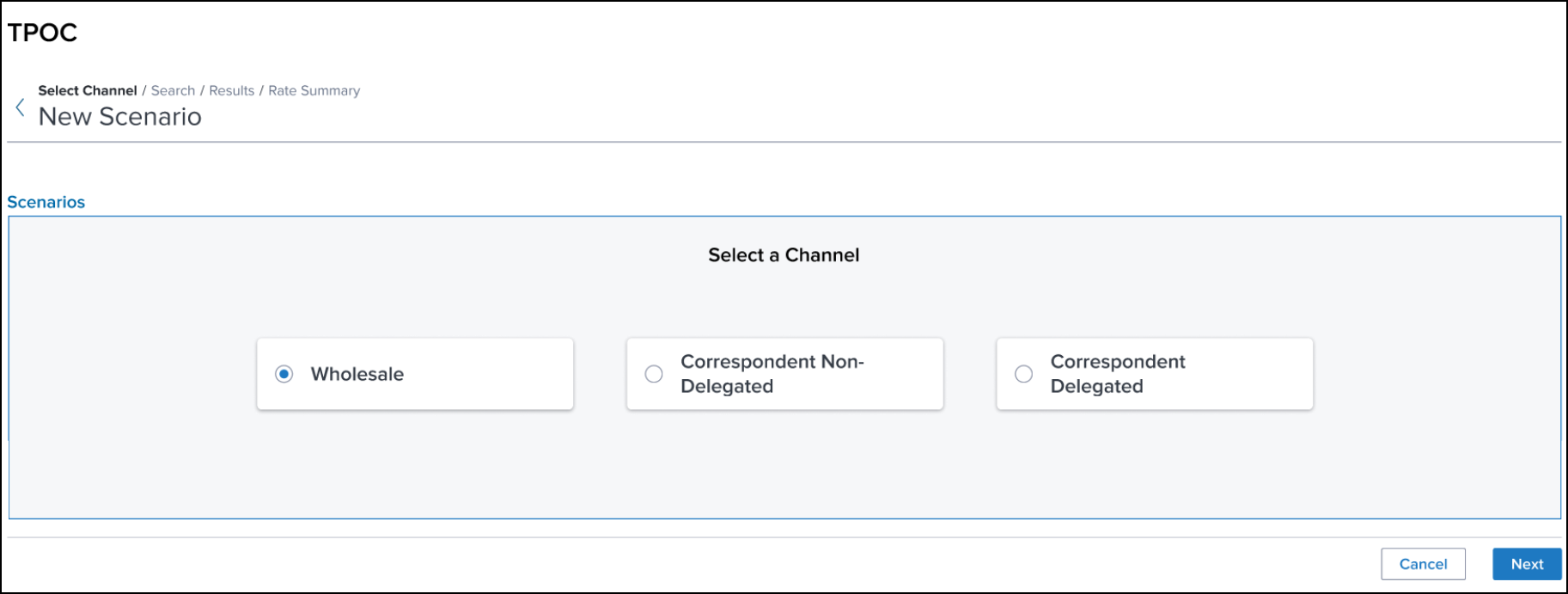
When a user selects Scenarios from Encompass TPO Connect (TPO Connect), a new Select a Channel modal will be displayed. The user will need to select the channel in which they want to price the loan.
-
The channel selections displayed in the modal will be based on the channels configured for the TPO Connect instance.
-
If only one channel is configured for the TPO Connect instance, the modal will be skipped and the user will be immediately directed to the Search page.
Scenarios Page Updates
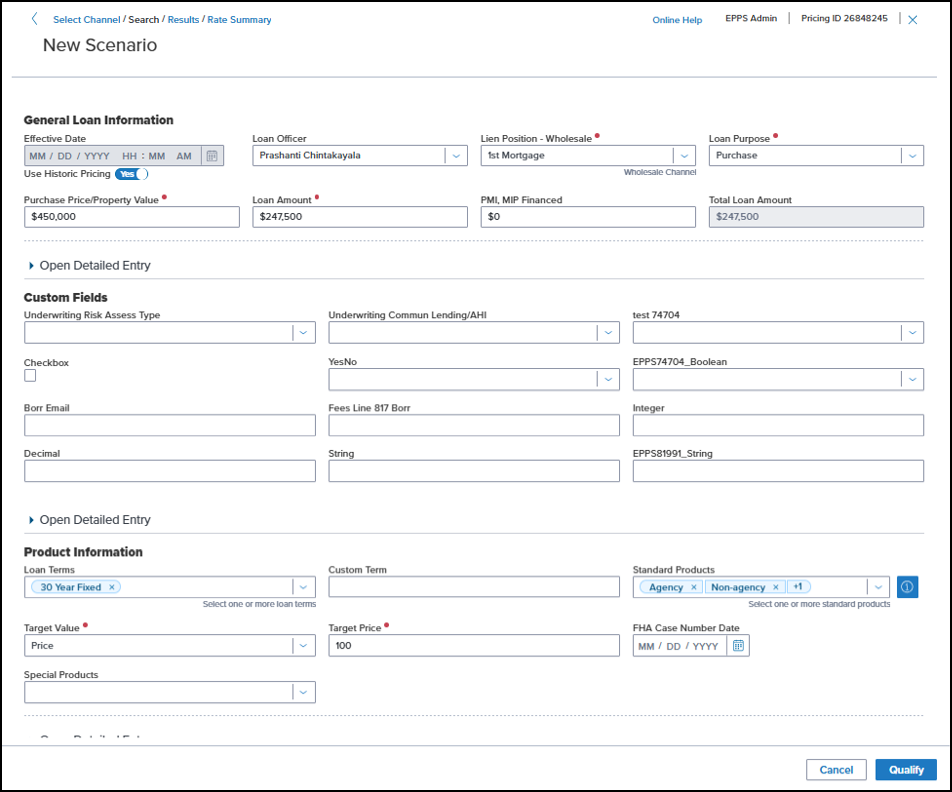
The TPO Connect Scenarios page has been updated to enable TPO Connect users to use ICE PPE Custom Search pages.
-
Based on how the Custom Search Page setting is configured in ICE PPE and the channel selected in the Select a Channel modal, your TPO Connect users can take advantage of a Search page optimized for that channel.
-
The User ID, Online Help link, and Pricing ID will be displayed on all Scenario pages so the data and link are easily accessible to TPO Connect users.
New Scenario Results Page
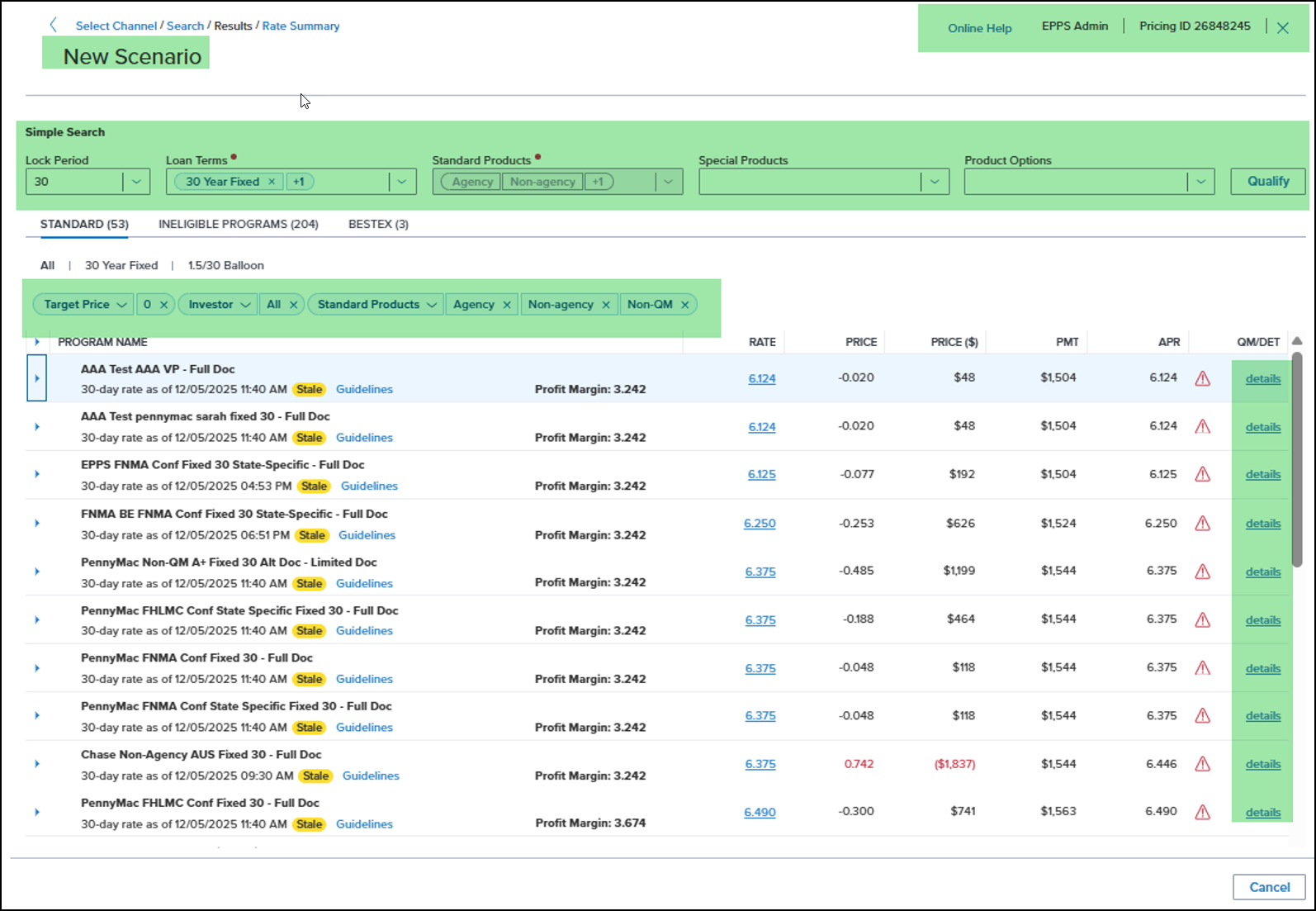
A new Scenario Results page has been added to enable TPO Connect users to select the program and pricing that will be submitted for their rate lock request.
-
Simple Search - A Simple Search bar is displayed at the top of the page to allow a user to change the Lock Period, Loan Terms, Standard Products, Special Products, and Product Options without returning to the Search page. In addition, a user can re-qualify the loan from this page.
-
Standard tab - This tab displays a list of eligible products, rates, and prices grouped by investor loan program. The product with the best pricing at the selected rate will be displayed in expanded mode at the top of the list.
- The sub-tabs organize the data by each Loan Term selected in qualifications. The “All” tab will display the data of all Loan Terms in a single view.
- The filters enable a user to modify their results based on Target Rate or Price, Investor and Standard Products, and whether to display flagged programs.
- If the guideline links are enabled, selecting a link opens a modal with the AllRegs Market Clarity content.
- Select the Arrow icon on the left margin to open an expanded view of the program. A Flag icon will be displayed next to a product name if the product does not match one of the product options selected on the Search page.
- The Rate links select the chosen rate and program and opens the Summary page.
- The details link opens the Pricing Details modal and provides details for the product.
-
Ineligible Programs tab - This tab displays a list of ineligible products, rates, and prices grouped by investor loan program.
-
Best Ex tab - This tab displays a list of eligible rates and prices grouped by Standard Product, Special Product, Loan Term, and Product Option categories.
New Scenario Rate Summary Page
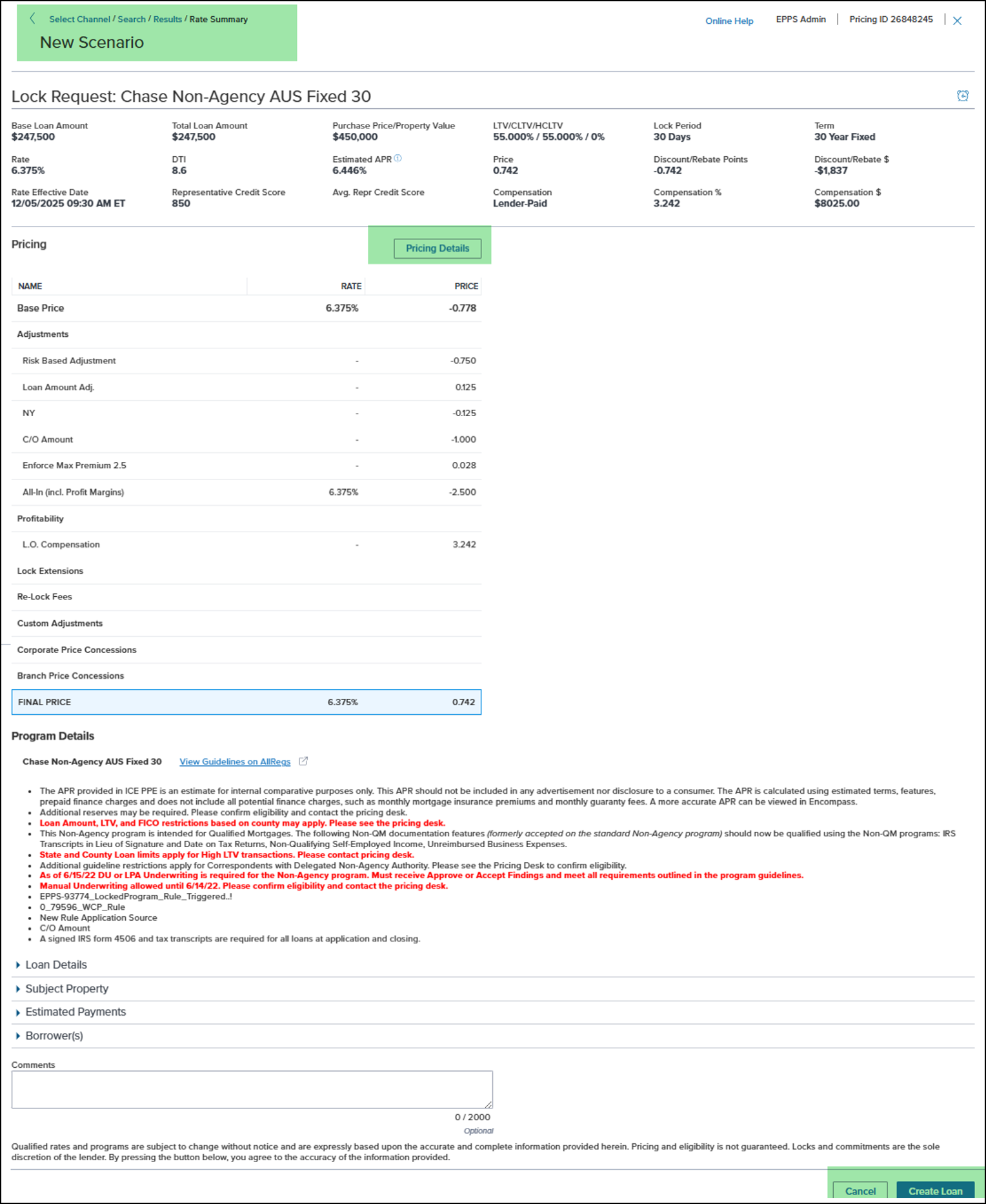
A new Scenario Rate Summary page has been added which summarizes the key details of your lock request at the top of the page. The Pricing and Program details are displayed in the middle of the page. The arrows at the bottom of the page provide additional information for categories including Loan Details, Subject Property, Estimated Payments, and Borrowers.
-
Select the Pricing Details button to display adjusted and raw pricing grids for your selected program. Your choice is highlighted in grid.
-
Select the Alarm Clock icon at the top of the page or the Rate Alert button at the bottom of the page to open the Rate Alert modal and set a Rate Alert.
-
To set a Rate Alert, complete the information in the modal and then select the Create button.
-
Select the Create Loan button to send the pricing data to TPO Connect to create a new loan.
Update to Prepayment Penalty Term
New “PPPTerm” Expression Added to Condition and Matrix Definitions
A new PPPTerm expression has been added to the Condition Definition in Custom Program Management (CPM) and the CPM and Client Matrix (Matrix and Rate Matrix) Definitions. This expression will present a user with a multi-select list of prepayment penalty terms.
Update to ICE PPE
"ICE PPE" refers to the new User experience (introduced as part of the 24.2 release) using the Encompass Partner Connect (EPC) interface.
Non-QM Doc Level Field Pre-Populated on Results Page When “Non-QM” Selected as Standard Product on General Tab
The Non-QM Doc Level field will be pre-populated on the Results page when “Non-QM” is selected as a Standard Product on the General tab.
-
If “Full Income”, the field will be pre-populated with “24 Months W-2/Tax Returns” (Default).
-
If “Alternative Income” (formerly Limited Income), the field will be pre-populated with “24 Months Personal Bank Statements” (Default).
Updates to the ICE PPE Portal
New Conditions Added to Rule Definition
Updated on 5/11/2026
Two new conditions have been added to the Rule Definition.
-
Non-QM Doc Level - This condition is the non-QM doc level selected for the loan.
-
Non-Occupant Co-Borrower - This condition is “True” when the co-borrower’s declaration indicates they are not occupying the property (Encompass field 1343 is “No”).
New “Reset Lock Date if Current Market is Applied” Setting Added to Worst Case Pricing Policy Page Under Settings
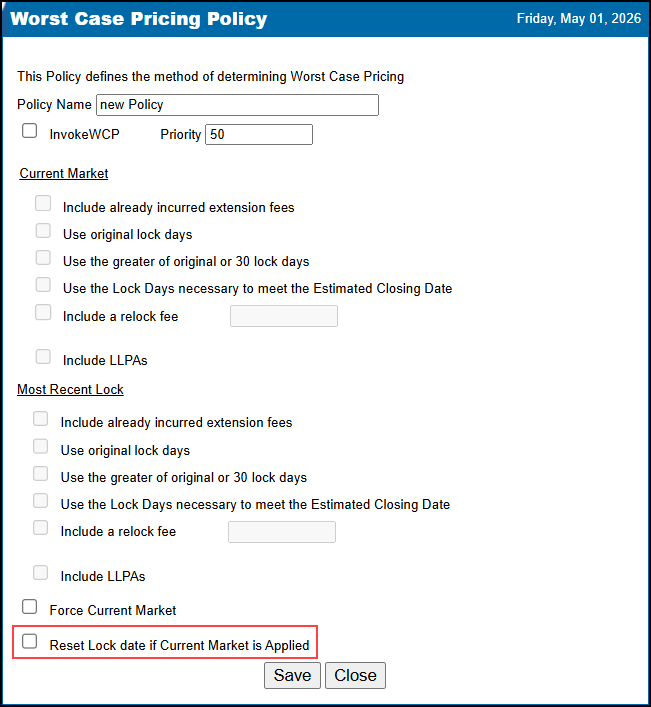
A new Reset lock date if Current Market is applied setting has been added to the Worst Case Pricing Policy page under Settings.
-
If the setting is selected, the Lock Date will be updated to the current date when Current Market (including Force Current Market) is applied.
-
If the setting is not selected, the original Lock Date will be retained.
New “NonOccCoBorrower” Expression Added to Condition and Matrix Definitions
Updated on 5/11/2026
A new NonOccCoBorrower expression has been added to the Condition Definition in Custom Program Management (CPM) and the CPM and Client Matrix (Matrix and Rate Matrix) Definitions. This expression is “True” when the co-borrower’s declaration indicates they are not occupying the property (Encompass field 1343 is “No”).
New “Apply LO Compensation” Action Added to CPM and Client Matrix Definition
A new Apply LO Compensation action has been added to the CPM and Client Matrix Definition. When this action is selected:
-
Cell values in the grid will accept a comma delimited set of exactly four values of BPS, Dollars, Min, and Max.
-
The validation is “Four parameters are required in each cell.”.
-
The values can be either floating numbers or NULLs.
-
Cells can be empty/blank.
“Notes” Column Added to Geography Versions Page
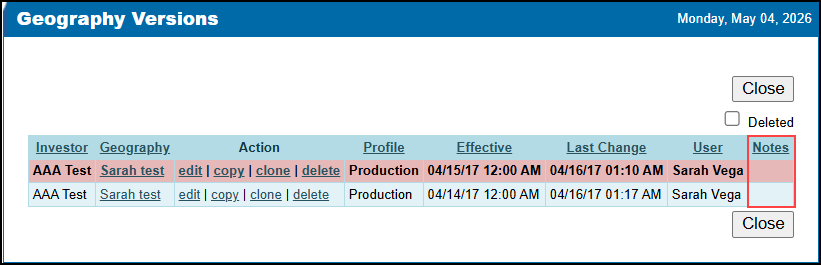
As part of the ICE PPE 25.4 December Service Pack, a Notes field was added to the Geography Definition. As part of this release, a Notes column has been added to the CPM and Client Geography Versions page.
EPPS.-93498
Max DTI Added to Ineligible Details on the Qualify Tab
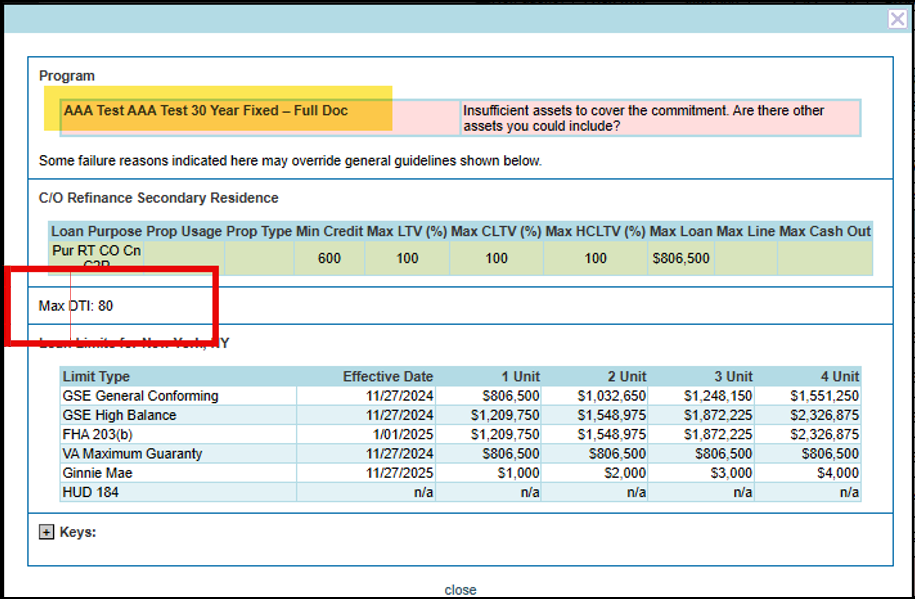
The Max DTI used in the qualification has been added to the Ineligible Details accessed from the Qualify tab.
New LO Comp Setting Added to Options Page Under Settings
Updated on 5/11/2026
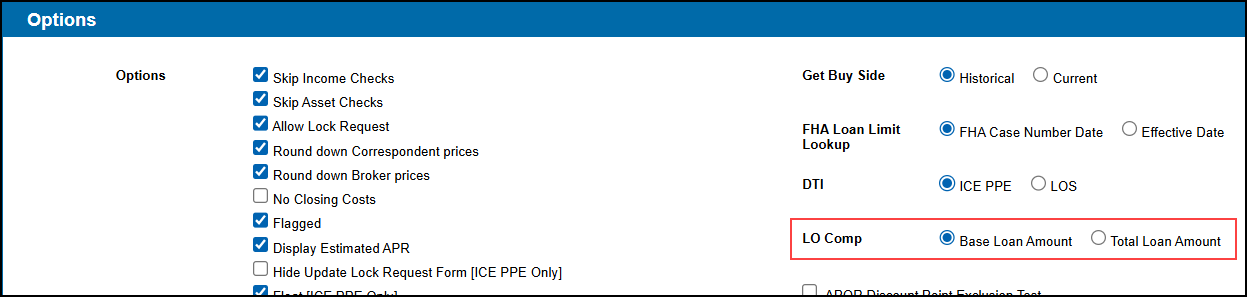
A new LO Comp setting has been added to the Options page under Settings. This setting enables the LO Comp to be calculated and applied using the Base Loan Amount or the Total Loan Amount.
Previously, if the LO Comp came from Encompass, the Comp dollar amount was based on the Encompass Comp Plan definition calculation using either the Base or Total Loan Amount. However, the Point value in ICE PPE was always calculated using the Base Loan Amount. With this new setting, a Client admin can align Points and Dollar amount values when using Total Loan Amount.
If the LO Comp came from ICE PPE, both Points and Dollar amount values were always calculated using the Base Loan Amount. With this new setting, a Client admin can choose to calculate Points and Dollar amount values off of either the Base or Total Loan Amount.
-
The default value will be Base Loan Amount for new and existing clients.
-
This applies to the following:
-
User Definition
-
Comp Tiers
-
"Deduct a Wholesale Compensation Margin" Rule Task
-
"Apply LO Compensation" Matrix Action
-
This applies to both ICE PPE and Classic EPPS.
Additional Enhancements
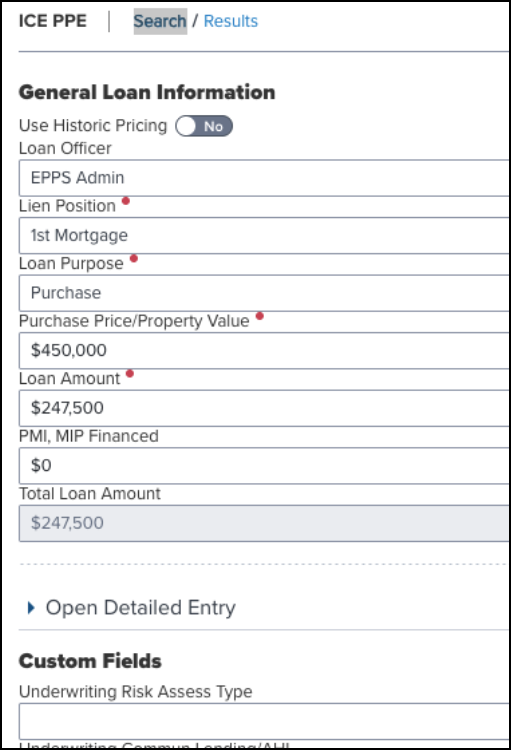
Layout of Search Page Updated for Mobile Devices
The Search page in the Encompass web interface has been updated to a single column layout for mobile devices with a display at or below 768 pixels to make it easier to read and navigate.
The layout will remain unchanged for mobile devices with a display above 768 pixels.
Loan Officer Dropdown List on Search Page Updated to Display in Alphabetical Order
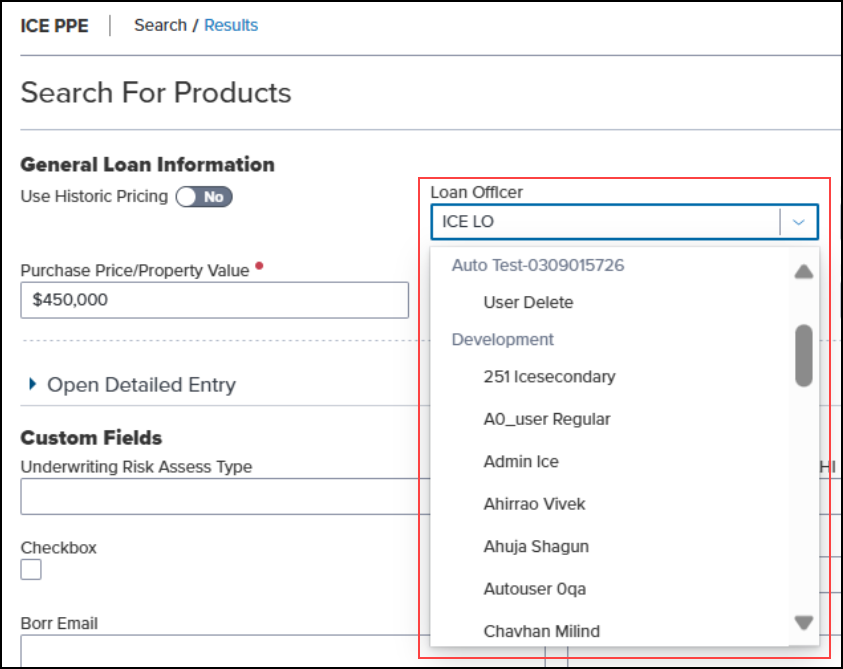
The names in the Loan Officer dropdown list on the Search page in the Encompass web interface have been updated to be displayed in alphabetical order by “Last name, First name”. In addition, the list will be sorted by Office (in alphabetical order) and then loan officer name.
And the Price Of Field on Rate Alert Modal Updated to Support Zero Base Pricing
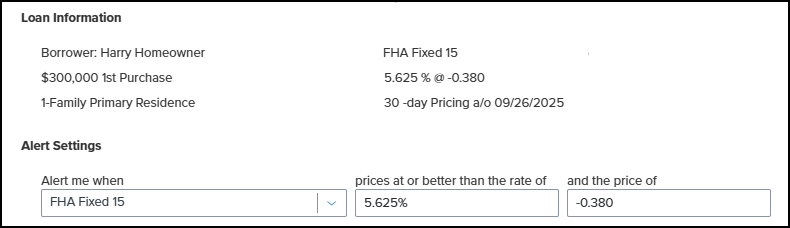
The and the price of field on the Rate Alert modal in the Encompass web interface has been updated to support zero base pricing. For zero base pricing, the amount must be between -20 to 20.
Non-Occupant Coborrower Added to loanQualifier and eligibility REST APIs
Non-Occupant Coborrower has been added to the loanQualifier and eligibility REST APIs.
| Next Section: Fixed Issues | 
|
|

|
Previous Section: Introduction |