Compliance Review
The Encompass Compliance Service (ECS) , available for the Encompass desktop and web interface, enables you to perform a loan check (i.e., order a compliance report) at any point during the loan process. During a loan check, loans are reviewed for compliance issues based on Truth in Lending (TIL), Home Ownership and Equity Protection Act (HOEPA), State and Local High Cost, State Consumer Credit, TILA-RESPA Integrated Disclosure (TRID) rules, and other industry regulations and mandates. Once the check is complete, a compliance report is generated indicating the loan's compliance issues and exceptions, as well as data within the loan that successfully passed the review.
Chose an option below to learn more about the Compliance Review in each interface of Encompass.
Encompass Desktop Interface (Banker Edition)
 Switch to Encompass Web Interface
Administrative and User Guide
TILA-RESPA Review
Understanding Compliance Review Results
Encompass Web Interface
Switch to Encompass Desktop Interface (Banker Edition)
The Encompass Compliance Service (ECS) enables you to perform a loan check (i.e., order a compliance report) at any point during the loan process. During a loan check, loans are reviewed for compliance issues based on Truth in Lending (TIL), Home Ownership and Equity Protection Act (HOEPA), State and Local High Cost, State Consumer Credit, TILA-RESPA Integrated Disclosure (TRID) rules, and other industry regulations and mandates. Once the check is complete, a compliance report is generated indicating the loan's compliance issues and exceptions, as well as data within the loan that successfully passed the review.
General Guidelines
Using the Encompass Compliance Service, you can:
- View a compliance report, complete with a list of returned messages.
- View a list of fees processed during your last compliance report.
- Manually run a preview compliance report.
- Manually order a compliance report.
Compliance Review Status Results
The overall review status is located toward the top of the report, under the Review Status heading. In addition, there are six possible status results that can be returned for each review within a report. These results are displayed above the Request Summary information section. The possible results are listed in order of severity in the report.
-
Choose an option below to learn about each Compliance Review Status message and when they are delivered.
The status message of ERROR is delivered when ECS —
- encounters a processing exception caused by a system failure or when key elements or data are missing from the loan.
When a processing exception occurs, the service is unable to render a compliance decision. These are called "PCALC" errors.
The status message of FAIL is delivered when ECS -
- determines the loan contains a compliance exception, thus failing the compliance review.
The status message of ALERT is delivered when ECS —
- examines the loan data and, based on its findings, classifies the loan as a “special” loan type.1 i.e., sub-prime, non-prime, nontraditional, higher-priced, or rate spread home loans
This status simply notifies you that the loan is considered "special" because it has exceeded a rate or fee threshold, but is not indicative of a compliance failure.
The status message of WARNING is delivered when ECS —
- identifies potential issues within the loan that you should investigate to determine whether a compliance exception exists.2 i.e., second lien loan amount of $300,000 will generate a Warning status for the HMDA review.
- does not receive enough information to determine whether a compliance violation exists.3 i.e., certain states require impound amounts paid by the borrower be placed in interest bearing accounts. ECS will return a warning because it is unable to determine if such funds have been placed in an interest bearing account.
The status message of PASS is delivered when ECS —
- does not identify any exceptions with the loan data.
The status message of INFO is delivered for —
- rule reviews that are being completed for elements of a loan file that are deemed necessary to bring attention to but meant for informational purposes only.
An INFO status will remain on the Mavent Report and will not restrict a user from proceeding with processing their loan.
-
There are two additional status results that can be returned for reviews that are not run. Choose an option below to view each requirement.
The status message of NOT PROCESSED is delivered when —
- the details of the specific loan being reviewed make certain laws non-applicable. Example i.e., if the loan is a purchase loan for a California investment property, ECS will return a “Not Processed” status under the high cost review because both the federal and California high cost tests do not apply to purchase loans for investment properties..
The status message of NOT REQUESTED is delivered for —
- a review group if that review group is either not selected or set to run under certain conditions within the compliance review setup.
For more information about these status results and additional details about the standard baseline review results, refer to the Understanding ECS Review Results document.
Viewing a List of Compliance Issues
To view a list of all errors, failures, alerts, warnings, passes and info’s returned in a report, click the View Error List button. The list includes the specific review that returned the issue, as well as a message explaining why the issue was returned.
“There is no geocode data for the property address. Please verify the address is correct.”
If the issue was caused by data entered into a specific field in Encompass, the field ID is included in the list. Click this item in the list, and then click Go To Field to jump directly to the field in Encompass.
The window listing the compliance issues remains open until you click Close, even when you jump to a field in Encompass. To order a new compliance report from this window, click Order Review. The report is displayed on the Compliance Review screen.
View a List of Loan’s Fees
To view a list of all the fees processed during the loan check, click the Fee Details button. Fees that are not mapped correctly or have other issues are highlighted in red.
These issues should be corrected to ensure the most accurate compliance report results. Click a fee in the list, and then click Go To Fee to jump directly to the field in Encompass.
The Compliance Review Fee Details window that lists the fees remains open until you click Close, even when you jump to a field in Encompass.
Compliance Review Log Alert
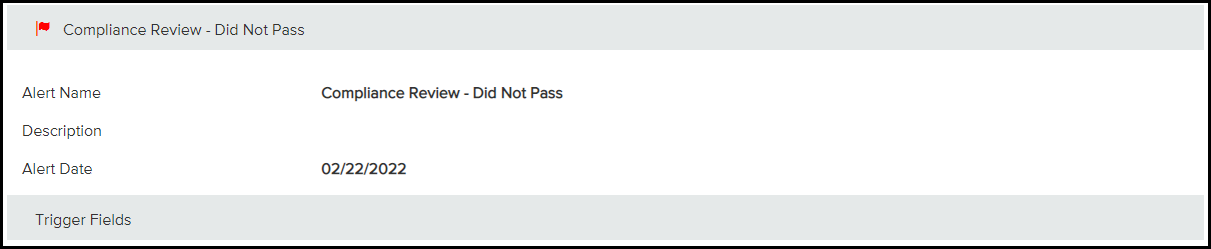
In order for a loan to pass a loan check, every review that was included in the report must return a status of Pass. When a loan does not pass a loan check, a “Compliance Review - Did Not Pass” alert is added to the Alerts & Messages tab in the Log.
To clear this alert, you can:
-
Correct all the issues listed in the report, and then order a new compliance report.
When the loan passes the loan check, the alert will be removed.
OR
-
Click the Clear Alert button (if enabled by the administrator).
Even though the alert is removed, the loan's compliance issues will remain until they are corrected.
Viewing the Compliance Report
The Documents section provides a central location for Encompass users to view current and previously ordered compliance reports.
- Every time a compliance report is ordered, an alert is added to Notifications.
- The last report that was ordered is available to view on the Compliance Review screen.
- Reports ordered earlier are stored in the Documents folder.
-
From a loan, select Notifications.
-
Under Alerts, locate the most recent Compliance Review alert.
-
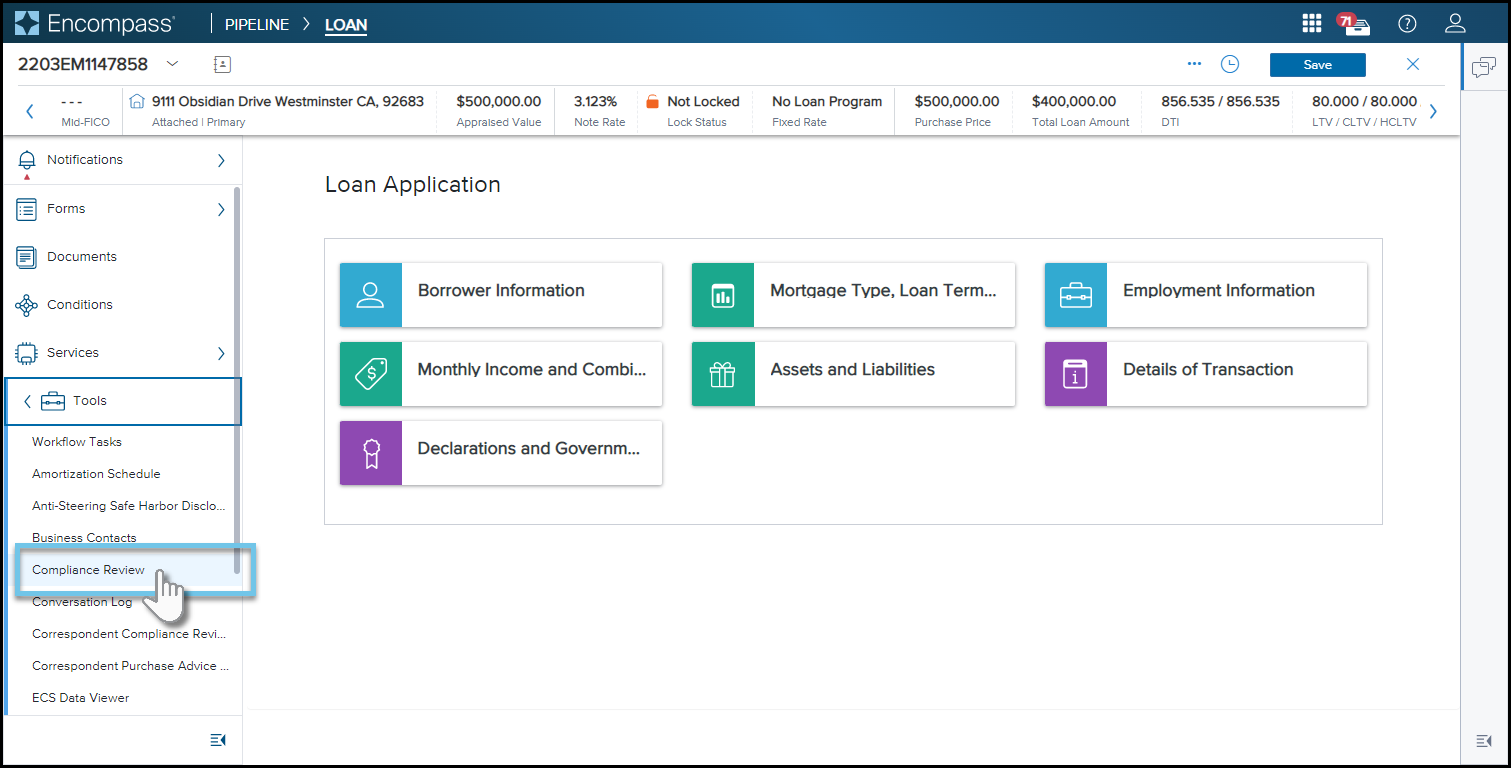
From a loan, select Tools, then select Compliance Review.
-
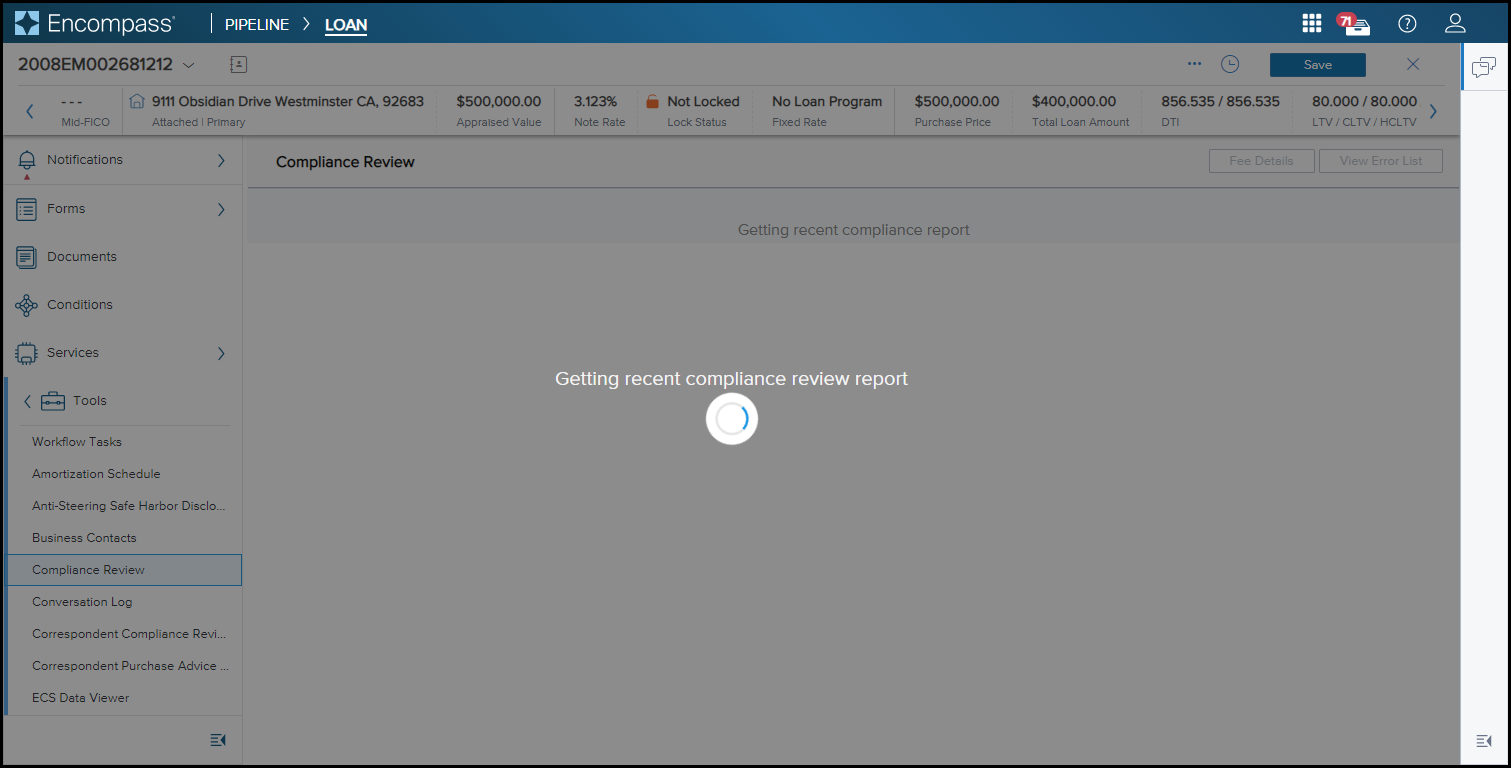
A loading spinner
 icon will appear in the middle of the screen along with the message "Getting recent
compliance review report."
icon will appear in the middle of the screen along with the message "Getting recent
compliance review report."
-
If this is the first time accessing the Compliance Review for the loan being viewed, a warning message appears on the top right of the screen. The message will clear on its own, or you may select the close
 icon.
icon.

-
If a compliance report has already been ordered using Encompass (Banker Edition) or the Web version of Encompass, the completed report will display in the center of the screen after loading.
-
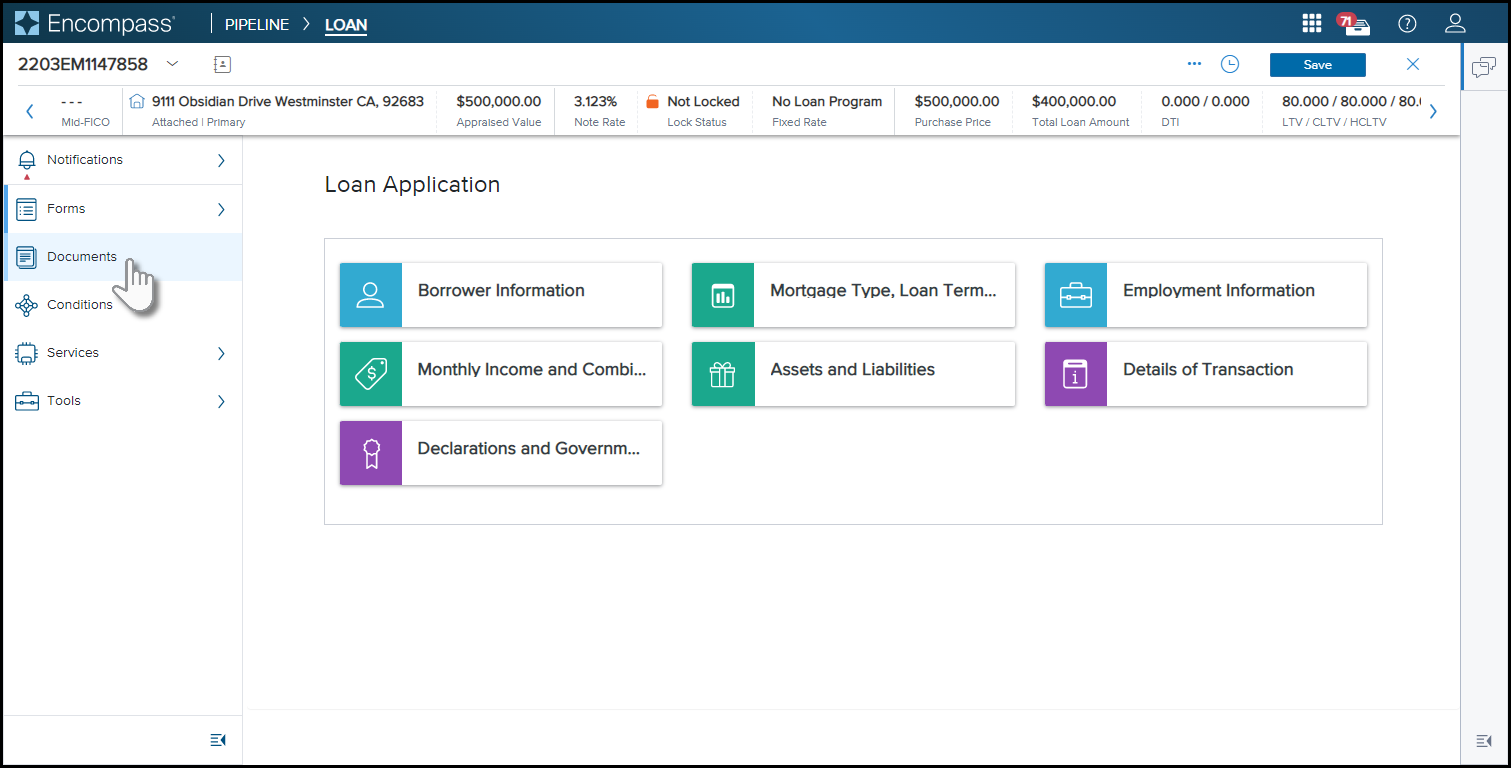
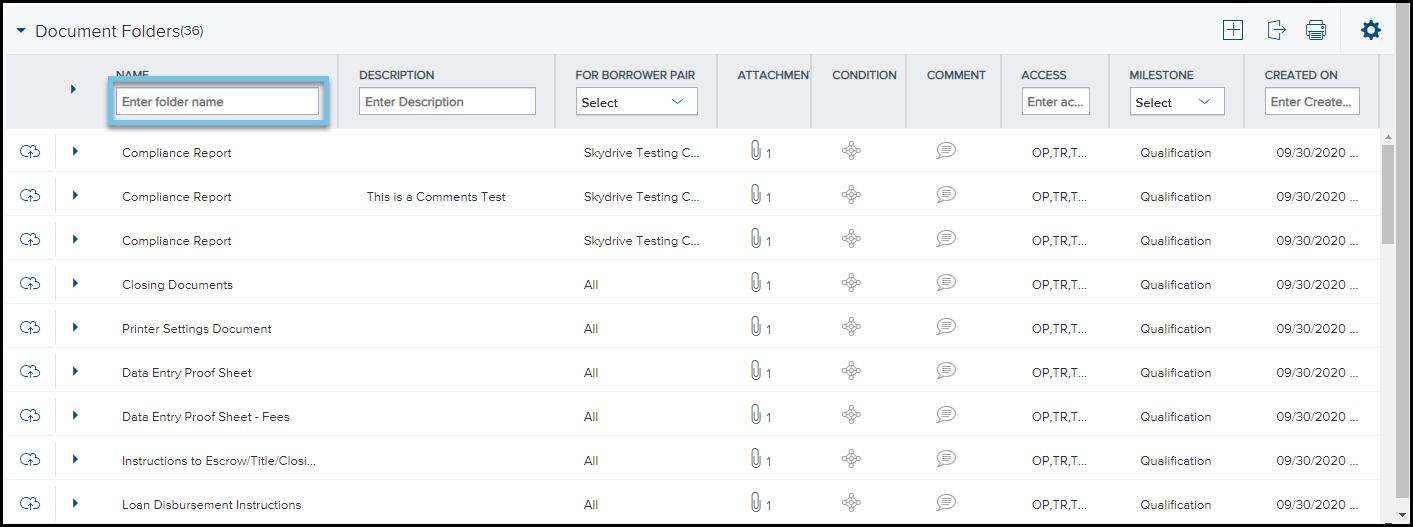
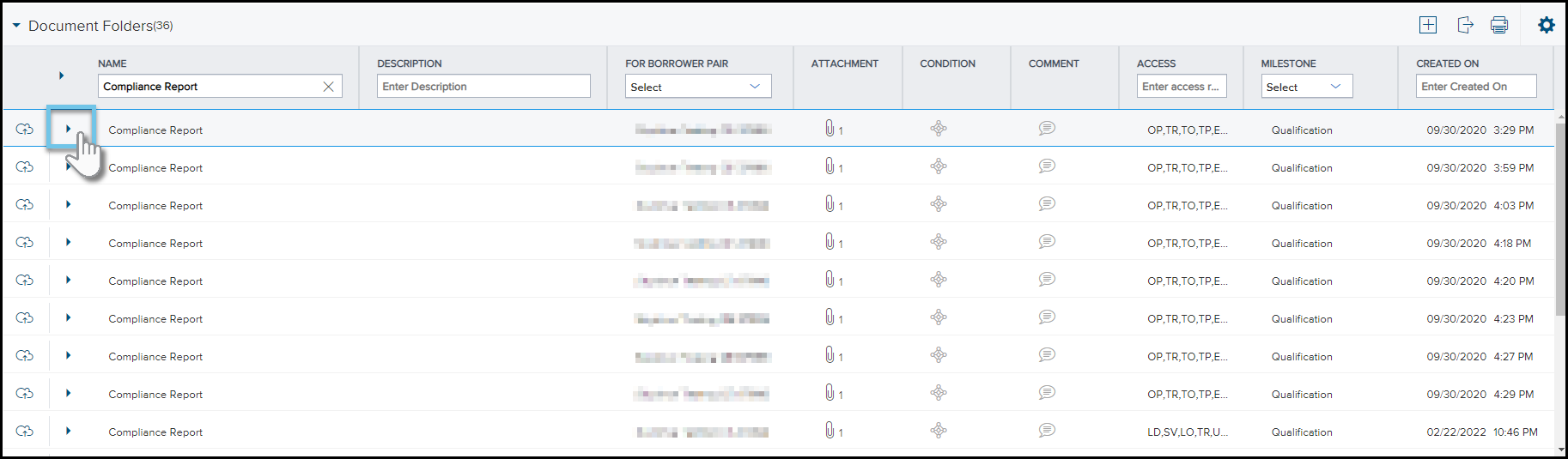
From a loan, select Documents, and then select Documents Folders (#) to expand the list of saved documents to the documents folder.
-
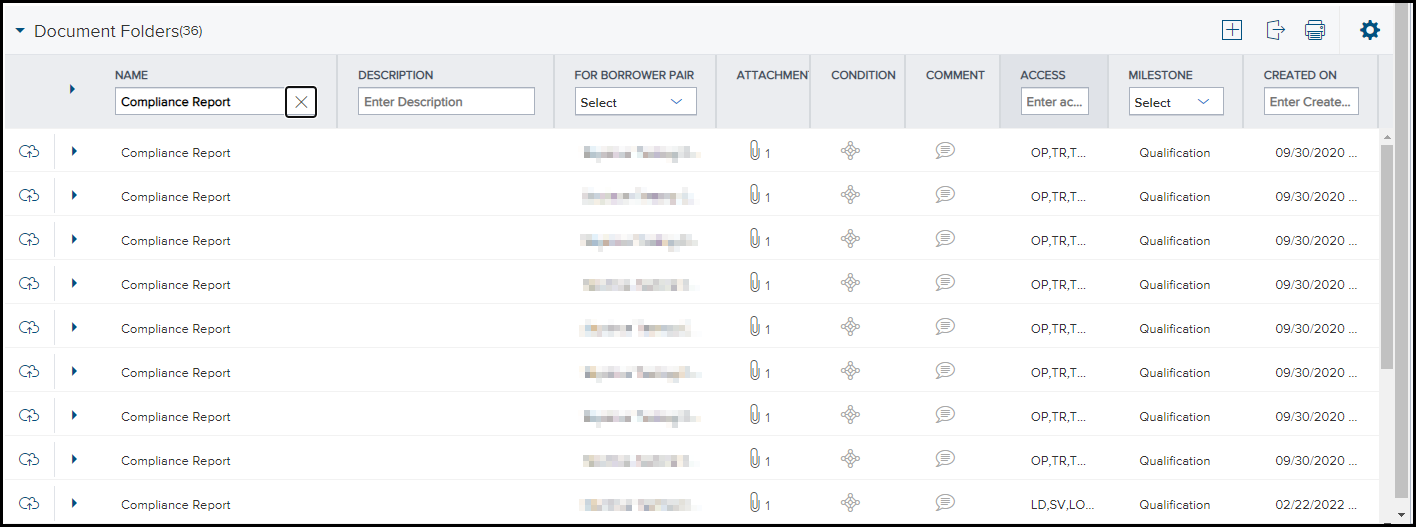
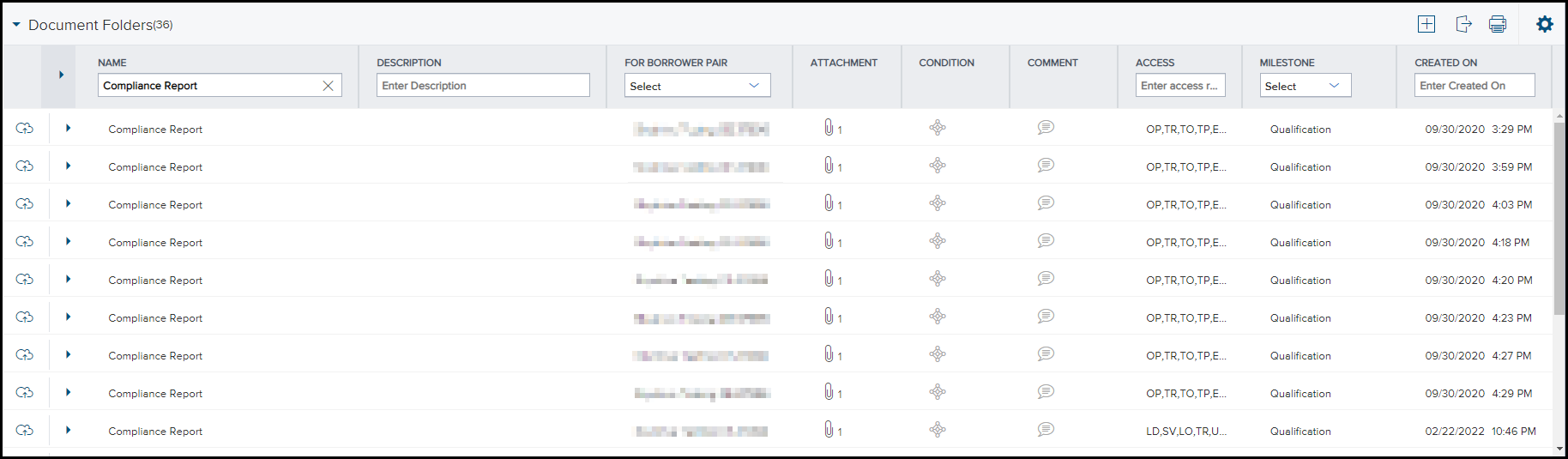
To locate a report ordered earlier, either —
- Entering "Compliance Report" into the field below Name in the Name column. Only Compliance Report documents will display.
- Manually locate documents named "Compliance Report" by using the scroll bar on the side of the page.
-
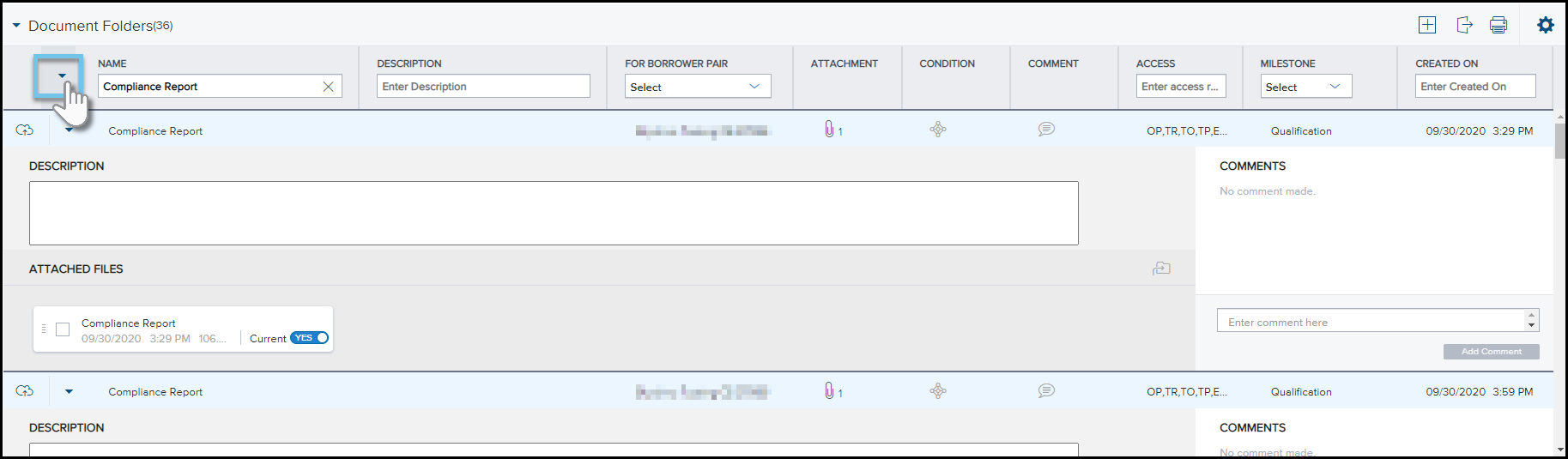
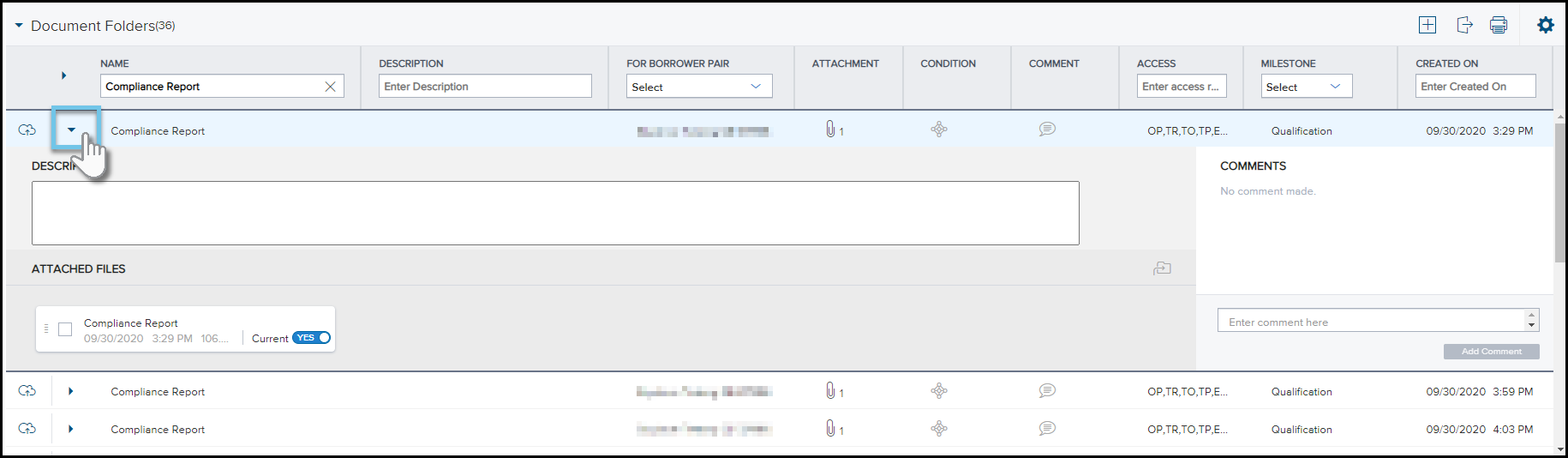
Once you have identified one or more compliance reports to view, either —
-
Select the expand
 icon to the left of the Name column to expand all documents visible in the
documents folder.
icon to the left of the Name column to expand all documents visible in the
documents folder.
-
Select the expand
icon to the left of a document name to expand one document at a time.
Viewing the Compliance Report
Every time a compliance report is ordered, an entry is added to the Log. The last report that was ordered is available to view on the Compliance Review screen. Reports ordered earlier are stored in the eFolder. To view an earlier report, click the entry in the Log. You can also click the eFolder icon to view a list of reports on the Documents tab.
 To View the Latest Report on the Compliance Review Screen
- From the Pipeline, open the loan for which a compliance report was ordered.
- Click the Tools tab, and then click Compliance Review.
Tests to Include
Compliance reports contain separate sections for each review that was performed and provide the result of each review. When a compliance issue occurs, the data (or missing data) causing the issue is explained in the report.
The following reviews may be included in a report:
Depending on the Compliance Review Setup configured by your administrator, certain reviews may not be performed during the loan check.
The ECS tests several areas of the loan file to determine ATR/QM Compliance:
- ATR Exempt Loan: Users can designate whether the loan is an ATR Exempt Loan exempt from ATR requirements because of the creditor type, loan type, unit count, or primary loan purpose using the ATR/QM Exemption Eligibility fields in the ATR/QM Management tool’s ATR/QM Eligibility input form. If a loan is designated as exempt from the ATR/QM Rules, the compliance review will not apply any Ability to Repay rules.
- ATR Standard: The ATR Standard Rule provides eight specific factors a creditor must consider including:
- Current or reasonably expected income or assets
- Current employment status
- Monthly payment on Covered loan, monthly payment on any simultaneous loan
- Monthly payment for mortgage-related obligations
- Current debt obligations, alimony, and child support
- Monthly Debt-to-Income (DTI) and Residual Income (RI)
- Credit history
The compliance review will look at the relevant fields in the Underwriter Summary tool (available in Encompass Banker Edition only) to determine if these factors were evaluated.
- Qualified Mortgage: The compliance review will run rules to determine whether the loan is a Higher-Priced Covered Transaction, point and fee limitation rules, rules for prohibited loan terms and features, rules to ensure that the necessary underwriting factors were considered/evaluated, Debt-to-Income and/or Residual Income rules, and Agency/GSE eligibility rules, as applicable based on the type of Qualified Mortgage being made.
- QM: Safe Harbor/Presumption of Compliance: The ATR Rule provides a safe harbor for Qualified Mortgages that are not higher-priced. Loans that are higher-priced and meet the definition of a QM have a different protection, that of a rebuttable presumption that the creditor complied with the ATR requirements.
- QM: Loan Feature Limitations: The compliance review will determine whether the loan has a prohibited loan feature disqualifying the loan from QM eligibility. Depending on the QM Type, these loan features may include: an interest-only payment term, negative amortization, loan term greater than 30 years, or a balloon payment.
- QM: Points and Fees Limits: The compliance review will determine whether the loan exceeds the applicable points and fees threshold, disqualifying a loan from QM eligibility.
- "Bona Fide" Discount Points - Users may use either the new Starting Adjusted Rate (field ID NEWHUD.X1720) and the Points in Starting Adjusted Rate fields or the existing Undiscounted Rate field (field ID 3293) to designate whether the discount points are "Bona Fide" and to test whether to include them or exclude them as appropriate.
- Underwriting: QM loans contain specific requirements around Payment Underwriting, Mortgage-Related Obligations, Income or Assets, Employment Status, Simultaneous Loans, Debt, Alimony, Child Support, DTI or RI, and Credit History. The existing system payment underwriting functionality has been revised to reflect the revised maximum payment underwriting requirements for loans eligible for General QM, Balloon-Payment QM, Small Creditor QM, or Small Creditor Balloon-Payment QM status. The compliance review will perform testing to ensure the DTI for a General QM does not exceed 43%. It will also perform DTI testing and/or Residual Income testing on other loan types, depending on the type of loan being made.
- QM: Agency/GSE Eligibility: The compliance review will use the AUS response and Risk Assessment information when determining the eligibility of Agency/GSE Qualified Mortgages to be sold to or guaranteed by government agencies and GSEs.
- Non-Standard to Standard Refinances: The ATR Rule contains special requirements for creditors refinancing their own customers into more affordable loans to help those customers avoid payment shock. The compliance review will run rules to determine whether the prior loan is eligible for a refinance into a Standard Loan Refinance and also to determine whether the Standard Loan meets the requirements under Ability to Repay.
Under the Ability to Repay/Qualified Mortgage Review, the compliance review applies the tests described below, based on the ATR Type and QM Type which can be selected in Encompass multiple ways (and applied in the following order):
- The Ability-To-Repay Loan Type (field ID QM.X23) and Qualified Mortgage Loan Type (field ID QM.X24).
- The default Ability-To-Repay Loan Type and Qualified Mortgage Loan Type selected in the Compliance Review Setup.
- The system default of General Qualified Mortgage.
- The ATR Exempt Creditor is a "Community Development Financial Institution", "Community Housing Development Organization", "Downpayment Assistance Provider", or "Nonprofit Organization".
- The ATR Exempt Transaction Type (field ID QM.X107) is "Bridge Loan", Emergency Economic Stabilization Act", "Housing Finance Agency Program", "Reverse Mortgage", or "Time Share Plan".
- The Credit Type (field ID QM.X110) is selected (indicating the loan is not primarily for personal, family, or household purposes).
- The Loan Type (field ID 1172) is "HELOC".
- The Number of Units (field ID 16) is greater than 4.
- The ATR Type (field ID QM.X23) is "Non-Standard to Standard Refinance".
Users can designate whether the loan is an ATR Exempt Loan exempt from ATR requirements because of the creditor type, loan type, unit count, or primary loan purpose using the ATR/QM Exemption Eligibility fields in the ATR/QM Management tool’s ATR/QM Eligibility input form. A loan meeting any of the following criteria is treated as exempt from the ATR/QM rules and the compliance review will not apply any Ability to Repay rules.
- Higher Priced Covered Transaction - See the Mavent Alert, Federal: Section 43 Higher-Priced Covered Transaction, Safe Harbor and Presumption of Compliance (FederalSection43Higher-PricedCoveredTransaction,SafeHarborandPresumptionofCompliance-ECSUsers.pdf).
- Loan Terms and Features
- The compliance review fails the loan if the Amortization Term (field ID 325) is greater than the Loan Term (field ID 4).
- The compliance review fails the loan if the Interest Only Term (field ID 1177) is greater than 0.
- The compliance review fails the loan if it contains a negative amortization feature.
- The compliance review fails the loan if the Loan Term is greater than 360 months.
- QM Points and Fees Limit
- The compliance review fails the loan with a Gross Loan Amount less than $12,500 if the points and fees exceed 8% of the Total Loan Amount*.
- The compliance review fails the loan with a Gross Loan Amount greater than $100,000 if the points and fees exceed 3% of the Total Loan Amount*.
- The compliance review fails the loan with a Gross Loan Amount greater than or equal to $12,500 but less than $20,000 if the points and fees exceed $1,000.
- The compliance review fails the loan with a Gross Loan Amount greater than or equal to $20,000 but less than $60,000 if the points and fees exceed 5% of the Total Loan Amount*.
- The compliance review fails the loan with a Gross Loan Amount greater than or equal to $60,000 but less than $100,000 if the points and fees exceed $3,000
- Underwriting Factors
- Debt to Income (DTI) - The compliance review fails the loan if the DTI exceeds 43%. The DTI is calculated as Debts and Expenses / Gross Income.
- Debts and Expenses
- Covered Loan Highest Payment Amount
- Simultaneous Loan Payment Amount
- If the loan is a first lien, simultaneous payment equals Other Fin. (field ID 229)
- If the loan is a junior lien, simultaneous payment equals First Mtg P&I (field ID 1724)
- VOL Liabilities where Exclude form URLA page 2 Liabilities Total (field ID FL0117) and Will be paid off (field ID FL0118) equals N.
- Proposed Housing Payment Amounts
- Haz. Ins (field ID 230)
- RE Taxes (field ID 1405)
- Mtg. Ins (field ID 232)
- HOA Dues (field ID 233)
- Other (field ID 234)
- Contingent Liabilities
- Assumed Mortgage Payment (field ID QM.X192)
- Assumed Mortgage Payment (field ID QM.X194)
- Assumed Mortgage Payment (field ID QM.X196)
- Car Loan Payment (field ID QM.X198)
- Student Loan Payment (field ID QM.X199)
- Mortgage Payment (field ID QM.X200)
- Other Payment (field ID QM.X202)
- Negative Cash Flow (Primary Residence - Non Subj)
- Negative Cash Flow (Investment Property - Non Subj)
- Negative Cash Flow (Vacation Property - Non Subj)
- Gross Income
- 1003 Fields
- Base (field ID 101 and 110)
- Overtime (field ID 102 and 111)
- Bonuses (field ID 103 and 112)
- Commissions (field ID 104 and 113)
- Div./Interest (field ID 105 and 114)
- Other (field ID 107 and 116)
- Other (field ID 108 and 117)
- Appendix Q Fields
- Base-Borrower (field ID QM.X137) and Base-Co-Borrower (field ID QM.X145)
- Overtime-Borrower (field ID QM.X138) and Overtime-Co-Borrower (field ID QM.X146)
- Bonuses-Borrower (field ID QM.X139) and Bonuses-Co-Borrower (field ID QM.X147)
- Commissions-Borrower (field ID QM.X140) and Commissions-Co-Borrower (field ID QM.X148)
- Div./Interest-Borrower (field ID QM.X141) and Div./Interest-Co-Borrower (field ID QM.X149)
- Other-Borrower (field ID QM.X142) and Other-Co-Borrower (field ID QM.X150)
- Other-Borrower (field ID QM.X143) and Other-Co-Borrower (field ID QM.X151)
- Military-Borrower (field ID QM.X163) and Military-Co-Borrower (field ID QM.X168)
- VA Benefit-Borrower (field ID QM.X164) and VA Benefit-Co-Borrower (field ID QM.X169)
- Gov't Assit. Program-Borrower (field ID QM.X165) and Gov't Assit. Program-Co-Borrower (field ID QM.X170)
- Mtg. Credit Certificate-Borrower (field ID QM.X166) and Mtg. Credit Certificate-Co-Borrower (field ID QM.X171)
- Homeown Subsidy-Borrower (field ID QM.X167) and Homeown Subsidy-Co-Borrower (field ID QM.X172)
- Cost-of-living Adj.-Borrower (field ID QM.X155) and Cost-of-Living Adj.-Co-Borrower (field ID QM.X159)
- Performance Raises-Borrower (field ID QM.X156) and Performance Raises-Co-Borrower (field ID QM.X160)
- Bonuses-Borrower (field ID QM.X157) and Bonuses-Co-Borrower (field ID QM.X161)
- New Job-Borrower (field ID QM.X158) and New Job-Co-Borrower (field ID QM.X162)
- Social Security-Borrower (field ID QM.X173) and Social Security-Co-Borrower (field ID QM.X182)
- Federal Gov't Empl. Retirement-Borrower (field ID QM.X174) and Federal Gov't Empl. Retirement-Co-Borrower (field ID QM.X183)
- Railroad Retirement Benefits-Borrower (field ID QM.X175) and Railroad Retirement Benefits-Co-Borrower (field ID QM.X184)
- State Gov't Empl Retirement-Borrower (field ID QM.X176) and State Gov't Empl Retirement-Co-Borrower (field ID QM.X185)
- Disability-Borrower (field ID QM.X177) and Disability-Co-Borrower (field ID QM.X186)
- Public Assis. Pmts-Borrower (field ID QM.X178) and Public Assis. Pmts-Co-Borrower (field ID QM.X187)
- Child Support- Borrower (field ID QM.X179) and Child Support-Co-Borrower (field ID QM.X188)
- Military Allowances-Borrower (field ID QM.X180) and Military Allowances-Co-Borrower (field ID QM.X189)
- Other Income-Borrower (field ID QM.X181) and Other Income-Co-Borrower (field ID QM.X190)
- Cash Flow (Primary Residence - Non Subj)
- Cash Flow (Investment Property - Non Subj)
- Cash Flow (Vacation Property - Non Subj)
- Income Borr Federal Income Tax (field ID 1156)
- Income Deductions Borr State Income Tax (field ID 1158)
- Income Deductions Borr SSN (field ID 1159)
- VA Loan Analysis Deductions Other Borr (field ID VALA.X19)
- Income Deductions Spouse Federal Income Tax (field ID 1306)
- Income Deductions Spouse State Income Tax (field ID 1307)
- Income Deductions Spouse SSN (field ID 1308)
- Income Deductions Spouse Other (field ID 1309)
- QM Agency/GSE Eligibility - Not applicable.
- NonStandard to Standard Refinance - Not applicable.
This applies to closed-end loans secured by 1 - 4 unit dwellings with application dates on or after 01/10/2014, an ATR Type of "Qualified Mortgage", and a QM Type of "General Qualified Mortgage".
The dollar amounts listed above are adjusted annually for inflation and published each year in the commentary to Regulation Z.
*Reg Z Closed End Total Loan Amount Definition - The total loan amount for a closed-end credit transaction is calculated by taking the amount financed, as determined according to § 1026.18(b), and deducting any cost listed in § 1026.32(b)(1)(iii), (iv), or (vi) that is both included as points and fees under § 1026.32(b)(1) and financed by the creditor.
See the Mavent Alert, Federal: Qualified Mortgage and High-Cost Mortgage Threshold Tests - Updates to the Definition of Points and Fees (FederalQualifiedMortgageandHigh-CostMortgageThresholdTests-UpdatestotheDefinitionofPointsandFees-ECSUsers.pdf).
HELOC and mortgage liabilities are calculated based on values in the VOM (see the Cash Flow Calculations section below).
This is the sum of the values in the Net Income/Loss fields (field ID FM##32) for all VOM entries where the Mortgage Property Is the Subject Property fields (field ID FM##28) are not selected and the Mortgage Property Use of Property fields (field ID FM##41) are "Primary Residence", if the sum is a negative number.
This is the sum of the values in the Net Income/Loss fields where the Mortgage Property Is the Subject Property fields are not selected and the Mortgage Property Use of Property fields are "Investment Property", if the sum is a negative number.
This is the sum of the values in the Net Income/Loss fields (field ID FM##32) where the Mortgage Property Is the Subject Property fields (field ID FM##28) are not selected and the Mortgage Property Use of Property fields (field ID FM##41) is "Second Home", if the sum is a negative number.
## represents the numerical ID of the VOM entry (e.g. "01" for the first VOM entry).
This income consists of the greater of the income from the 1003 Page 2 or the ATR/QM Appendix Q Form plus any positive cash flow (see Cash Flow Calculation section).
The Will be used to 'offset' mortgage payment and deducted from total income field (field ID QM.X335) does not affect the ECS income or the DTI calculation.
The Will be used to 'offset' mortgage payment and deducted from total income field (field ID QM.X336) does not affect the ECS income or the DTI calculation.
This is the sum of the values in the Net Income/Loss fields (field ID FM##32) for all VOM entries where the Mortgage Property Is the Subject Property fields (field ID FM##28) are not selected and the Mortgage Property Use of Property fields (field ID FM##41) are "Primary Residence", if the sum is a positive number.
This is the sum of the values in the Net Income/Loss fields where the Mortgage Property Is the Subject Property fields are not selected and the Mortgage Property Use of Property fields are "Investment Property", if the sum is a positive number.
This is the sum of the values in the Net Income/Loss fields (field ID FM##32) where the Mortgage Property Is the Subject Property fields (field ID FM##28) are not selected and the Mortgage Property Use of Property fields (field ID FM##41) is "Second Home", if the sum is a positive number.
## represents the numerical ID of the VOM entry (e.g. "01" for the first VOM entry).
If the loan is a higher-priced cover transaction, the compliance review applies the residual income test, applying the VA threshold.
If the Effective Income minus Total Expenses is less than the residual income threshold (as defined in the charts below), the compliance review fails the loan.
The Effective Income equals income (as defined above) minus:
|
Table of Residual Incomes by Region for Loan Amounts of $79,999 and Below |
||||
|---|---|---|---|---|
| Family Size | Northeast | Midwest | South | West |
|
1 |
$390 |
$382 |
$382 |
$425 |
| 2 | $654 | $641 | $641 | $713 |
| 3 | $788 | $772 | $772 | $859 |
| 4 | $888 | $868 | $868 | $967 |
| 5 | $921 | $902 | $902 | $1,004 |
| Over 5 | Add $75 each additional member up to a family of seven | |||
|
Table of Residual Incomes by Region for Loan Amounts of $80,000 and Above |
||||
|---|---|---|---|---|
| Family Size | Northeast | Midwest | South | West |
|
1 |
$450 |
$441 |
$441 |
$491 |
| 2 | $755 | $738 | $738 | $823 |
| 3 | $909 | $889 | $889 | $990 |
| 4 | $1,025 | $1,003 | $1,003 | $1,117 |
| 5 | $1,062 | $1,039 | $1,039 | $1,158 |
| Over 5 | Add $80 each additional member up to a family of seven | |||
| Key Geographic Regions Used in the Preceding Tables | ||||
|---|---|---|---|---|
| Northeast | Connecticut | New Hampshire | Pennsylvania | |
| Maine | New Jersey | Rhode Island | ||
| Massachusetts | New York | Vermont | ||
|
Midwest |
Illinois | Michigan | North Dakota | |
| Indiana | Minnesota | Ohio | ||
| Iowa | Missouri | South Dakota | ||
| Kansas | Nebraska | Wisconsin | ||
| South | Alabama | Kentucky | Puerto Rico | |
| Arkansas | Louisiana | South Carolina | ||
| Delaware | Maryland | Tennessee | ||
| District of Columbia | Mississippi | Texas | ||
| Florida | North Carolina | Virginia | ||
| Georgia | Oklahoma | West Virginia | ||
| West | Alaska | Hawaii | New Mexico | Wyoming |
| Arizona | Idaho | Oregon | ||
| California | Montana | Utah | ||
| Colorado | Nevada | Washington | ||
Agency/GSE Qualified Mortgage - Conventional Loan
- Higher Priced Covered Transaction - See the Mavent Alert, Federal: Section 43 Higher-Priced Covered Transaction, Safe Harbor and Presumption of Compliance (FederalSection43Higher-PricedCoveredTransaction,SafeHarborandPresumptionofCompliance-ECSUsers.pdf).
- Loan Terms and Features
- The compliance review fails the loan if the Amortization Term (field ID 325) is greater than the Loan Term (field ID 4).
- The compliance review fails the loan if the Interest Only Term (field ID 1177) is greater than 0.
- The compliance review fails the loan if it contains a negative amortization feature.
- The compliance review fails the loan if the Loan Term is greater than 360 months.
- QM Points and Fees Limit
- The compliance review fails the loan with a Gross Loan Amount less than $12,500 if the points and fees exceed 8% of the Total Loan Amount*.
- The compliance review fails the loan with a Gross Loan Amount greater than $100,000 if the points and fees exceed 3% of the Total Loan Amount*.
- The compliance review fails the loan with a Gross Loan Amount greater than or equal to $12,500 but less than $20,000 if the points and fees exceed $1,000.
- The compliance review fails the loan with a Gross Loan Amount greater than or equal to $20,000 but less than $60,000 if the points and fees exceed 5% of the Total Loan Amount*
- The compliance review fails the loan with a Gross Loan Amount greater than or equal to $60,000 but less than $100,000 if the points and fees exceed $3,000.
- Underwriting Factors - Not applicable.
- QM Agency/GSE Eligibility
- A Desktop Underwriter AUS Recommendation of "Approve", "Approve/Eligible", "ApproveEligible", or "Approve Eligible", as well as a DU Case ID.
- A Loan Prospector AUS Recommendation of "Accept", "Approve", "Approve/Eligible", "ApproveEligible", "Approve Eligible", "AcceptEligible", "Accept/Eligible", or "Accept Eligible".
- An Underwriting Type of "Manual Underwriting" and at least on of the following flags on the Underwriter Summary set to true:
- Underwritten According to Contractual Agreement with Agency/GSE (field ID 3878)
- Received Waiver for Agency/GSE Guidelines (field ID 3879)
- Manually Underwritten according to Agency/GSE Guidelines (field ID 3880)
- The Desktop Underwriter AUS Recommendation comes from one of the following fields (in order):
- Fannie Automatic Underwriting Decision (field ID ULDD.FNM.AutoUWDec)
- AUS Recommendation (field ID 1544) if field ID 1543 equals "DU"
- AUS Recommendation (field ID AUSF.X3) if field ID AUSF.X1 equals "DU"
- The DU Case ID comes from one of the following fields (in order):
- DU Case ID/LP AUS Key # (field ID DU.LP.ID)
- DU Case ID/LP AUS Key # (field ID AUSF.X4)
- The Loan Prospector AUS Recommendation comes from one of the following fields (in order):
- Freddie Automatic Underwriting Decision (field ID ULDD.FRE.AutoUWDec)
- AUS Recommendation (field ID 1544) if field ID 1543 equals "LP"
- AUS Recommendation (field ID AUSF.X3) if field ID AUSF.X1 equals "LP"
- The LP AUS Key comes from one of the following fields (in order):
- DU Case ID/LP AUS Key # (field ID DU.LP.ID)
- DU Case ID/LP AUS Key # (field ID AUSF.X4)
- Manual/Other Underwriting information comes from one of the following fields (in order):
- Underwriting System Type
- AUS Recommendation (field ID 1544) if field ID 1543 equals "DU"
- AUS Recommendation (field ID AUSF.X3) if field ID AUSF.X1 equals "DU"
- Underwriting Recommendation
- Fannie Automatic Underwriting Decision
- AUS Recommendation (field ID 1544)
- AUS Recommendation (field ID AUSF.X3)
- Non-Standard to Standard Refinance - Not applicable.
This applies to closed-end loans secured by 1 -4 unit dwellings with application dates on or after 01/10/2014 , consummation dates before 01/10/2021, an ATR Type of "Qualified Mortgage", a QM Type of "Agency/GSE Qualified Mortgage", and a Mortgage Type of "Conv".
The dollar amounts listed above are adjusted annually for inflation and published each year in the commentary to Regulation Z.
*Reg Z Closed End Total Loan Amount Definition - The total loan amount for a closed-end credit transaction is calculated by taking the amount financed, as determined according to § 1026.18(b), and deducting any cost listed in § 1026.32(b)(1)(iii), (iv), or (vi) that is both included as points and fees under § 1026.32(b)(1) and financed by the creditor.
See the Mavent Alert, Federal: Qualified Mortgage and High-Cost Mortgage Threshold Tests - Updates to the Definition of Points and Fees (FederalQualifiedMortgageandHigh-CostMortgageThresholdTests-UpdatestotheDefinitionofPointsandFees-ECSUsers.pdf).
If an Agency/GSE Qualified Mortgage is submitted to the compliance review with a Mortgage Type of "Conv", the compliance review applies the GSE eligibility rules, requiring the loan to have either:
or
or
If the Manual Underwriting is performed, the compliance review returns a warning message.
- Higher Priced Covered Transaction
- The compliance review treats the loan as eligible for FHA Safe Harbor if it has an APR that does not exceed the average prime offer rate for a comparable mortgage, as of the date the interest rate is set, by more than the combined annual mortgage insurance premium and 1.15 percentage points for a first lien mortgage.
- The compliance review treats the loan as eligible for FHA Rebuttable Presumption and return an alert status if it has an APR that exceeds the average prime offer rate for a comparable mortgage, as of the date the interest rate is set, by more than the combined annual mortgage insurance premium and 1.15 percentage points for a first lien mortgage.
- Loan Terms and Features
- The compliance review fails the loan if the Amortization Term (field ID 325) is greater than the Loan Term (field ID 4).
- The compliance review fails the loan if the Interest Only Term (field ID 1177) is greater than 0.
- The compliance review fails the loan if it contains a negative amortization feature.
- The compliance review fails the loan if the Loan Term is greater than 360 months.
- QM Points and Fees Limit
- The compliance review fails the loan with a Gross Loan Amount less than $12,500 if the points and fees exceed 8% of the Total Loan Amount*.
- The compliance review fails the loan with a Gross Loan Amount greater than $100,000 if the points and fees exceed 3% of the Total Loan Amount*.
- The compliance review fails the loan with a Gross Loan Amount greater than or equal to $12,500 but less than $20,000 if the points and fees exceed $1,000.
- The compliance review fails the loan with a Gross Loan Amount greater than or equal to $20,000 but less than $60,000 if the points and fees exceed 5% of the Total Loan Amount*
- The compliance review fails the loan with a Gross Loan Amount greater than or equal to $60,000 but less than $100,000 if the points and fees exceed $3,000.
- Underwriting Factors - Not applicable.
- QM Agency/GSE Eligibility
- The compliance review fails the loan if the FHA Total Scorecard Risk Class (field ID 3029) is not one of these values: "accept/approve", "acceptapprove", "accept approve", "Accept/Approve", "AcceptApprove", "Accept Approve", "Accept", or "Approve" or the FHA Total Scorecard Eligibility Assessment (field ID 3631) is not one of these values: "eligible" or "Eligible", unless the loan was manually underwritten and one of the following checkboxes is selected:
- Underwritten According to Contractual Agreement with Agency/GSE (field ID 3878)
- Received Waiver for Agency/GSE Guidelines (field ID 3879)
- Manually Underwritten according to Agency/GSE Guidelines (field ID 3880)
- The compliance review returns a warning if an FHA Case Assignment Date is not provided.
- The compliance review fails the loan if no AUS Type is supplied, or if an Other Underwriting System Type other than "Manual Underwriting" is provided.
- The Manual/Other Underwriting information comes from one of the following fields (in order):
- Underwriting System Type
- Field ID 1556
- If "Other" Description (field ID AUSF.X2)
- Underwriting Recommendation
- Fannie Automatic Underwriting Decision (field ID ULDD.FNM.AutoUWDec)
- AUS Recommendation (field ID 1544)
- AUS Recommendation (field ID AUSF.X3)
- Non-Standard to Standard Refinance - Not applicable.
This applies to all closed-end FHA loans secured by a 1 - 4 unit dwelling with an application date or FHA case number assignment date on or after 01/10/2014, an ATR Type of "Qualified Mortgage", and a QM Type of "Agency/GSE Qualified Mortgage" or "FHA QM".
ECS will continue to apply the Section 35 Higher Priced Mortgage Loan Review to closed-end loans secured by a primary 1 - 4 unit dwelling.
The dollar amounts listed above are adjusted annually for inflation and published each year in the commentary to Regulation Z.
*Reg Z Closed End Total Loan Amount Definition - The total loan amount for a closed-end credit transaction is calculated by taking the amount financed, as determined according to § 1026.18(b), and deducting any cost listed in § 1026.32(b)(1)(iii), (iv), or (vi) that is both included as points and fees under § 1026.32(b)(1) and financed by the creditor.
See the Mavent Alert, Federal: Qualified Mortgage and High-Cost Mortgage Threshold Tests - Updates to the Definition of Points and Fees (FederalQualifiedMortgageandHigh-CostMortgageThresholdTests-UpdatestotheDefinitionofPointsandFees-ECSUsers.pdf).
Agency/GSE Qualified Mortgage - USDA Loans
- Higher Priced Covered Transaction - See the Mavent Alert, Federal: Section 43 Higher-Priced Covered Transaction, Safe Harbor and Presumption of Compliance (FederalSection43Higher-PricedCoveredTransaction,SafeHarborandPresumptionofCompliance-ECSUsers.pdf).
- Loan Terms and Features
- The compliance review fails the loan if the Amortization Term (field ID 325) is greater than the Loan Term (field ID 4).
- The compliance review fails the loan if the Interest Only Term (field ID 1177) is greater than 0.
- The compliance review fails the loan if it contains a negative amortization feature.
- The compliance review fails the loan if the Loan Term is greater than 360 months.
- QM Points and Fees Limit
- The compliance review fails the loan with a Gross Loan Amount less than $12,500 if the points and fees exceed 8% of the Total Loan Amount*.
- The compliance review fails the loan with a Gross Loan Amount greater than $100,000 if the points and fees exceed 3% of the Total Loan Amount*.
- The compliance review fails the loan with a Gross Loan Amount greater than or equal to $12,500 but less than $20,000 if the points and fees exceed $1,000.
- The compliance review fails the loan with a Gross Loan Amount greater than or equal to $20,000 but less than $60,000 if the points and fees exceed 5% of the Total Loan Amount*
- The compliance review fails the loan with a Gross Loan Amount greater than or equal to $60,000 but less than $100,000 if the points and fees exceed $3,000.
- Underwriting Factors - Not applicable.
- QM Agency/GSE Eligibility
- The compliance review fails the loan if does not contain one of the following:
- A Desktop Underwriter AUS Recommendation of "Approve", "Approve/Eligible", "ApproveEligible", or "Approve Eligible".
- A Loan Prospector AUS Recommendation of "Accept", "Approve", "Approve/Eligible", "ApproveEligible", "Approve Eligible", "AcceptEligible", "Accept/Eligible", or "Accept Eligible".
- "PMI Aura" selected as the AUS Type and an AUS recommendation of "Approve/Eligible, "Accept", "Approve", "ApproveEligible", "Approve Eligible", "AcceptEligible", "Accept/Eligible", or "Accept Eligible".
- An Underwriting Type of "Manual Underwriting" and at least on of the following flags on the Underwriter Summary set to true:
- Underwritten According to Contractual Agreement with Agency/GSE (field ID 3878)
- Received Waiver for Agency/GSE Guidelines (field ID 3879)
- Manually Underwritten according to Agency/GSE Guidelines (field ID 3880)
- The Manual/Other Underwriting information comes from one of the following fields (in order):
- Underwriting System Type
- Field ID 1556
- If "Other" Description (field ID AUSF.X2)
- Underwriting Recommendation
- Fannie Automatic Underwriting Decision (field ID ULDD.FNM.AutoUWDec)
- AUS Recommendation (field ID 1544)
- AUS Recommendation (field ID AUSF.X3)
- Non-Standard to Standard Refinance - Not applicable.
This applies to closed-end loans secured by 1 - 4 unit dwellings with an application date or FHA case number assignment date on or after 01/10/2014, an ATR Type of "Qualified Mortgage", a QM Type of "Agency/GSE Qualified Mortgage", and a Loan Type of "USDA-RHS".
The dollar amounts listed above are adjusted annually for inflation and published each year in the commentary to Regulation Z.
*Reg Z Closed End Total Loan Amount Definition - The total loan amount for a closed-end credit transaction is calculated by taking the amount financed, as determined according to § 1026.18(b), and deducting any cost listed in § 1026.32(b)(1)(iii), (iv), or (vi) that is both included as points and fees under § 1026.32(b)(1) and financed by the creditor.
See the Mavent Alert, Federal: Qualified Mortgage and High-Cost Mortgage Threshold Tests - Updates to the Definition of Points and Fees (FederalQualifiedMortgageandHigh-CostMortgageThresholdTests-UpdatestotheDefinitionofPointsandFees-ECSUsers.pdf).
or
or
or
- Higher Priced Covered Transaction - Not applicable.
- Loan Terms and Features
- The compliance review fails a VA loan and treats it as not VA QM-eligible if it contains any of the following: balloon payment, a loan term of greater than 361 months, a prepayment penalty, interest-only payments or negative amortization.
- The compliance review fails a VA loan and treats it as not VA QM-eligible if the late fee exceeds 4% of the past due payment amount or if the late fee grace period is less than 15 days.
- The compliance review fails a VA loan and treats it as not VA QM-eligible if discount points are financed into a purchase or cash out refinance loan.
- The compliance review fails a VA loan and treats it as not VA QM-eligible if the combination of loan origination fees and unallowable itemized fees exceeds 1% of the note amount. OR
- QM Points and Fees Limit - The compliance review fails the loan if the points and fees exceed 3% of the Total Loan Amount*.
- Underwriting Factors - Not applicable.
- QM Agency/GSE Eligibility
- The compliance review fails the loan if does not contain one of the following:
- A Desktop Underwriter AUS Recommendation of "Approve", "Approve/Eligible", "ApproveEligible", or "Approve Eligible".
- A Loan Prospector AUS Recommendation of "Accept", "Approve", "Approve/Eligible", "ApproveEligible", "Approve Eligible", "AcceptEligible", "Accept/Eligible", or "Accept Eligible".
- "PMI Aura" selected as the AUS Type and an AUS recommendation of "Approve/Eligible, "Accept", "Approve", "ApproveEligible", "Approve Eligible", "AcceptEligible", "Accept/Eligible", or "Accept Eligible".
- An Underwriting Type of "Manual Underwriting" and at least on of the following flags on the Underwriter Summary set to true:
- Underwritten According to Contractual Agreement with Agency/GSE (field ID 3878)
- Received Waiver for Agency/GSE Guidelines (field ID 3879)
- Manually Underwritten according to Agency/GSE Guidelines (field ID 3880)
- The Manual/Other Underwriting information comes from one of the following fields (in order):
- Underwriting System Type
- Field ID 1556
- If "Other" Description (field ID AUSF.X2)
- Underwriting Recommendation
- Fannie Automatic Underwriting Decision (field ID ULDD.FNM.AutoUWDec)
- AUS Recommendation (field ID 1544)
- AUS Recommendation (field ID AUSF.X3)
- For Streamline or Interest Rate Reduction Refinance loans, the compliance review also applies the following rules:
- The compliance review treats a VA IRRRL loan as a Safe Harbor loan if all of the following are true:
- The borrower has not had any 30-day or more past due payments in the last six months (field ID VASUMM.X30).
- The prior loan was consummated 6 or more months prior to the new loan's consummation date.
- The fees and charges financed as part of the loan or paid at closing are recouped within 36 months.
- The compliance review returns an exception on a VA IRRRL loan for which any of the following are true:
- The borrower has had at least one, more than 30-day past due payment, in the last six months (field ID VASUMM.X30).
- The prior loan was consummated 6 or more months prior to the new loan's consummation date.
- The fees and charges financed as part of the loan or paid at closing are not recouped within 36 months.
- The compliance review returns an exception on a VA IRRRL loan if the new loan's interest rate (field ID 3) is not lower than the interest rate of the loan being refinanced (field ID VASUMM.X16) and the refinancing is not from an adjustable rate to a fixed rate loan.
- The compliance review returns an exception on a VA IRRRL loan treats it as not QM-eligible if the new loan increases the outstanding principal balance on the prior existing loan (field ID 26), except with respect to fees and charges allowed by VA.
- The compliance review returns an alert on a VA loan if the borrower is more than 30 days past due on the loan being refinanced (field ID VASUMM.X30) in Encompass version 14.2 or Field ID 2558 in prior versions).
- Non-Standard to Standard Refinance - Not applicable.
This applies to closed-end loans secured by 1 - 4 unit dwellings with an application date or FHA case number assignment date on or after 01/10/2014, an ATR Type of "Qualified Mortgage", a Mortgage Type of "VA", and a Qualified Mortgage Type of "AgencyGSE QM" or "VA QM".
For Streamline or Interest Rate Reduction Refinance loans, 1% of the sum of the outstanding balance on the loan being refinanced (field ID 26), plus the total amount spent on energy efficient improvements (field ID 961), plus reasonable and customary amounts for any of the following items: that portion of taxes, assessments, and other similar items for the current year chargeable to the borrower and an initial deposit for the tax and insurance account ((field ID 138) when Exclude Prepaids(field ID VASUMM.X26) is selected).
*Reg Z Closed End Total Loan Amount Definition - The total loan amount for a closed-end credit transaction is calculated by taking the amount financed, as determined according to § 1026.18(b), and deducting any cost listed in § 1026.32(b)(1)(iii), (iv), or (vi) that is both included as points and fees under § 1026.32(b)(1) and financed by the creditor.
See the Mavent Alert, Federal: Qualified Mortgage and High-Cost Mortgage Threshold Tests - Updates to the Definition of Points and Fees (FederalQualifiedMortgageandHigh-CostMortgageThresholdTests-UpdatestotheDefinitionofPointsandFees-ECSUsers.pdf).
or
or
or
If any of these exceptions are triggered, the compliance review returns a presumption of compliance Qualified Mortgage status.
Small Creditor Balloon (Temp)/Rural Small Creditor Qualified Mortgage
- Higher Priced Covered Transaction - See the Mavent Alert, Federal: Section 43 Higher-Priced Covered Transaction, Safe Harbor and Presumption of Compliance (FederalSection43Higher-PricedCoveredTransaction,SafeHarborandPresumptionofCompliance-ECSUsers.pdf).
- Loan Terms and Features
- The compliance review fails the loan if the Interest Only Term (field ID 1177) is greater than 0.
- The compliance review fails the loan if it contains a negative amortization feature.
- The compliance review fails the loan if the Loan Term (field ID 4) is greater than 360 months.
- QM Points and Fees Limit
- The compliance review fails the loan with a Gross Loan Amount less than $12,500 if the points and fees exceed 8% of the Total Loan Amount*.
- The compliance review fails the loan with a Gross Loan Amount greater than $100,000 if the points and fees exceed 3% of the Total Loan Amount*.
- The compliance review fails the loan with a Gross Loan Amount greater than or equal to $12,500 but less than $20,000 if the points and fees exceed $1,000.
- The compliance review fails the loan with a Gross Loan Amount greater than or equal to $20,000 but less than $60,000 if the points and fees exceed 5% of the Total Loan Amount*
- The compliance review fails the loan with a Gross Loan Amount greater than or equal to $60,000 but less than $100,000 if the points and fees exceed $3,000.
- Underwriting Factors - Not applicable.
- QM Agency/GSE Eligibility - Not applicable.
- Non-Standard to Standard Refinance - Not applicable.
This applies to closed-end loans secured by 1 - 4 unit dwellings with an application date on or after 01/10/2014, a QM Type of "Small Creditor QM" (when the creditor is a small creditor and the loan's consummation date is equal to or earlier than 01/10/2016) or a QM Type of "Small Creditor Rural QM".
The dollar amounts listed above are adjusted annually for inflation and published each year in the commentary to Regulation Z.
*Reg Z Closed End Total Loan Amount Definition - The total loan amount for a closed-end credit transaction is calculated by taking the amount financed, as determined according to § 1026.18(b), and deducting any cost listed in § 1026.32(b)(1)(iii), (iv), or (vi) that is both included as points and fees under § 1026.32(b)(1) and financed by the creditor.
See the Mavent Alert, Federal: Qualified Mortgage and High-Cost Mortgage Threshold Tests - Updates to the Definition of Points and Fees (FederalQualifiedMortgageandHigh-CostMortgageThresholdTests-UpdatestotheDefinitionofPointsandFees-ECSUsers.pdf).
The TILA-RESPA review applies to closed-end loans secured by 1-4 unit dwellings attached to real property, where the application is taken on or after October 3, 2015.
This review dos not apply to open-end HELOCS (field ID 1172 equals HELOC) or loans not made primarily for personal, family, or household purposes (field ID QM.X110).
If the Encompass Compliance Service does not receive enough information to determine whether the loan is secured by real property, it will apply the TILA-RESPA Rules to all closed-end loans secured by 1-4 unit dwellings, made primarily for personal, family, or household purposes, where the application date is on or after October 3, 2015 and where the RESPA-TILA Form Version in Encompass is set to RESPA-TILA 2015 LE and CD.
The TILA/RESPA heading in the compliance report reflects the result of the TILA Tolerance Review (for loans made prior to October 3, 2015 and for loans that are exempt from the Integrated Disclosure requirements, as described above), TILA-RESPA Review (for loans with an application date on or after October 3, 2015 which are subject to the Integrated Disclosure requirements), and TILA-Right of Rescission Review. The most severe status will be reflected in the TILA/RESPA heading.
The TILA review includes comparisons, tests, functions and calculations based on the Truth In Lending Act and Mortgage Disclosure Improvement Act (MDIA). Specifically, the Encompass Compliance Service recalculates the finance charge amount, amount financed, APR, total of payments, payment schedule, and the amortization schedule. The review will also validates that the loan's disclosure dates are in compliance with the "3-7-3 rules" set forth in the MDIA.
The TILA Right of Rescission review tests a non-purchase money closed-end loan secured by a 1-4 unit primary dwelling to determine whether it is in compliance with TILA rescission timing requirements. The Right of Rescission test compares the disclosed right to cancel expiration date and the loan disbursement date to the compliance review’s calculated right to cancel expiration date and returns an exception if either date is earlier than the earliest allowable date
- When working with dates for this review, input the last day of the RTC expiration regardless of the funding date.
This review checks for compliance with HOEPA and applicable state and local jurisdictions. The Encompass Compliance Service calculates the high cost thresholds as defined in HOEPA and by applicable state and local jurisdictions to determine if a loan is considered a high cost loan. The federal, state, and local APR and Points and Fees threshold calculations ensure proper classification of fees by ascertaining to whom the fee is paid (for example, lender, affiliate, originator, or provider) and by whom the fee is paid. Historical rules, indices, and information are preserved to enable a retrospective quality control audit.
This review calculates thresholds and ensures critical regulatory requirements are met with respect to "higher priced mortgage loans" (HPML). HPML thresholds are calculated according to Section 12 C.F.R. § 226.35(a)(1) of the Regulation Z. Effective October 1, 2009, Regulation Z defines HPMLs to include loans with an APR above a specified threshold. The threshold for a first-lien loan is 1.5% or more above the average prime offer rate for a loan (which is not an unusual interest rate). The threshold for a second lien is 3.5% or more. If the loan is classified as an HPML, the Encompass Compliance Service analyzes the loan's prepayment penalties to determine if they are prohibited under Regulation Z.
The State Rules review applies the requirements of over 340 US state laws for consumer residential mortgage loans secured by real property. It enforces the laws as they relate to:
- Usury rate ceilings percentage caps
- Prohibited fees
- Fee percentage or dollar amount limits
- Higher-rate, higher-risk, higher-priced, subprime, non-prime, and rate spread loans
- This review analyzes loans for compliance with state laws and regulations governing higher-rate, higher-risk, higher-priced, subprime, non-prime, and rate spread and similarly classified loans. Status messages in the report will explain why a loan triggered the applicable threshold and is classified as a state higher rate mortgage. The review will also determine compliance with critical aspects of higher rate mortgage regulations, including provisions relating to disclosures, foreclosure, predatory practices, and assignee liability.
- Prepayment penalty prohibitions and limitations
- Late fee dollar amount limits and length of late fee grace periods
- Interest accrual start dates
- Negative amortization prohibitions
- Balloon payment prohibitions or term limitations
- Payment and term limitations
ICE Mortgage Technology maintains a nationwide database of over 450,000 licensed mortgage entities, including lenders and brokers, that is updated as frequently as state regulatory agencies make new licensing information available. The custom License review uses this database to determine the following:
- The lender assigned to the loan is licensed in a particular jurisdiction.
- The license is active and in good standing.
- The license authorizes the lender to originate this type of transaction.
This review evaluates the pertinent loan data to HMDA requirements. The FFIEC Validity and Quality edits are processed against the HMDA fields. The results of the review display in he HMDA section of the compliance report.
The FHA review evaluates FHA loans and identifies certain issues in the following areas: Seller Contribution Limit, Tax Service Fee Prohibition, Late Charge and Grace Period Limits, ARM Adjustment and Rate Restrictions, MSA Loan Limits, and Loan Term Limits.
This review provides an alert advising the lender of the HMDA Rate Spread on a Higher-Priced Mortgage Loan. The Encompass Compliance Service uses the greater of the Disclosed APR, Encompass APR, or calculated APR as the loan’s APR for comparison purposes. The HMDA-LAR Rate Spread reporting requirement occurs when the difference between the loan's APR and the average prime offer rate for a comparable transaction is equal to or greater than 1.5% for first liens or 3.5% for subordinate liens.
The Government Sponsored Enterprise (GSE) review includes the following:
- Fannie Mae Points & Fees - The review calculates the allowable Fannie Mae points and fees thresholds as defined in the Fannie Mae Lender Letter 03-00, issued April 11, 2000 (and codified in Fannie Mae's Selling Guide Part VII, Section 104.11), as updated and amended based upon loan data.
- Freddie Mac Points & Fees - The review calculates the allowable Freddie Mac points and fees thresholds as defined in the Freddie Mac Industry Letter, issued December 28, 2000 (and codified in Freddie Mac's Seller/Servicer Guide Section 22.32), as updated and amended based upon loan data.
- GSE HUD-HOEPA Mortgage High Cost Thresholds - The review calculates the high cost thresholds as defined in the Fannie Mae Selling Guide Part VII, Section 104.15, as updated and amended, and the Freddie Mac Single-Family Seller/Servicer Guide Chapter 22, as updated and amended, based upon loan data.
Your Encompass administrator can work with your company's sales representative to develop and maintain custom business rules to enforce internal compliance policies or investor-specific program requirements. For example, your company could use enterprise rules to conduct a custom review for the following:
- Enforce lending programs and policies
- Evaluate borrower's ability to repay
- Manage broker compensation
- Analyze bona fide discount points
- Identify loans at risk of becoming high cost by changes to fees at closing
- Set over-disclosure tolerances
- Conform to investor and/or GSE requirements
The VA Enterprise Review contains rules to test for some of the prohibited terms on VA loans. This review contains the following enterprise rules:
- Federal - Late Charge Limitation (VA)
- Federal - Grace Period Limitation (VA)
- Federal - Discount Points May Not Be Financed in a Purchase Money Loan (VA)
- Federal - Discount Points May Not Be Financed in a Cash-Out Refinance Loan (VA)
- Federal - Discount Points Limitation in a Rate and Term Refinance Loan (VA) (Warning)
- Federal - Loan Origination Fee 1% Limitation (VA)
- Federal - Unallowable Itemized Fees (1% Maximum) (VA)
- Federal - Loan Origination Fee and Unallowable Itemized Fees Charged (VA)
- Federal - Rate and Term Refinance Itemized Fees Charged (VA) (IRRL Warning)
The LO Compensation Review will provide a Warning message on a closed-end loan secured by a 1-4 unit dwelling with an Application Date on or after April 1, 2011 that includes the Mortgage Broker (loan originator) receiving any of the following fees from someone other than the Borrower:
- Loan Discount (Fee ID 2)
- Yield Spread Premium (Fee ID 12)
- RESPA - Your Charge/Credit (Points) amount (Fee ID 15)
- Prepaid Interest (Fee ID 31)
- Interest Rate Buydown Fee (Fee ID 158)
The Encompass Compliance Service will provide a Warning message on a closed-end loan secured by a 1-4 unit dwelling with an Application Date on or after April 1, 2011 that includes the Mortgage Broker (loan originator) receiving compensation directly from the Borrower and from another person.
The NMLS (Nationwide Mortgage Licensing System) Registration Review review verifies an individual loan originator’s NMLS information against NMLS data using NMLS B2B Access. The review may be used to test for the applicable individual loan originator’s NMLS registration information on seasoned loans, with the applicable data and information at the time the loans were closed.
The Encompass Compliance Service will return Warning or Failure messages if the loan originator's NMLS unique identifier, name, or license number does not match the NMLS registration data provided by NMLS B2B Access. The service also will return the name and license(s) associated with the individual loan originator’s NMLS unique identifier for easy reference.
This review includes certain CitiMortgage® policies available to approved correspondents.
This section is a combination of reviews that are not included in any of the reviews above, for example ARM Mapper, Perform Mortgage Calculations, and Index Review.
- Due to a change of policy by the ICE Benchmark Administration effective September 2, 2014, all LIBOR index rates are updated one business day after the index’s effective date. When running the Index Review to validate LIBOR rates, the index validation is performed against a look back period that does not include the current day's index rate.
The following ARM Index Types are impacted:
- LIBOR - 1 month 1 Month London Inter-Bank Offering Rate (LIBOR)
- LIBOR - 3 month 3 Month London Inter-Bank Offering Rate (LIBOR)
- LIBOR - 6 month 6 Month London Inter-Bank Offering Rate (LIBOR)
- LIBOR - 12 month 12 Month London Inter-Bank Offering Rate (LIBOR)