Confirm Submission window
 Overview
Overview
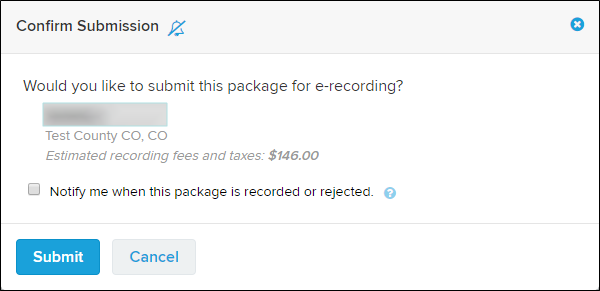
The Confirm Submission widow is used to review package submissions, set the package recorded or rejected notification option, and submit the package.
Margin Compliance
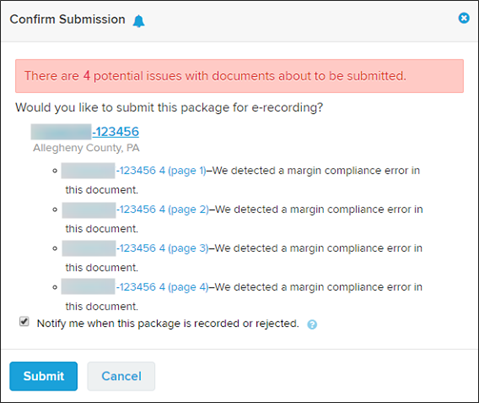
Margin compliance checks are only performed when documents are being submitted to the counties that charge non‑compliance fees.
We analyze documents to see if we believe they will incur non‑compliance fees due to content falling outside the county's (or jurisdiction's) margin requirements. If we detect such artifacts in the margins we warn the user, an example of which is shown below.
I want to ...
I want to ...
Open the Confirm Submission window
Open the Confirm Submission window
- At the top of the navigation menu, select the Simplifile logo. The Packages page opens in the right panel and the navigation menu highlights the Packages item.
- In the navigation page, select the Packages item. The Packages page opens in the right panel.
- If needed, use the Search for packages field to search for the wanted package.
- Select the package name in the Packages column. The Packages Details page opens and the navigation menu changes to display the packages items with the Details item selected.
- In the Package Details page, mark the document to be submitted.
- Select the Submit button. The Confirm Submission window opens.
Set the notification option when the package is recorded or rejected
Set the notification option when the package is recorded or rejected
A notificationsoption is available on the SubmissionConfirmation window.
- Open the Confirm Submission window.
- Review the information in the window to make sure you have the correct package.
- In the Notify me when this package is recorded or rejected checkbox, do one of the following:
- To be notified when this package is recorded or rejected, mark the checkbox.
- To not be notified when this package is recorded or rejected, clear the checkbox.
- Do one of the following:
- To submit the package, select the Submit button. The package is submitted.
- To cancel the submission, select the Cancel
 button. The submission is canceled.