Manage Submitters page
 Overview
Overview
This topic provides information on how to use the Manage Submitters page.
You can view the contact information for the submitters who send you packages. Depending on your setup, you can also enable and disable submitters.
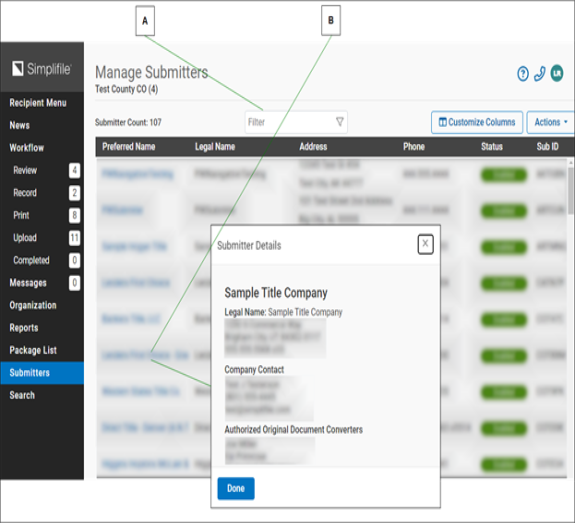
| Letter | Description |
|---|---|
| A | To search for a specific submitter, enter information in the Filter field. |
| B | This number indicates how many. |
| C | To display company contact information for that submitter, select a submitter name. To view information about that status for that organization, hover the cursor over a status indicator. |
| D | To enable or disable marked submitters, mark boxes at the beginning of each line and use the Actions options. |
I want to ...
I want to ...
View company contact information for a submitter
View company contact information for a submitter
- Open the Manage Submitters page.
- In the Org Name column, select the organization name. A window opens with the organization information.
Find a specific submitter
Find a specific submitter
- Open the Manage Submitters page.
- In Filter field, enter text or numbers. The system searches the submitter ID and organization name fields and displays the submitters with matching information.
View information about an organization’s status
View information about an organization’s status
- Open the Manage Submitters page.
- hover your mouse pointer over the status.
Enable or disable an organization
Enable or disable an organization
If you have the needed rights, you may enable and disable organizations.
- Open the Manage Submitters page.
- Mark submitter boxes at the beginning of each row.
- Select the Actions dropdown list. A menu displays.
- Choose either Enable or Disable.