Contact Info page (Administrator Role)
 Overview
Overview
This topic provides information on how to use the Contact Info page.
The Contact Info page displays information about your organization, including its hours, document types accepted, and the name, title, and contact information for the main contact person and the primary recorder at your location. If you are affiliated with multiple organizations, you can use a dropdown list to change which organization’s information displays.
Use this page to edit the Contact Information and the Recorder Information.
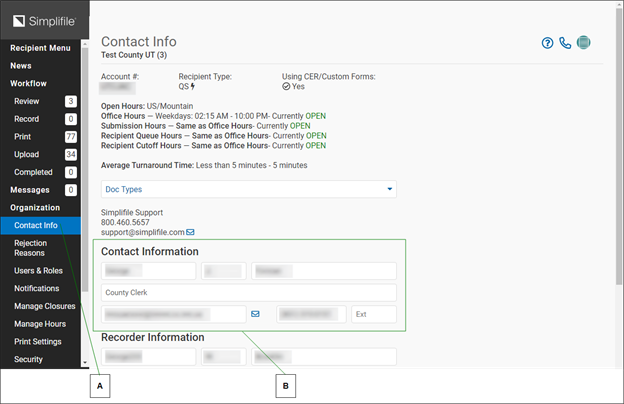
The bottom of the page displays the organization’s address, telephone and fax numbers, and web page address, if applicable. Below is a partial example.
| Letter | Description |
|---|---|
| A | The contact person can choose Organization > Contact Info at any time to edit the contact information on this page. |
| B | The contact person’s account is set up when your recording site begins its relationship with Simplifile. This person can then manage other user accounts. |
I want to ...
I want to ...
Edit the Contact Information section
Edit the Contact Information section
- Open the Contact Info page.
- In the dropdown list near the top left corner, choose the recording county (or jurisdiction).
- In the Contact Information section, make the wanted changes in the fields.
- Select the Save Changes button.
Edit the Recorder Information section
Edit the Recorder Information section
- Open the Contact Info page.
- In the dropdown list near the top left corner, choose the recording county (or jurisdiction).
- In the Recorder Information section, make the wanted changes in the fields.
- Select the Save Changes button.
Edit the Address, Phone, Fax, and Website information sections
Edit the Address, Phone, Fax, and Website information sections
- Open the Contact Info page.
- In the dropdown list near the top left corner, choose the recording county (or jurisdiction).
- In the various section, make the wanted changes in the fields.
- Select the Save Changes button.