Customer Support Question window
 Overview
Overview
The Simplifile Customer Support Questions window is used to set a question and associated answer that is used to get support.
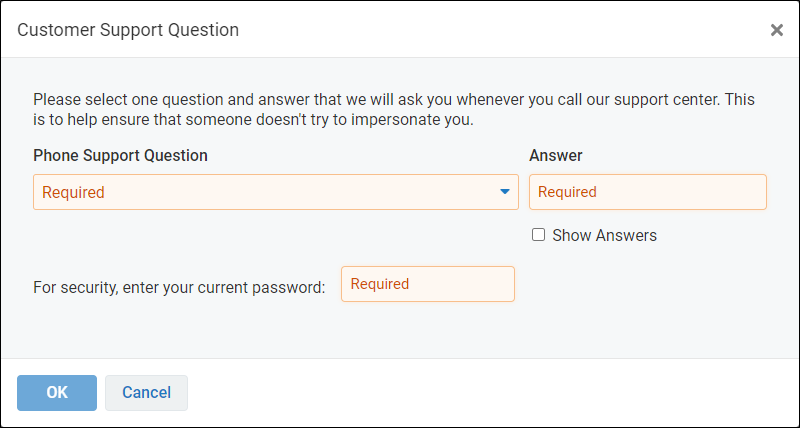
If your Simplifile environment has the security policy disabled or if the Set required security questions option in your enabled security policy is disabled, you won’t see the Support Question row or the Edit Support Questions button in the My Settings page.
When your organization’s security policy is enabled (the Security policy enabled box is marked) and the Require security questions box is marked, the first time users try to open Simplifile they need to provide answers to six questions—five that Simplifile can use to verify their identity online, and one that Simplifile Support can use to verify their identity if they need to call in.
The users choose the question they want to answer from a predetermined set of 26. The answer is encrypted and securely stored. Users can change the support question at any time.
I want to ...
I want to ...
Open the Customer Support Question window
Open the Customer Support Question window
- In the My Simplifile Toolbar (in the upper-right corner of the page), select the right-most User Settings button (similar to
 ) and select the Profile link. The My Settings page opens in the right panel.
 -
Scroll to the bottom of the page to the Personal Application Settings section.
If security questions are enabled in your organization's Security page, the Security Questions and the Support Question rows are displayed.
- In the Support Question row, select the Edit Support Question button.
Enter your customer support question choice and answer
Enter your customer support question choice and answer
In the Support Question row:
- Open the Customer Support Question window.
- Select the select a question dropdown arrow. A list of security questions is displayed.
- Select the wanted security question. The question is displayed in the field.
- In the Answer field, type your answer to the question.
- In the For security, enter your current password field, enter your current password.
- Select the OK
 button. The security questions are saved and the window closes.