Lender tip sheet for document collaboration with settlement agents
Collaborate on loan‑related documents
- Select the name of the loan where you want to collaborate.
- In the left navigation menu, select the Documents item.
- You need to add a document to Simplifile. Do one of the following:
- To upload a single document, select the Upload icon on a placeholder.
- To upload a version of a document, select the Actions
 dropdown button on a document card and select the Upload Version item.
 - To add one or more documents at a time, select the Add Docs
 button on the top right of the page and select the Choose Files to Upload
  button.
 - Drag and drop files from your computer to the area below any existing document cards.
-
Do any of the following on the document card:
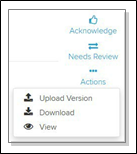
- Select the Actions dropdown button to download or view the document. An eye icon lets you view PDFs without downloading.
- Use the other tools on the right of the document card to acknowledge a document, return a document to the settlement agent for review, or download a document.
- To view or download previous versions of a document, select the document card header and choose the Versions item on the left navigation menu.
- Select the Actions
- The settlement agent needs to review and acknowledge or suggest changes to the document.