New Features & Forms in Version 25.2 (Broker Edition)
This section discusses the new features being introduced in this Encompass release.
Use the Actual Number of Days to Calculate APR
 New Option to Use the Actual Number of Days to Calculate APR Instead of the Standard 30 Days
A new Admin Tools policy is now available to enable lenders to calculate the APR for loans using the actual number of days for the first loan payment date rather than the standard 30 number of days for the first payment date. When the actual number of days is used, the actual number of days in the month are used when determining the first payment date that’s used to calculate APR. (January = 31 days, February = 28 days (except for leap year), March = 31 days, and so on.)
In the Encompass Admin Tools > Settings Manager > Policies category, the new Calculate APR using Actual Number of Days for Initial Period option is set to Disabled by default. Double-click the value, select Enabled, and then click Apply to apply this policy in your Encompass instance. Once enabled, Encompass uses the actual number of days to calculate APR.
Note that this policy is not applied to bi-weekly, construction, or HELOC loans.
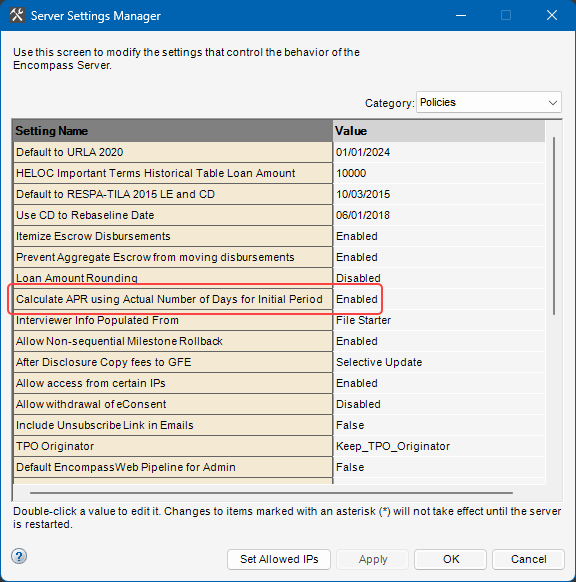
While this policy is applied at a global level in Encompass, the option to calculate APR using the actual number of days is also provided at the loan level. The new Use Actual Days checkbox (5062) is available on the RegZ - LE and RegZ - CD input forms only.
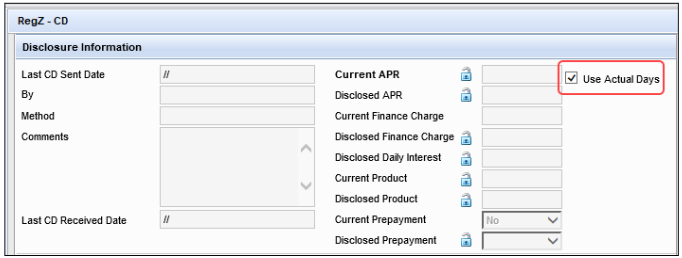
By default, the checkbox is selected or not selected based on the Calculate APR using Actual Number of Days for Initial Period policy in Encompass Admin Tools. Users can select this checkbox to elect to use the actual number of days in the month for the first payment date to calculate APR for the current loan. When this checkbox is not selected, the standard 30 days for the initial loan payment will be used to calculate the APR.
Coming Soon: eSign Events - New eSigning Provider Coming in Encompass 25.3
eSign Events - New eSigning Provider Coming in Encompass 25.3
(Added on May 16, 2025)
For the past several years, electronic signing (eSigning) within Encompass has been facilitated by DocuSign in all areas where eSigning is supported (except for hybrid eClose). Beginning with the Encompass 25.3 release currently targeted for August 9, 2025, the signing platform will transition to eSign Events for all electronic documents in all environments. No setup or user action will be required. This will have no impact on non-platform signing solutions.
As part of the Encompass 25.2 release, the test environments and concept release environments will be enabled with the new eSigning experience.
We recommend users:
-
Become familiar and test eSign Events in these environments
-
Share the new experience with their teams (loan officers, loan processors, disclosure desks)
-
Update any needed training materials or videos
Again, in Encompass 25.3, eSign Events will be used for eSigning for all electronic documents in all environments, including Production. At that time, DocuSign will no longer be available for use in Encompass.
Additional Information
While eSign Events is a new signing provider, the user experience is intuitive and will be familiar to Encompass users who previously utilized DocuSign for eSigning.
When a borrower or other signer clicks eSign to begin signing, they will be taken to a new eSign Events location with a slightly different theme, but the tasks the borrower or other signers need to complete are the same as they were with DocuSign.
Review KA #000116011 - eSign Events: New eSigning Provider Coming in Encompass 25.3 to learn more about the benefits of eSign Events and to view a feature comparison to understand how the eSign Events flow compares to the DocuSign experience.
| Next Section: Feature Enhancements | 
|
|

|
Previous Section: Introduction |